

Tekmatix Help Articles
Love your help
Use the search bar below to find help guides and articles for using Tekmatix
Use the search bar below to look for help articles you need.
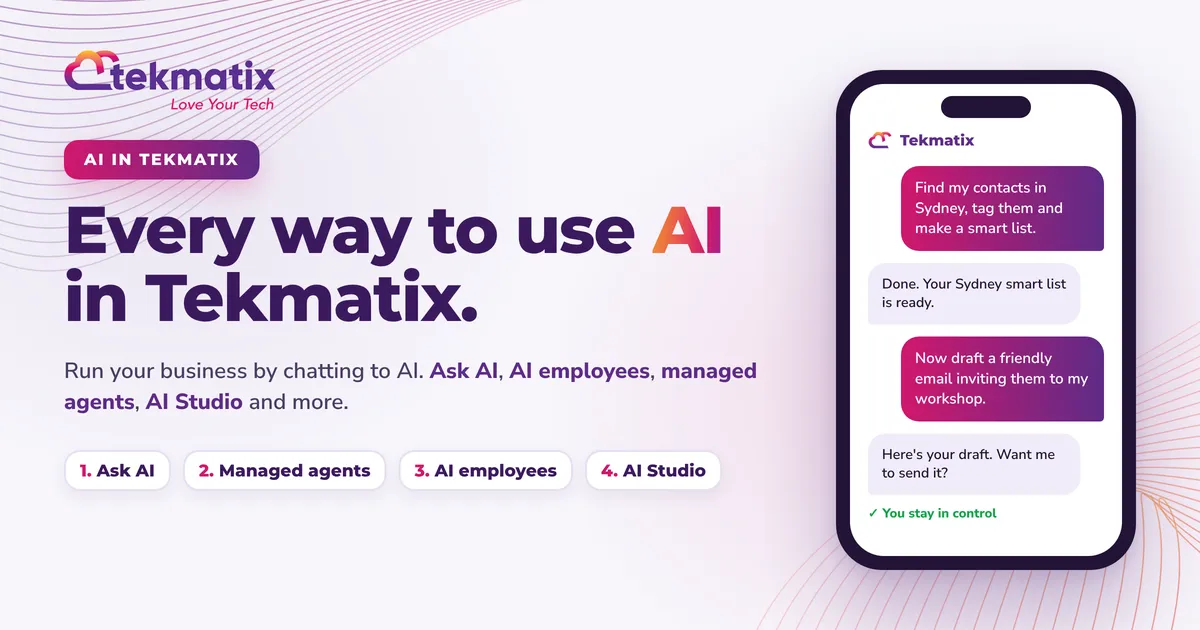
Every Way to Use AI in Tekmatix: The Complete Guide
Quick answer: Tekmatix has AI built into almost every part of your account. You can chat to Ask AI to get work done for you, put AI employees (Conversation AI and Voice AI) in front of your customers, set up managed agents (previously known as Super Agents) to run tasks for you on a trigger or a schedule, build pages with AI Studio and the AI funnel and website builder, create automations with Workflow AI, and write content, emails and review replies with Content AI, Email AI and Reviews AI. You can even connect your own Claude, ChatGPT or GrokBot. You stay in control and approve what matters.
TL;DR
- The big idea: you don't have to learn the platform any more. Tell AI what you want done, and it gets done.
- Ask AI is your in-built AI assistant. Type or speak a request, on your computer or in the mobile app, and it takes action across your account.
- Managed agents (previously known as Super Agents) are AI teammates that work on their own when something happens, or on a schedule.
- AI employees talk to your customers for you: Conversation AI by chat and message, Voice AI by phone.
- AI Studio and the AI funnel and website builder build your pages from a prompt.
- Workflow AI, Content AI, Email AI, Reviews AI and Calendar AI take the grunt work out of automations, content, emails, reviews and booking calendars.
- Not on Tekmatix yet? Book a free demo or start your free trial.
The big shift: run your business by chatting to AI
For years, business software came with homework. Watch the tutorials. Learn where every setting lives. Click through ten screens to do one job. Or pay someone else to do it.
That's changed. Tekmatix is the all-in-one business platform you run by talking to AI. You tell it what you want done, in plain language, from your desk or your phone, and your work gets done. Your CRM, emails, funnels, websites, calendars, courses, socials, payments and automations are all in one place, and AI now works across all of them.
This guide walks you through every way to use AI inside your Tekmatix account, what each one is for, real examples, prompts you can copy, and how to get started. It's long, so use the summary table below to jump to what you need.
Every AI tool in Tekmatix at a glance
| AI tool | What it does for you | What starts it |
|---|---|---|
| Ask AI | Your in-built AI assistant. Creates content, finds data and takes action across your account. | You type or speak a request |
| Managed agents (previously known as Super Agents) | AI teammates that run tasks on their own inside your account and connected apps. | A trigger, an event, a schedule or a chat |
| Conversation AI | An AI employee that chats with your leads and customers by text, email, social, WhatsApp and web chat. | A customer sends a message |
| Voice AI | An AI employee that answers and makes phone calls, qualifies leads and books appointments. | A phone call, a workflow or a voice widget |
| AI Studio | Builds websites, landing pages, forms, booking pages and web apps from a chat. | You describe what you want |
| AI funnel and website builder | Builds and edits pages inside the funnel and website builder. | You choose Build with AI |
| Workflow AI | Builds and edits automations from a plain-language description. | You describe the automation |
| Knowledge Base | Stores the business information your AI agents use to answer accurately. | You add your website, FAQs and files |
| Content AI | Writes and refines social posts, blogs, emails, web copy and images. | You prompt it inside a builder |
| Email AI | Designs on-brand emails from a prompt or a reference. | You choose Build with AI in Emails |
| Reviews AI | Suggests or sends replies to your online reviews. | A new review arrives |
| Calendar AI | Sets up booking calendars from a description. | You describe your calendar |
| Your own AI | Claude, ChatGPT or GrokBot connected to your account. | You chat to your own AI app |
Ask AI: the AI assistant built into your account
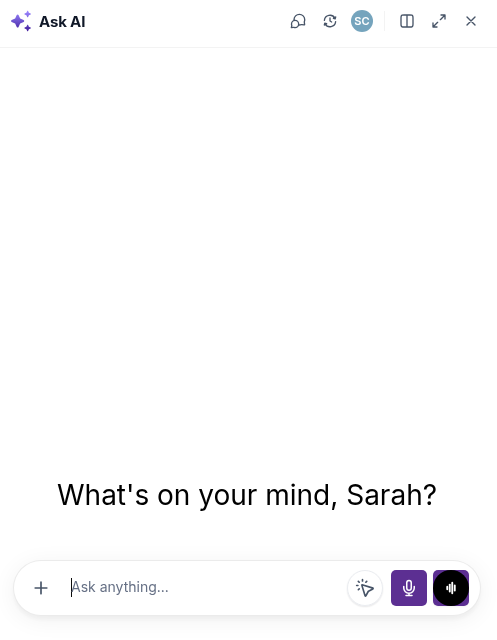
Ask AI is your in-built AI tech assistant. Instead of clicking through menus, you describe what you want done and Ask AI does it for you.
Ask AI can carry out around 600 actions across more than 40 areas of your Tekmatix account. It can read your data, create records, update settings, write content, generate images, manage contacts and run bulk actions, all from one chat. You can type or use voice, and it shows you what it's about to do and asks before it creates, changes, deletes or sends anything.
Where to find it
Ask AI on your phone
Ask AI is also in the mobile app (search for LeadConnector in your app store and log in with your usual Tekmatix details). Open Ask AI from the app and ask for what you need while you're in the car park, at the cafe or between clients. If you're a team member and can't see Ask AI in the app, ask your account admin to switch on Ask AI access for your login.
Download on the App StoreGet it on Google PlayThings you can ask it to do
Want the full list of what Ask AI can do, plus dozens more prompts? Read our complete Ask AI guide.
- Ask AI only acts when you ask it to. It is your assistant, not an autopilot.
- Some areas are read-only or not connected to Ask AI yet. Automations and email campaigns are best built with Workflow AI and the email builder, covered below.
- Ask AI usage is pay as you go from your wallet, or included in an AI plan.
Managed agents: AI teammates that work while you don't
Managed agents (previously known as Super Agents) are AI teammates you create by describing the job in plain language. Once they're published, they get on with it on their own.
This is where AI stops being something you chat to and starts being something that works for you in the background. You describe the role, the rules and the actions it's allowed to take, and Tekmatix builds the agent for you. No flowcharts, no code.
If you use AI already, think of a managed agent as being a lot like skills in Claude, agents in GrokBot or scheduled tasks in ChatGPT, except it lives inside your Tekmatix account and works directly with your contacts, pipelines, calendars and workflows.
What sets a managed agent off
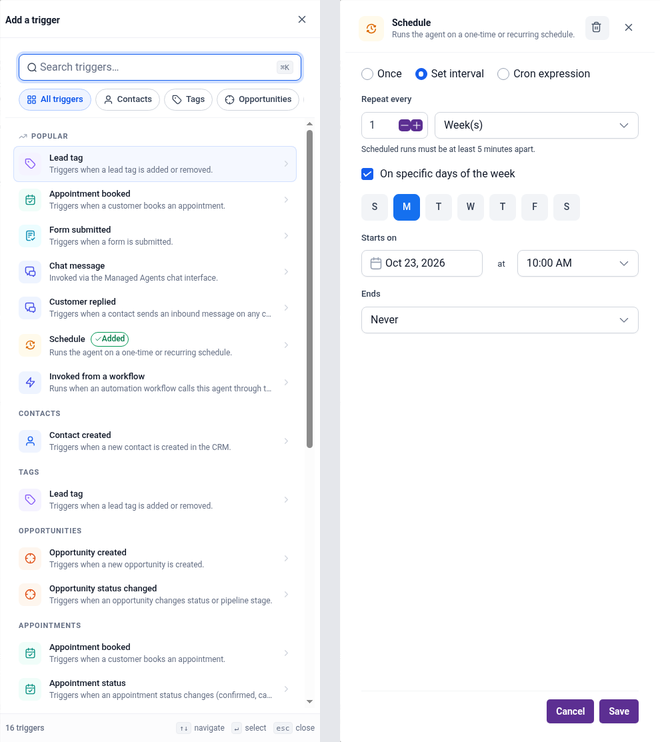
There are 16 triggers to choose from, including:
- An action or event in your account: a contact is created, a tag is added or removed, a form or survey is submitted, a Facebook lead form comes in, an opportunity is created or changes status, or an appointment is booked.
- A schedule: once at a set date and time, on a repeating interval (every day, every Monday, the first of the month), or a custom schedule. You can even describe it in plain English, such as "every Tuesday, Wednesday and Thursday at 9am until the end of the month".
- A chat message: you can chat to your agent directly, or put it on a supported chat channel so it springs into action when someone messages it.
- A workflow: one of your existing workflows can call the agent as a step, so AI handles the thinking part of a bigger automation.
What a managed agent can do
- Update contact fields and tags, create tasks, notes and appointments, and trigger your workflows.
- Answer questions using your Knowledge Base (your documents, FAQs, tables and website content), and search the web with sources you can click to check.
- Work with connected apps outside Tekmatix through connectors.
- Create and edit images, spoken audio and short videos, and save them to your media library.
Real examples
- Daily CEO report: every weekday at 7am, summarise yesterday's new leads, sales and booked calls, and flag anyone who needs a follow-up.
- Social media assistant: write and schedule on-brand posts with images for your social channels each week.
- Lead follow-up: when a contact is tagged 'new lead', check their details, add a task for your team and start the right nurture workflow.
- Community moderator: welcome new members, answer common questions and flag posts for review.
- Survey follow-up: when someone submits your feedback survey, read their answers, tag them and route unhappy customers to a human.
How to set one up
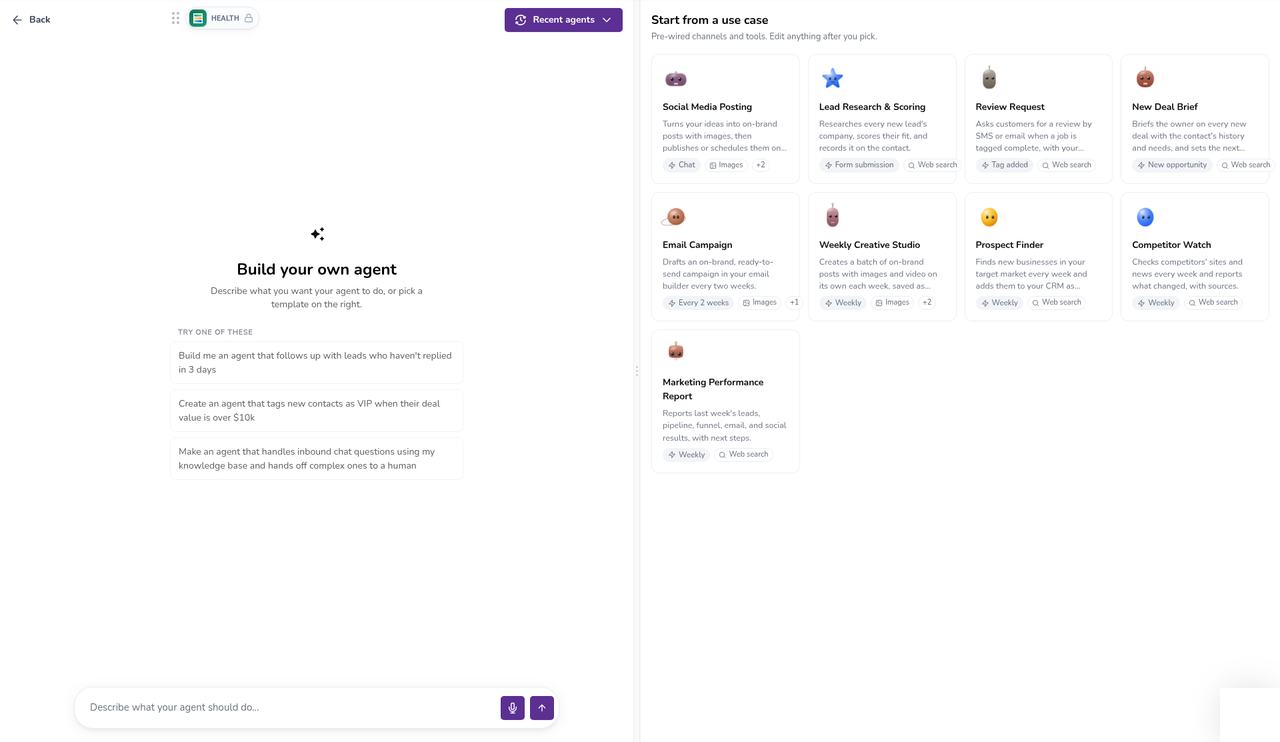
- Give your agent clear guardrails in plain language, for example "never send anything to customers without my approval".
- Always test before you publish, and check the agent's activity log after it starts running.
- Managed agent runs are pay as you go, or included up to a monthly limit on an AI plan.
AI employees: Conversation AI and Voice AI talk to your customers
Managed agents work for you. AI employees work with your customers. They answer questions, qualify leads and book appointments, day and night.
Conversation AI: your chat and messaging employee
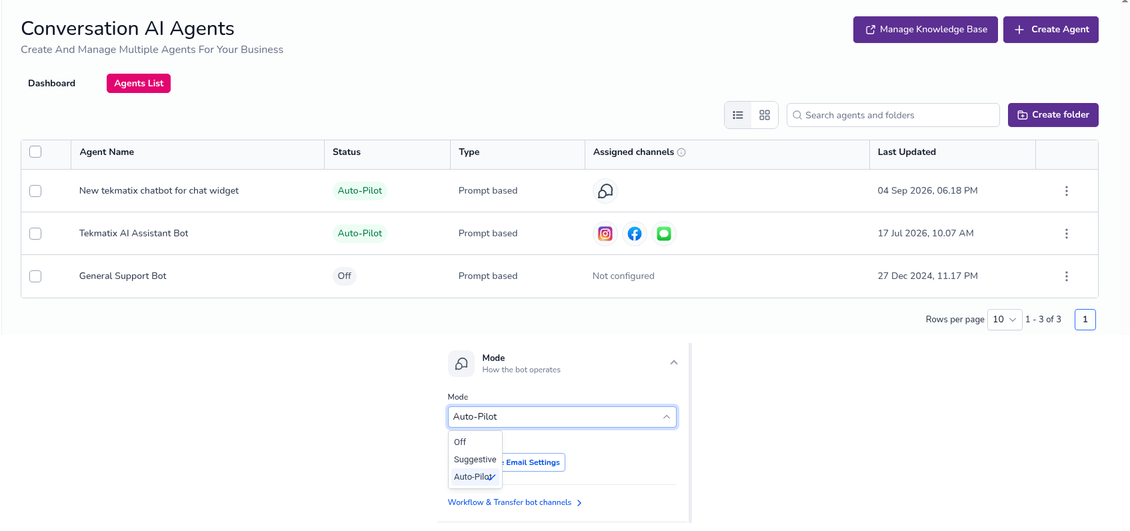
Conversation AI replies to your leads and customers across SMS, email, Facebook, Instagram, WhatsApp, your website chat widget and live chat. You choose which channels it's active on.
- Off: the agent is paused and doesn't reply.
- Suggestive mode: it drafts the reply and a human on your team reviews and sends it. A great way to start.
- Auto-Pilot mode: it replies on its own and works the conversation towards a booking, and hands over to a human when needed.
- It can capture lead details, answer FAQs from your Knowledge Base, book into one or more calendars, trigger workflows and summarise conversations.
- Build it with a guided form, a prompt, or a visual flow builder for multi-step conversations.
- Set working hours so it only replies when you want it to. Here's how to set working hours for your AI agent.
Voice AI: your phone employee
Voice AI agents answer your incoming calls, make outbound calls from your workflows, have natural conversations, collect information, answer questions, book appointments and trigger follow-up actions after the call. They can handle calls after hours, on weekends and on public holidays, so you stop missing leads.
- Inbound calls: answer, qualify, book and transfer callers.
- Outbound calls: follow up new leads, remind people about appointments or reactivate past customers using the Voice AI Outbound Call workflow action. You are responsible for making sure each contact has agreed to be called.
- Voice in your chat widget: visitors can talk to your Voice AI agent through their browser, with no phone call needed.
- Build your agent on the Build tab (its instructions, welcome message, actions and knowledge), then test it with a Web Call from your browser or a Phone Call, and switch it on from the Deploy tab.
- Voice AI needs a phone number set up in your Tekmatix phone system to take and make phone calls.
Ready-built AI employees from Tekmatix
Every Tekmatix plan from Starter up also comes with more than 10 AI employees we've already built and trained for you, such as Business Brain, Brand Kit Builder, Contacts Manager, Social Media Manager, Calendar Builder, Nurture Email Writer, Lead Activation Manager, Lead Follow-Up, Daily CEO Report and 90-Day Build Plan. There's no extra cost for them. You just pay for the AI you use.
AI employees vs managed agents vs Ask AI
| Ask AI | AI employees | Managed agents | |
|---|---|---|---|
| Who it works for | You, inside your account | Your leads and customers | You and your team, in the background |
| Who starts it | You, by typing or speaking | A customer message or call | An event, trigger, schedule or chat |
| How independent | Acts only when you ask | Suggests replies or runs on Auto-Pilot | Runs on its own once published |
| Best for | Quick jobs, content, reports, bulk actions | Answering, qualifying and booking | Repeating jobs and multi-step processes |
Put simply: chatting with a customer is a job for an AI employee. A one-off job for you is a job for Ask AI. A job that should happen every time something happens, or every Monday at 9am, is a job for a managed agent.
AI Studio: build websites, pages and web apps by chatting
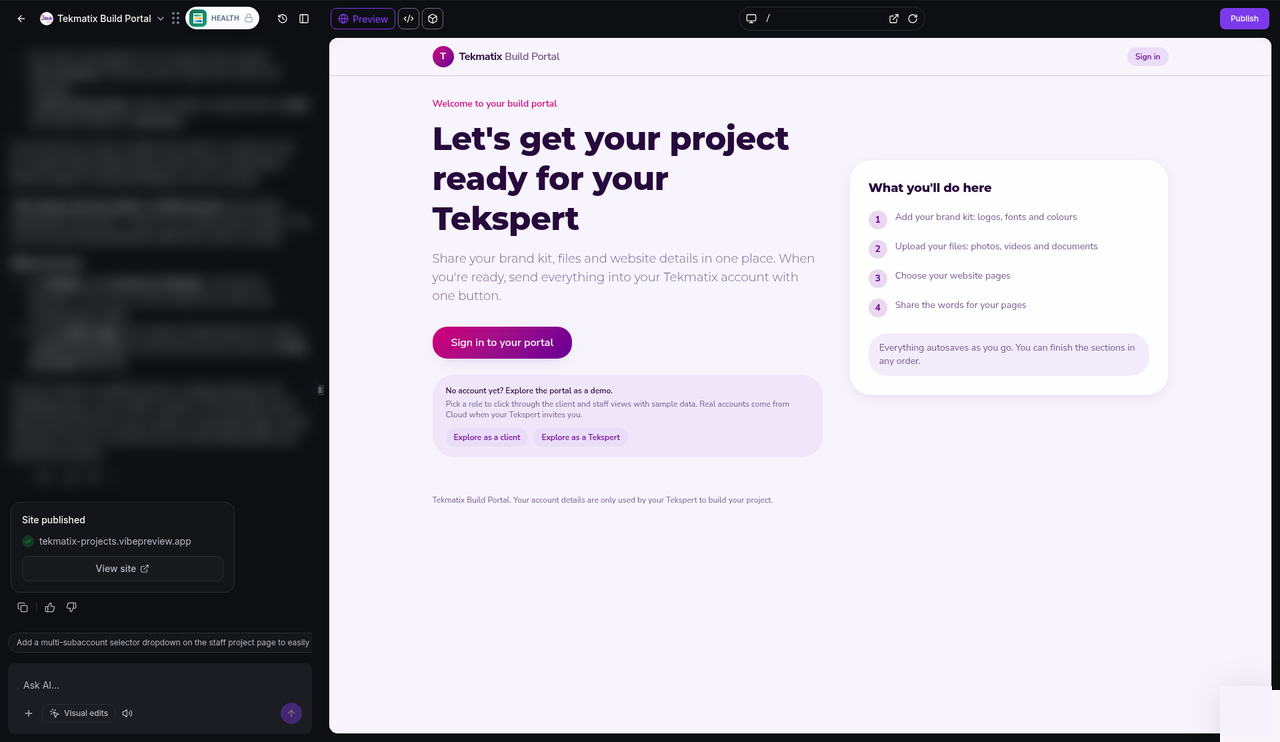
AI Studio is a chat-based builder for websites, landing pages, forms, booking pages and other interactive web projects.
Describe what you want, or give it a template, a web link or a screenshot for inspiration, and AI Studio designs the layout, writes the copy and creates the images. Then keep chatting to change anything, or click on parts of the preview to edit text, images, colours and spacing directly. Every change saves a new version, so you can always go back.
- Build a full website, a landing page, a multi-step survey, a branded form or a custom booking page connected to your calendar.
- Sell products and take payments. See how to sell products and take payments in AI Studio.
- Add a database, logins and file storage to build simple web apps. See how to add a database, logins and file storage.
- Preview your project, then publish it to a preview link or your own domain.
- Trigger a workflow when someone submits an AI Studio form.
- Your account admin may need to switch on AI Studio access for each user.
- AI Studio projects are published from AI Studio. They don't move into the standard funnel builder.
- AI Studio usage is pay as you go, or included in an AI plan.
The AI funnel and website builder: pages in your normal builder, built by AI
Prefer to work in the standard funnel and website builder? AI can build and edit those pages for you too.
It works right inside the funnel and website builder you already know, so once the page is built you can keep editing it by hand, connect your domain, add tracking and plug it into your workflows.
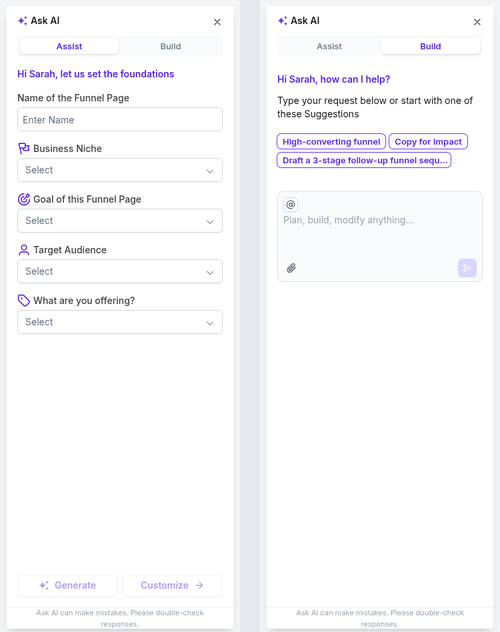
- Where: open your funnel or website builder (depending on your account, the menu says Sites & Funnels or Websites & Funnels) and use Build with AI or the Ask AI panel, which has two tabs.
- Assist: fill in a few guided fields (your niche, the goal of the page, your audience and your offer) and AI builds the page.
- Build: describe exactly what you want in your own words.
- Import from a link or image: give it a page you like as a starting point.
- Chat to edit: ask for new sections, better headlines or a different layout.
- SEO help: it suggests page titles and descriptions for you.
- You can also ask Ask AI to create a funnel or website for you from a single chat.
For a step-by-step walkthrough, read how to build a funnel in seconds on Tekmatix with AI.
Workflow AI: describe the automation, AI builds it
Automations used to be the most technical part of any platform. Now you just describe what should happen.
Tell Workflow AI something like "when someone fills in my enquiry form, send them a welcome email, wait one day, then send a text and create a task for my team" and it builds the workflow, with the trigger, actions and timing in place. You can then refine it by chatting, test it and publish it.
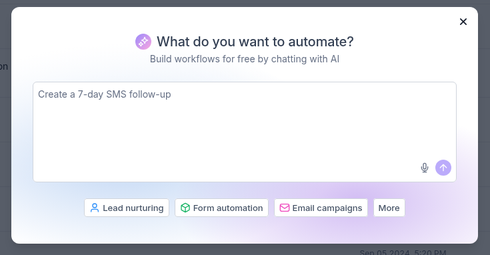
Inside your workflows, you can also add AI actions that think for you, such as making a decision, detecting what someone wants from their message, summarising text or translating it. These AI actions may be charged on a pay as you go basis.
Content AI, Email AI, Reviews AI and Calendar AI
These are the everyday AI helpers sitting inside the tools you already use.
Content AI
Content AI writes and refines text and images wherever you create content in Tekmatix, including social posts, blogs, emails, website copy and headlines. Look for the AI option inside the builder you're working in.
Email AI
Email AI designs on-brand emails for you. It uses your brand board (your colours, fonts and logo), builds an email from a prompt or a reference, suggests layouts and lets you make changes by chatting. Like the funnel builder, it has an Assist tab with guided fields and a Build tab for your own prompt.
Reviews AI
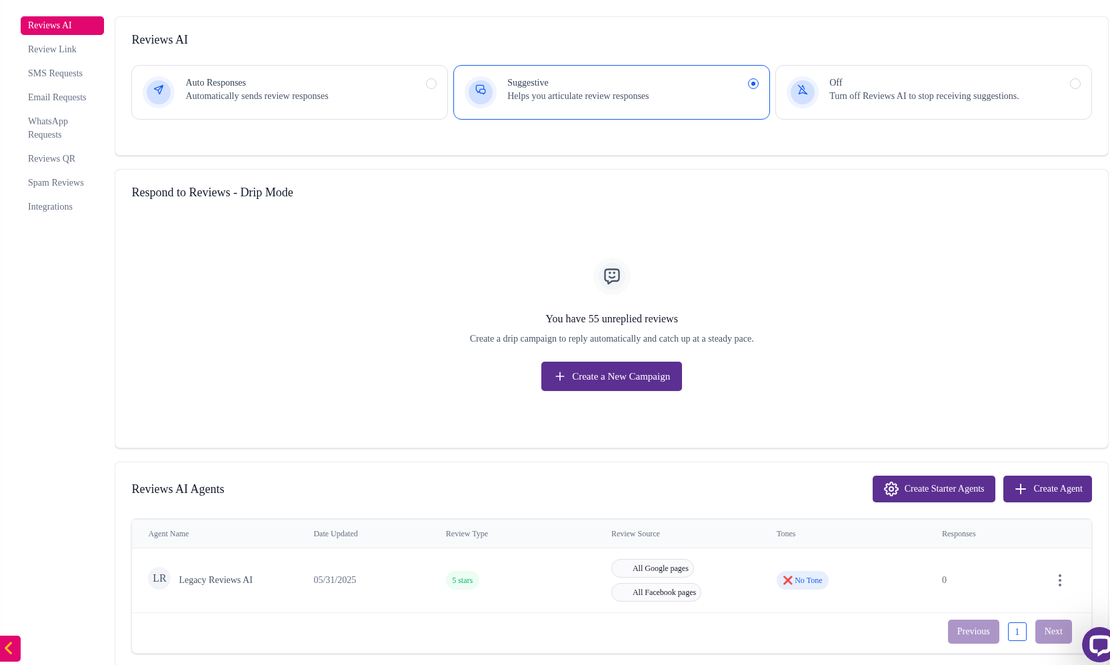
Reviews AI writes replies to your online reviews. Choose from three modes: Auto Responses, where it replies for you, Suggestive, where it drafts a reply for you to approve, or Off. Got a backlog of old reviews you never answered? Drip mode works through them gradually, a few at a time, instead of replying to them all at once.
Calendar AI
Describe the booking calendar you need, such as who it's for, how long the appointments are and when you're available, and Calendar AI sets it up with you step by step. It can also help you work out why a time slot isn't showing up. Here's how to use Calendar AI to set up your booking calendars.
Knowledge Base: the brain behind your AI
Your Knowledge Base is where you store the information your AI should know: your website, FAQs, documents, tables and policies. Conversation AI, Voice AI and managed agents use it to give answers that are accurate to your business. The better your Knowledge Base, the better your AI. To get started faster, the Create with AI option helps you build one.
Connect your own Claude, ChatGPT or GrokBot
Already use an AI you love? Connect it to your Tekmatix account and run your business from it.
Through a secure connection, your own AI can work inside your Tekmatix account: find contacts, summarise conversations, check your calendar, draft social posts, prepare invoices, write blog drafts and more. And because your AI app is on your phone, so is your business.
For jobs the direct connection doesn't cover yet, AI tools with browser control can work on your account screen for you, so your AI can build a whole funnel: the sales page, the checkout connected to your payments, the thank-you page, the follow-up emails and the abandoned-cart reminders. You review and approve it.
Get set up: connect ChatGPT to Tekmatix, connect Claude to Tekmatix, or see a full example of how to create a sales page and funnel with ChatGPT.
Which AI tool should you use?
| If you want to... | Use |
|---|---|
| Get a quick job done, find information or make a bulk change | Ask AI |
| Do it from your phone | Ask AI in the mobile app, or your own AI app |
| Reply to leads and customers by message, 24/7 | Conversation AI |
| Answer or make phone calls | Voice AI |
| Have something happen automatically every time an event occurs, or on a schedule | Managed agent |
| Build a website, landing page, booking page or web app from a chat | AI Studio |
| Build a page you'll keep editing in the funnel builder | AI funnel and website builder |
| Build an automation | Workflow AI |
| Write posts, emails or review replies | Content AI, Email AI or Reviews AI |
| Set up a booking calendar | Calendar AI |
Who is this for?
Tekmatix AI is made for business owners who would rather run their business than learn software. It's a great fit if you are:
- A coach, consultant, course creator or membership owner who wants funnels, emails and follow-up done without the tech headache.
- A service business that misses calls and messages after hours and wants every lead answered and booked.
- A small team that spends hours on admin, reporting and data entry every week.
- Anyone who has paid a developer thousands and waited months for something AI can now draft in minutes.
What a day looks like when AI does the work
Warning: you may get addicted to your productivity.
How to get started with AI in Tekmatix
What does AI cost in Tekmatix?
AI in Tekmatix is pay as you go. You only pay for the AI you actually use, drawn from your account wallet, or you can choose an AI plan that includes set amounts of usage each month. Some AI helpers, such as the Workflow AI builder and the AI funnel builder, are free within daily limits. Texts, calls and emails are charged separately. See the full rates on our pay as you go pricing page.
You stay in control
- Ask AI shows you what it will do and asks before it creates, changes, deletes or sends.
- Managed agents and AI employees only go live when you publish or switch them on, and you can set guardrails in plain language.
- Nothing AI builds is published until you publish it.
- AI is a powerful helper, not a guarantee. The better your instructions and Knowledge Base, the better the results.
Frequently asked questions
What is the difference between Ask AI and a managed agent?
Ask AI is your assistant. It acts when you ask it to, for a job you want done now. A managed agent is a teammate that runs on its own when something happens in your account, when someone chats with it, or on a schedule, without you starting it each time.
What happened to Super Agents?
Super Agents are now called managed agents. They work the same way: you describe the job in plain language and the agent is built for you, with triggers, schedules, actions and testing in one place.
What is the difference between AI employees and managed agents?
AI employees, Conversation AI and Voice AI, talk to your customers by message and phone. Managed agents mostly work behind the scenes for you and your team, such as reports, follow-ups, content and admin, although they can also be placed on a chat channel.
Can I use AI in Tekmatix from my phone?
Yes. Ask AI is in the mobile app (search for LeadConnector in your app store). You can also connect your own Claude, ChatGPT or GrokBot app to your Tekmatix account and run things from there.
Do I need to be technical?
No. Every AI tool in Tekmatix works from plain-language instructions. If you can describe the job to a team member, you can describe it to AI.
Will AI send things to my customers without me knowing?
Only if you set it up to. Conversation AI can run in Suggestive mode so a human approves every reply, Ask AI asks before it sends, and managed agents follow the guardrails you give them. You decide when anything goes live.
I'm already a Tekmatix customer. Where do I start?
Start with Ask AI today, then join a free daily training call. Our Teksperts will show you how to use each AI tool in your own account.
Ready to run your business by chatting to AI?
Not on Tekmatix yet? Book a free demo and we'll show you how AI can take work off your plate, or start your free trial and try it yourself.
Book your free demoStart your free trialAlready a customer? Log in to your account and click Ask AI, or join a free daily training call.
Warning: you may get addicted to your productivity.

Latest Blog Posts
Every Way to Use AI in Tekmatix: The Complete Guide
Quick answer: Tekmatix has AI built into almost every part of your account. You can chat to Ask AI to get work done for you, put AI employees (Conversation AI and Voice AI) in front of your customers, set up managed agents (previously known as Super Agents) to run tasks for you on a trigger or a schedule, build pages with AI Studio and the AI funnel and website builder, create automations with Workflow AI, and write content, emails and review replies with Content AI, Email AI and Reviews AI. You can even connect your own Claude, ChatGPT or GrokBot. You stay in control and approve what matters.
TL;DR
- The big idea: you don't have to learn the platform any more. Tell AI what you want done, and it gets done.
- Ask AI is your in-built AI assistant. Type or speak a request, on your computer or in the mobile app, and it takes action across your account.
- Managed agents (previously known as Super Agents) are AI teammates that work on their own when something happens, or on a schedule.
- AI employees talk to your customers for you: Conversation AI by chat and message, Voice AI by phone.
- AI Studio and the AI funnel and website builder build your pages from a prompt.
- Workflow AI, Content AI, Email AI, Reviews AI and Calendar AI take the grunt work out of automations, content, emails, reviews and booking calendars.
- Not on Tekmatix yet? Book a free demo or start your free trial.
The big shift: run your business by chatting to AI
For years, business software came with homework. Watch the tutorials. Learn where every setting lives. Click through ten screens to do one job. Or pay someone else to do it.
That's changed. Tekmatix is the all-in-one business platform you run by talking to AI. You tell it what you want done, in plain language, from your desk or your phone, and your work gets done. Your CRM, emails, funnels, websites, calendars, courses, socials, payments and automations are all in one place, and AI now works across all of them.
This guide walks you through every way to use AI inside your Tekmatix account, what each one is for, real examples, prompts you can copy, and how to get started. It's long, so use the summary table below to jump to what you need.
Every AI tool in Tekmatix at a glance
| AI tool | What it does for you | What starts it |
|---|---|---|
| Ask AI | Your in-built AI assistant. Creates content, finds data and takes action across your account. | You type or speak a request |
| Managed agents (previously known as Super Agents) | AI teammates that run tasks on their own inside your account and connected apps. | A trigger, an event, a schedule or a chat |
| Conversation AI | An AI employee that chats with your leads and customers by text, email, social, WhatsApp and web chat. | A customer sends a message |
| Voice AI | An AI employee that answers and makes phone calls, qualifies leads and books appointments. | A phone call, a workflow or a voice widget |
| AI Studio | Builds websites, landing pages, forms, booking pages and web apps from a chat. | You describe what you want |
| AI funnel and website builder | Builds and edits pages inside the funnel and website builder. | You choose Build with AI |
| Workflow AI | Builds and edits automations from a plain-language description. | You describe the automation |
| Knowledge Base | Stores the business information your AI agents use to answer accurately. | You add your website, FAQs and files |
| Content AI | Writes and refines social posts, blogs, emails, web copy and images. | You prompt it inside a builder |
| Email AI | Designs on-brand emails from a prompt or a reference. | You choose Build with AI in Emails |
| Reviews AI | Suggests or sends replies to your online reviews. | A new review arrives |
| Calendar AI | Sets up booking calendars from a description. | You describe your calendar |
| Your own AI | Claude, ChatGPT or GrokBot connected to your account. | You chat to your own AI app |
Ask AI: the AI assistant built into your account
Ask AI is your in-built AI tech assistant. Instead of clicking through menus, you describe what you want done and Ask AI does it for you.
Ask AI can carry out around 600 actions across more than 40 areas of your Tekmatix account. It can read your data, create records, update settings, write content, generate images, manage contacts and run bulk actions, all from one chat. You can type or use voice, and it shows you what it's about to do and asks before it creates, changes, deletes or sends anything.
Where to find it
Ask AI on your phone
Ask AI is also in the mobile app (search for LeadConnector in your app store and log in with your usual Tekmatix details). Open Ask AI from the app and ask for what you need while you're in the car park, at the cafe or between clients. If you're a team member and can't see Ask AI in the app, ask your account admin to switch on Ask AI access for your login.
Download on the App StoreGet it on Google PlayThings you can ask it to do
Want the full list of what Ask AI can do, plus dozens more prompts? Read our complete Ask AI guide.
- Ask AI only acts when you ask it to. It is your assistant, not an autopilot.
- Some areas are read-only or not connected to Ask AI yet. Automations and email campaigns are best built with Workflow AI and the email builder, covered below.
- Ask AI usage is pay as you go from your wallet, or included in an AI plan.
Managed agents: AI teammates that work while you don't
Managed agents (previously known as Super Agents) are AI teammates you create by describing the job in plain language. Once they're published, they get on with it on their own.
This is where AI stops being something you chat to and starts being something that works for you in the background. You describe the role, the rules and the actions it's allowed to take, and Tekmatix builds the agent for you. No flowcharts, no code.
If you use AI already, think of a managed agent as being a lot like skills in Claude, agents in GrokBot or scheduled tasks in ChatGPT, except it lives inside your Tekmatix account and works directly with your contacts, pipelines, calendars and workflows.
What sets a managed agent off
There are 16 triggers to choose from, including:
- An action or event in your account: a contact is created, a tag is added or removed, a form or survey is submitted, a Facebook lead form comes in, an opportunity is created or changes status, or an appointment is booked.
- A schedule: once at a set date and time, on a repeating interval (every day, every Monday, the first of the month), or a custom schedule. You can even describe it in plain English, such as "every Tuesday, Wednesday and Thursday at 9am until the end of the month".
- A chat message: you can chat to your agent directly, or put it on a supported chat channel so it springs into action when someone messages it.
- A workflow: one of your existing workflows can call the agent as a step, so AI handles the thinking part of a bigger automation.
What a managed agent can do
- Update contact fields and tags, create tasks, notes and appointments, and trigger your workflows.
- Answer questions using your Knowledge Base (your documents, FAQs, tables and website content), and search the web with sources you can click to check.
- Work with connected apps outside Tekmatix through connectors.
- Create and edit images, spoken audio and short videos, and save them to your media library.
Real examples
- Daily CEO report: every weekday at 7am, summarise yesterday's new leads, sales and booked calls, and flag anyone who needs a follow-up.
- Social media assistant: write and schedule on-brand posts with images for your social channels each week.
- Lead follow-up: when a contact is tagged 'new lead', check their details, add a task for your team and start the right nurture workflow.
- Community moderator: welcome new members, answer common questions and flag posts for review.
- Survey follow-up: when someone submits your feedback survey, read their answers, tag them and route unhappy customers to a human.
How to set one up
- Give your agent clear guardrails in plain language, for example "never send anything to customers without my approval".
- Always test before you publish, and check the agent's activity log after it starts running.
- Managed agent runs are pay as you go, or included up to a monthly limit on an AI plan.
AI employees: Conversation AI and Voice AI talk to your customers
Managed agents work for you. AI employees work with your customers. They answer questions, qualify leads and book appointments, day and night.
Conversation AI: your chat and messaging employee
Conversation AI replies to your leads and customers across SMS, email, Facebook, Instagram, WhatsApp, your website chat widget and live chat. You choose which channels it's active on.
- Off: the agent is paused and doesn't reply.
- Suggestive mode: it drafts the reply and a human on your team reviews and sends it. A great way to start.
- Auto-Pilot mode: it replies on its own and works the conversation towards a booking, and hands over to a human when needed.
- It can capture lead details, answer FAQs from your Knowledge Base, book into one or more calendars, trigger workflows and summarise conversations.
- Build it with a guided form, a prompt, or a visual flow builder for multi-step conversations.
- Set working hours so it only replies when you want it to. Here's how to set working hours for your AI agent.
Voice AI: your phone employee
Voice AI agents answer your incoming calls, make outbound calls from your workflows, have natural conversations, collect information, answer questions, book appointments and trigger follow-up actions after the call. They can handle calls after hours, on weekends and on public holidays, so you stop missing leads.
- Inbound calls: answer, qualify, book and transfer callers.
- Outbound calls: follow up new leads, remind people about appointments or reactivate past customers using the Voice AI Outbound Call workflow action. You are responsible for making sure each contact has agreed to be called.
- Voice in your chat widget: visitors can talk to your Voice AI agent through their browser, with no phone call needed.
- Build your agent on the Build tab (its instructions, welcome message, actions and knowledge), then test it with a Web Call from your browser or a Phone Call, and switch it on from the Deploy tab.
- Voice AI needs a phone number set up in your Tekmatix phone system to take and make phone calls.
Ready-built AI employees from Tekmatix
Every Tekmatix plan from Starter up also comes with more than 10 AI employees we've already built and trained for you, such as Business Brain, Brand Kit Builder, Contacts Manager, Social Media Manager, Calendar Builder, Nurture Email Writer, Lead Activation Manager, Lead Follow-Up, Daily CEO Report and 90-Day Build Plan. There's no extra cost for them. You just pay for the AI you use.
AI employees vs managed agents vs Ask AI
| Ask AI | AI employees | Managed agents | |
|---|---|---|---|
| Who it works for | You, inside your account | Your leads and customers | You and your team, in the background |
| Who starts it | You, by typing or speaking | A customer message or call | An event, trigger, schedule or chat |
| How independent | Acts only when you ask | Suggests replies or runs on Auto-Pilot | Runs on its own once published |
| Best for | Quick jobs, content, reports, bulk actions | Answering, qualifying and booking | Repeating jobs and multi-step processes |
Put simply: chatting with a customer is a job for an AI employee. A one-off job for you is a job for Ask AI. A job that should happen every time something happens, or every Monday at 9am, is a job for a managed agent.
AI Studio: build websites, pages and web apps by chatting
AI Studio is a chat-based builder for websites, landing pages, forms, booking pages and other interactive web projects.
Describe what you want, or give it a template, a web link or a screenshot for inspiration, and AI Studio designs the layout, writes the copy and creates the images. Then keep chatting to change anything, or click on parts of the preview to edit text, images, colours and spacing directly. Every change saves a new version, so you can always go back.
- Build a full website, a landing page, a multi-step survey, a branded form or a custom booking page connected to your calendar.
- Sell products and take payments. See how to sell products and take payments in AI Studio.
- Add a database, logins and file storage to build simple web apps. See how to add a database, logins and file storage.
- Preview your project, then publish it to a preview link or your own domain.
- Trigger a workflow when someone submits an AI Studio form.
- Your account admin may need to switch on AI Studio access for each user.
- AI Studio projects are published from AI Studio. They don't move into the standard funnel builder.
- AI Studio usage is pay as you go, or included in an AI plan.
The AI funnel and website builder: pages in your normal builder, built by AI
Prefer to work in the standard funnel and website builder? AI can build and edit those pages for you too.
It works right inside the funnel and website builder you already know, so once the page is built you can keep editing it by hand, connect your domain, add tracking and plug it into your workflows.
- Where: open your funnel or website builder (depending on your account, the menu says Sites & Funnels or Websites & Funnels) and use Build with AI or the Ask AI panel, which has two tabs.
- Assist: fill in a few guided fields (your niche, the goal of the page, your audience and your offer) and AI builds the page.
- Build: describe exactly what you want in your own words.
- Import from a link or image: give it a page you like as a starting point.
- Chat to edit: ask for new sections, better headlines or a different layout.
- SEO help: it suggests page titles and descriptions for you.
- You can also ask Ask AI to create a funnel or website for you from a single chat.
For a step-by-step walkthrough, read how to build a funnel in seconds on Tekmatix with AI.
Workflow AI: describe the automation, AI builds it
Automations used to be the most technical part of any platform. Now you just describe what should happen.
Tell Workflow AI something like "when someone fills in my enquiry form, send them a welcome email, wait one day, then send a text and create a task for my team" and it builds the workflow, with the trigger, actions and timing in place. You can then refine it by chatting, test it and publish it.
Inside your workflows, you can also add AI actions that think for you, such as making a decision, detecting what someone wants from their message, summarising text or translating it. These AI actions may be charged on a pay as you go basis.
Content AI, Email AI, Reviews AI and Calendar AI
These are the everyday AI helpers sitting inside the tools you already use.
Content AI
Content AI writes and refines text and images wherever you create content in Tekmatix, including social posts, blogs, emails, website copy and headlines. Look for the AI option inside the builder you're working in.
Email AI
Email AI designs on-brand emails for you. It uses your brand board (your colours, fonts and logo), builds an email from a prompt or a reference, suggests layouts and lets you make changes by chatting. Like the funnel builder, it has an Assist tab with guided fields and a Build tab for your own prompt.
Reviews AI
Reviews AI writes replies to your online reviews. Choose from three modes: Auto Responses, where it replies for you, Suggestive, where it drafts a reply for you to approve, or Off. Got a backlog of old reviews you never answered? Drip mode works through them gradually, a few at a time, instead of replying to them all at once.
Calendar AI
Describe the booking calendar you need, such as who it's for, how long the appointments are and when you're available, and Calendar AI sets it up with you step by step. It can also help you work out why a time slot isn't showing up. Here's how to use Calendar AI to set up your booking calendars.
Knowledge Base: the brain behind your AI
Your Knowledge Base is where you store the information your AI should know: your website, FAQs, documents, tables and policies. Conversation AI, Voice AI and managed agents use it to give answers that are accurate to your business. The better your Knowledge Base, the better your AI. To get started faster, the Create with AI option helps you build one.
Connect your own Claude, ChatGPT or GrokBot
Already use an AI you love? Connect it to your Tekmatix account and run your business from it.
Through a secure connection, your own AI can work inside your Tekmatix account: find contacts, summarise conversations, check your calendar, draft social posts, prepare invoices, write blog drafts and more. And because your AI app is on your phone, so is your business.
For jobs the direct connection doesn't cover yet, AI tools with browser control can work on your account screen for you, so your AI can build a whole funnel: the sales page, the checkout connected to your payments, the thank-you page, the follow-up emails and the abandoned-cart reminders. You review and approve it.
Get set up: connect ChatGPT to Tekmatix, connect Claude to Tekmatix, or see a full example of how to create a sales page and funnel with ChatGPT.
Which AI tool should you use?
| If you want to... | Use |
|---|---|
| Get a quick job done, find information or make a bulk change | Ask AI |
| Do it from your phone | Ask AI in the mobile app, or your own AI app |
| Reply to leads and customers by message, 24/7 | Conversation AI |
| Answer or make phone calls | Voice AI |
| Have something happen automatically every time an event occurs, or on a schedule | Managed agent |
| Build a website, landing page, booking page or web app from a chat | AI Studio |
| Build a page you'll keep editing in the funnel builder | AI funnel and website builder |
| Build an automation | Workflow AI |
| Write posts, emails or review replies | Content AI, Email AI or Reviews AI |
| Set up a booking calendar | Calendar AI |
Who is this for?
Tekmatix AI is made for business owners who would rather run their business than learn software. It's a great fit if you are:
- A coach, consultant, course creator or membership owner who wants funnels, emails and follow-up done without the tech headache.
- A service business that misses calls and messages after hours and wants every lead answered and booked.
- A small team that spends hours on admin, reporting and data entry every week.
- Anyone who has paid a developer thousands and waited months for something AI can now draft in minutes.
What a day looks like when AI does the work
Warning: you may get addicted to your productivity.
How to get started with AI in Tekmatix
What does AI cost in Tekmatix?
AI in Tekmatix is pay as you go. You only pay for the AI you actually use, drawn from your account wallet, or you can choose an AI plan that includes set amounts of usage each month. Some AI helpers, such as the Workflow AI builder and the AI funnel builder, are free within daily limits. Texts, calls and emails are charged separately. See the full rates on our pay as you go pricing page.
You stay in control
- Ask AI shows you what it will do and asks before it creates, changes, deletes or sends.
- Managed agents and AI employees only go live when you publish or switch them on, and you can set guardrails in plain language.
- Nothing AI builds is published until you publish it.
- AI is a powerful helper, not a guarantee. The better your instructions and Knowledge Base, the better the results.
Frequently asked questions
What is the difference between Ask AI and a managed agent?
Ask AI is your assistant. It acts when you ask it to, for a job you want done now. A managed agent is a teammate that runs on its own when something happens in your account, when someone chats with it, or on a schedule, without you starting it each time.
What happened to Super Agents?
Super Agents are now called managed agents. They work the same way: you describe the job in plain language and the agent is built for you, with triggers, schedules, actions and testing in one place.
What is the difference between AI employees and managed agents?
AI employees, Conversation AI and Voice AI, talk to your customers by message and phone. Managed agents mostly work behind the scenes for you and your team, such as reports, follow-ups, content and admin, although they can also be placed on a chat channel.
Can I use AI in Tekmatix from my phone?
Yes. Ask AI is in the mobile app (search for LeadConnector in your app store). You can also connect your own Claude, ChatGPT or GrokBot app to your Tekmatix account and run things from there.
Do I need to be technical?
No. Every AI tool in Tekmatix works from plain-language instructions. If you can describe the job to a team member, you can describe it to AI.
Will AI send things to my customers without me knowing?
Only if you set it up to. Conversation AI can run in Suggestive mode so a human approves every reply, Ask AI asks before it sends, and managed agents follow the guardrails you give them. You decide when anything goes live.
I'm already a Tekmatix customer. Where do I start?
Start with Ask AI today, then join a free daily training call. Our Teksperts will show you how to use each AI tool in your own account.
Ready to run your business by chatting to AI?
Not on Tekmatix yet? Book a free demo and we'll show you how AI can take work off your plate, or start your free trial and try it yourself.
Book your free demoStart your free trialAlready a customer? Log in to your account and click Ask AI, or join a free daily training call.
Warning: you may get addicted to your productivity.