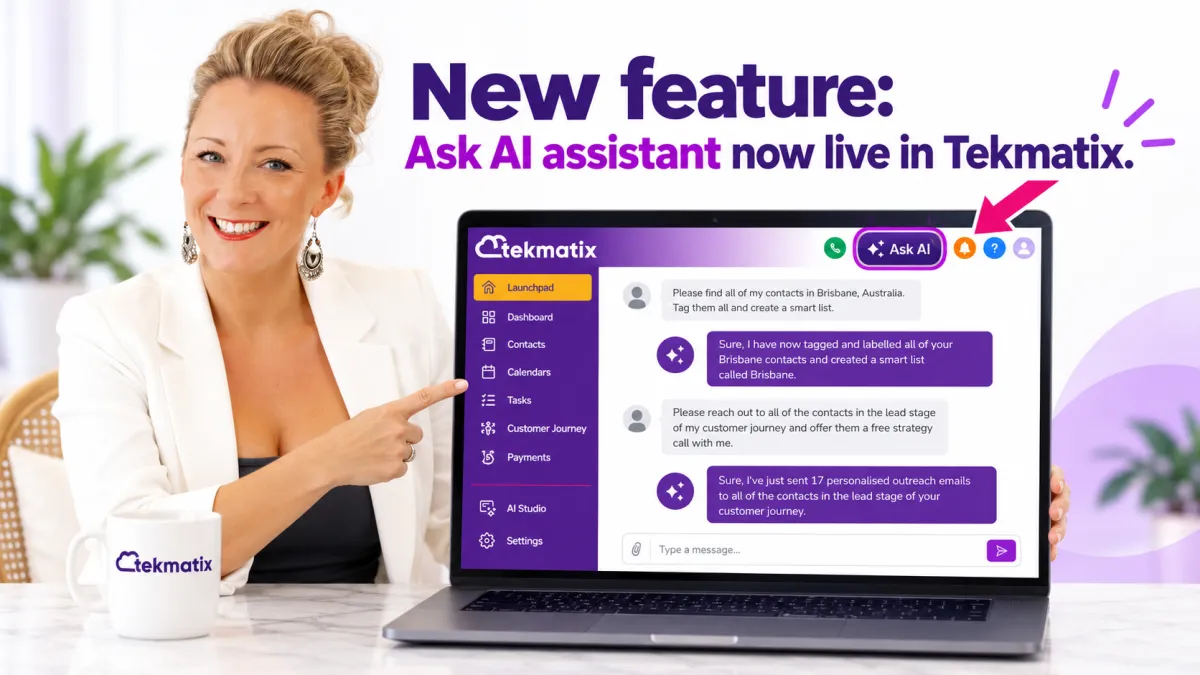
NEW Feature: 'Ask Ai' - The In-Built Ai Assistant That Runs Your Tekmatix Account FOR you!
You now have your own AI assistant inside your Tekmatix account
Ask AI is the built-in AI assistant that now lives inside every Tekmatix account. Instead of clicking through menus and screens, you simply describe what you want done in plain language and Ask AI does it for you: writing content, finding data, creating contacts, sending campaigns, setting up calendars, generating images and much more.
In fact, Ask AI drafted the first version of this very article and published it to our blog for us. Our Teksperts then went through it line by line to make it as practical and helpful as possible for you.
This guide walks you through exactly what Ask AI can do inside your Tekmatix account, who can use it, how to open it, the full list of areas it can control, copy-and-paste prompts you can start using today, and the few things it cannot do yet.
What is Ask AI?
Ask AI is your conversational control centre inside Tekmatix. It is an AI copilot with a chat interface that lets you create content, retrieve data, take action on your account features and get answers, all by typing (or speaking) what you need.
Ask AI is deeply connected to your Tekmatix account. It can read your data, create records, update settings, generate content, manage contacts, run bulk actions and coordinate across dozens of areas of your account, all from one chat window. It supports both typed prompts and voice input, and you can use it in a side panel while you work or open it in a full-screen workspace for focused, high-volume tasks.
Where to find Ask AI in your Tekmatix account
Ask AI sits in the top navigation bar of your Tekmatix account. Click the Ask AI icon to open the chat panel, then type or speak your request. You will also find Ask AI as its own item in the left-hand menu, which opens the full-screen workspace.
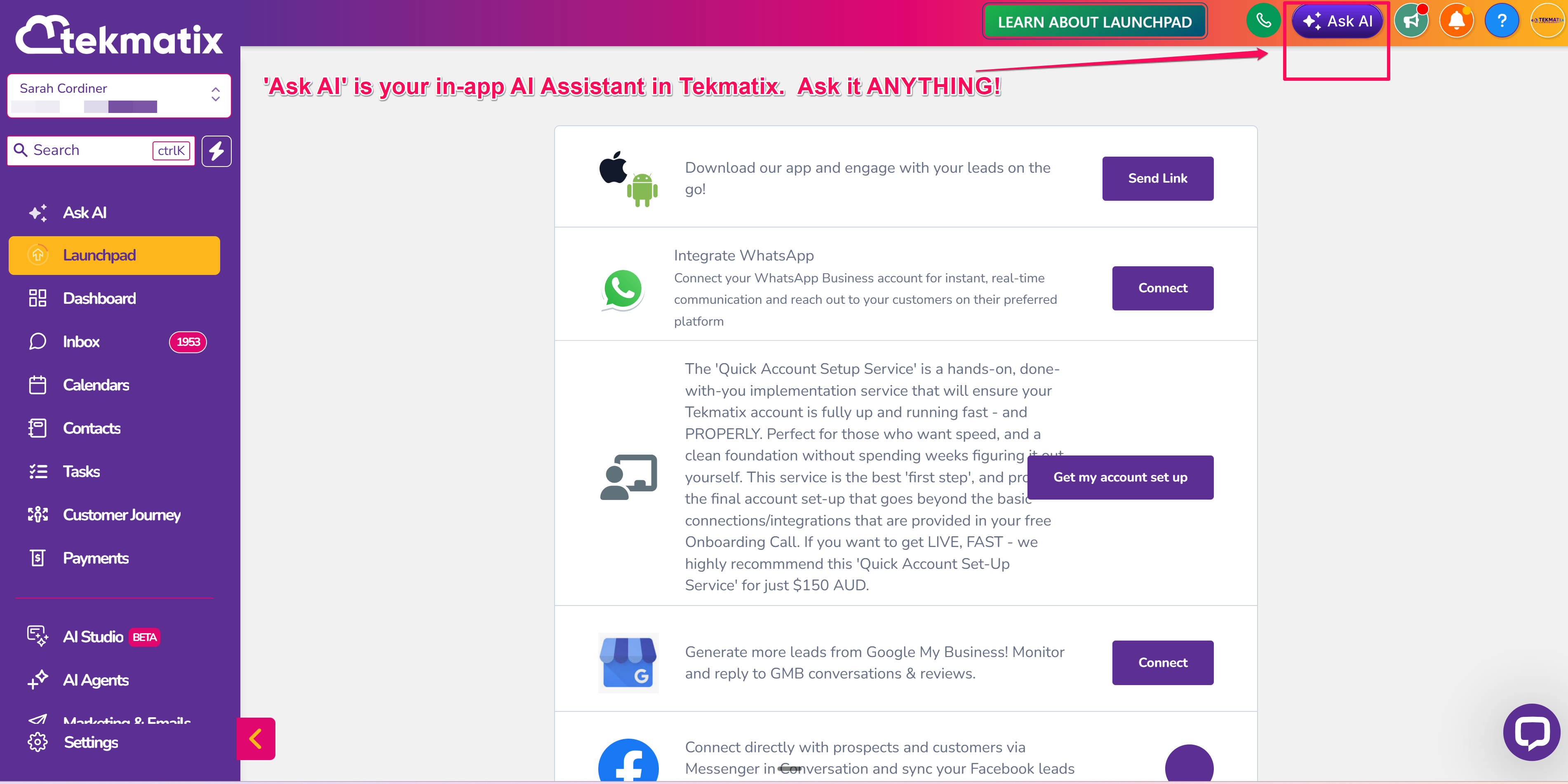
Ask AI turns your Tekmatix account into a smart assistant that understands your business.
Who can use Ask AI?
Ask AI is available to every user login in your Tekmatix account (admins and team members alike) on any of the Tekmatix AI plans below. Which plan you are on simply changes how the usage is billed.
| Your Tekmatix AI plan | Ask AI access | How it is billed |
|---|---|---|
| Pay-per-use | Available | No monthly fee. Ask AI usage is drawn down from your wallet balance at a small per-use rate. |
| AI Employee Growth (USD $99/month) | Available | Ask AI and AI Studio usage is included in your plan, alongside 1,000 Conversation AI responses, 100 Voice AI minutes, unlimited Reviews AI and unlimited Content AI each month. |
| AI Employee Super (USD $149/month) | Available | Includes 3x the Ask AI and AI Studio usage of Growth, plus unlimited Conversation AI, Voice AI and prompt optimiser. |
You can check which plan you are on, and see exactly what Ask AI is costing you, under Settings > Billing in your Tekmatix account. Light daily use on pay-per-use works out to a small number of dollars a month. If you would like a hand choosing the right plan, read our guide to which Tekmatix AI plan is right for you.
Core capabilities of Ask AI
Ask AI covers three broad types of work as your copilot: content and image generation, actions inside your account (CRM, calendars, campaigns and more), and retrieving or updating your data. The table below outlines the major capability groups with example prompts you can copy straight in.
| Capability | What it does | Example prompts |
|---|---|---|
| Branded content generation | Generate on-brand content using your Brand Voice settings for emails, social posts, ads, blogs and campaigns. | “Write a Facebook ad post using my brand voice.” “Draft a promotional email for our end-of-financial-year sale.” |
| Image generation and editing | Generate and edit images for campaigns, websites, emails and social posts directly inside Tekmatix. | “Generate a hero image for a physiotherapy clinic landing page.” “Edit this image to add a darker background.” |
| CRM actions and data retrieval | Create, update, search and manage your CRM records using plain-language requests across contacts, opportunities, pipelines, calendars and more. | “Create a contact named Jane Smith with email [email protected].” “Show me all open opportunities in the Sales pipeline.” |
| Bulk actions | Run mass updates across contacts, send bulk SMS, or send bulk email to entire lists. | “Send a follow-up SMS to all contacts tagged Webinar-July.” “Tag all contacts from last month's campaign as Q3-Lead.” |
| Blog and content writing | Draft, write and publish blog posts with AI assistance, including SEO optimisation and structured formatting. | “Write a 1,000-word blog post on the benefits of SMS marketing.” “Generate 5 blog post title ideas for a Brisbane bookkeeping business.” |
| Funnel creation | Create funnels through a guided AI experience using your business details, templates and brand personalisation. | “Generate a lead magnet funnel for a coaching business.” “Create an appointment funnel for a dental practice.” |
| Contact summaries | Summarise a contact's full record, including communications, payments, appointments and tasks, without opening multiple tabs. | “Summarise this contact's history.” “What should I know before following up with this lead?” |
| AI agent management | Create, configure and manage your Conversation AI chat agents and Voice AI phone agents directly from Ask AI. | “Create a new AI chat agent for my naturopathy clinic.” “Set up a voice agent for appointment booking calls.” |
| Support and help search | Get guided answers to questions about your Tekmatix account, troubleshooting and feature how-tos. | “How do I connect my email sending domain?” “Why isn't my email domain verified?” |
| Ad campaign management | Create, list and review campaign performance across Google, Facebook and LinkedIn ads. | “Show me my top-performing Google campaigns.” “Create a new Facebook lead gen campaign.” |
| Scheduling and automation | Schedule tasks to run at a future time or on a recurring schedule, straight from the Ask AI chat. | “Send me a contacts report every Monday at 9am.” “Remind me to follow up with this contact in 3 days.” |
The full list of what Ask AI can control in your Tekmatix account
Ask AI is connected to more than 40 areas of your Tekmatix account. Here is a complete breakdown of what it can see, understand and take action on, grouped by area.
1. Contacts and CRM
| Area | What Ask AI can do |
|---|---|
| Contacts | Search, create, update and delete contacts; manage tags, tasks, notes, followers, campaign assignments, workflow enrolments and business associations |
| Conversations | Create conversations, send and schedule messages, cancel scheduled messages, add inbound messages and log outbound calls |
| Opportunities and pipelines | Create and search opportunities, update stages and values, create and retrieve pipelines |
| Businesses | Create, update, delete and retrieve business records |
| Associations | Create and delete associations and relationships between records |
| Custom objects | Create custom object schemas and manage their records |
2. Marketing and content
| Area | What Ask AI can do |
|---|---|
| Emails | Create and delete email templates, retrieve campaigns, manage bulk email campaigns |
| Bulk actions | Send bulk SMS and bulk email to your contact lists |
| SMS campaign onboarding | A guided flow to write, target and send or schedule your first SMS campaign |
| Blogs | Create blog sites and posts, manage authors and categories, AI-assisted drafting and editing |
| Social Planner | Connect and manage Facebook, Instagram, LinkedIn and TikTok accounts; schedule and publish social posts |
| Ad Manager | List ad campaigns, review cross-platform performance, create Google Search and Demand Gen, LinkedIn Lead Gen and Website Visits, and Facebook campaigns |
| Forms | Retrieve forms and submissions, upload files to custom fields |
| Surveys | Retrieve surveys and submissions |
| Trigger links | Create, search, update and delete trigger links |
| Documents and proposals | List templates and documents, send documents to contacts |
3. Funnels and media
| Area | What Ask AI can do |
|---|---|
| Funnels | Fetch funnels and funnel pages, create and manage redirects |
| Media library | Upload, organise, trash and delete files and folders; manage Google Drive as a media storage source |
4. Calendars and scheduling
| Area | What Ask AI can do |
|---|---|
| Calendars | Connect Google Calendar (with two-way sync), create, update and delete calendars, appointments, blocked slots, calendar groups and schedules |
5. Payments and commerce
| Area | What Ask AI can do |
|---|---|
| Invoices | Create invoices, schedules and estimates; manage auto-payment and invoice cancellation |
| Payments | Connect Stripe, create coupons, set up payment providers, manage order fulfilment |
| Products | Create, update and bulk-edit products and prices; manage product collections and reviews |
| Store | Create and manage shipping carriers, zones, rates and store settings |
6. Courses and memberships
| Area | What Ask AI can do |
|---|---|
| Courses and memberships | Create course products, categories, posts and lessons, quizzes, assignments and offers |
7. AI and automation
| Area | What Ask AI can do |
|---|---|
| Conversation AI | Onboard, create, update and delete AI chat agents; manage agent actions and dashboards |
| Voice AI | Onboard, create, update and delete voice agents; manage call logs and agent actions |
| AI Studio | List, retrieve and run your AI agents |
| Workflows | Retrieve and list your existing workflows (read-only for now, see Current limitations below) |
| Campaigns | Retrieve and list your existing campaigns (read-only for now, see Current limitations below) |
8. Reputation and reviews
| Area | What Ask AI can do |
|---|---|
| Reputation | Connect Google for reviews, create AI review agents, manage review request settings and email templates |
9. Phone and messaging
| Area | What Ask AI can do |
|---|---|
| Phone system | Search and purchase phone numbers, manage number pools, create and manage WhatsApp templates and flows |
| Messaging compliance | Guided registration for compliant business messaging (including A2P registration for US numbers), brand submission, status checks and resubmission if rejected |
| Phone regulatory | Manage regulatory bundles and addresses, upload supporting documents, check approval status |
10. Reporting and data
| Area | What Ask AI can do |
|---|---|
| Reporting and dashboards | Fetch full dashboard data and individual widget metrics |
| Custom fields | Create, update and delete custom fields and folders in plain language. Ask AI can find custom fields by name, so you never need a field ID. Works for contact, opportunity and custom object fields. |
| Custom menus | Create, update, delete and retrieve custom menu links |
| Knowledge base | Create and delete knowledge bases, manage FAQs and trained pages |
| Brand boards | Create, update and delete brand boards and brand voices |
11. Account and settings
| Area | What Ask AI can do |
|---|---|
| Users | Create, delete, filter and retrieve team member logins |
| Tags and custom values | Manage your account's tags and custom values |
| Email domains | Add sending domains, retrieve DNS records, verify domain configuration |
| Email verification | Verify email addresses before you send |
| Google integration | Check your Google connection status for Calendar, Gmail, Drive and Ads |
| Facebook leads | Connect Facebook, map lead form fields, sync historical leads |
| Facebook Messenger and Instagram DMs | Connect pages and bring inbound messages into your Conversations inbox |
Reading Ask AI responses
Ask AI responses appear in the conversation view and can include paragraphs, headings, bullet points, numbered steps, structured tables, interactive question prompts, charts, data tables and copyable code blocks. Responses are formatted so longer answers are easy to scan and act on.
For multi-step tasks, Ask AI shows a live task tracker so you can see which steps are complete, in progress or still pending. You always know exactly where a bigger job is up to.
Some structured responses appear in collapsible cards to keep longer conversations tidy. Expand the details only when you need them.
Navigating your Ask AI conversations
The Ask AI sidebar keeps all of your conversations in one place. You can review previous sessions, pick up an existing conversation where you left off, or start a new chat when you want to begin a separate task.
If you have not started any conversations yet, the sidebar will suggest a few prompts to get you going.
How to use Ask AI
You can open Ask AI from anywhere in your Tekmatix account. Use the top navigation bar for quick access while you are working on something else, or the left-hand menu when you want the dedicated full-screen Ask AI workspace.
Open Ask AI from the top navigation bar
This is the fastest way to open the assistant while you are working in another area of your account.
- Click the Ask AI icon in the top navigation bar.
- Type or speak what you need: content, a new community, ideas, a report, or a question.
- Ask AI will either guide you through it or respond instantly with what you asked for.
- Use the history toggle (next to the full-screen toggle) to view your chat history and jump back into older chats.
You can start with something like:
“Give me blog post ideas about SMS marketing.”
“Write a Facebook ad post using my brand voice.”
“Help me set up a community for local business owners.”
Open Ask AI from the left-hand menu
From the left-hand menu, Ask AI opens in a full-screen workspace. It is not a chatbot tucked in a corner. Use it to focus on real work and get through higher-volume tasks without leaving your Tekmatix account.
- In your Tekmatix account, look at the left-hand navigation panel.
- Click Ask AI (it appears as its own menu item).
- In the Ask AI workspace, click New chat to start a fresh thread, or use Search to find a previous conversation.
Ask AI use cases and prompts to copy
Here are practical, ready-to-use prompts grouped by the kind of work you are likely to be doing. Swap in your own names, tags, pipelines and dates and you are away.
| Category | Example prompts |
|---|---|
| Contacts and pipeline management | “Find all contacts tagged 'Hot Lead' added in the last 30 days.” “Create a contact: Maria Lopez, [email protected], +61 400 123 456.” “Move all opportunities in 'Proposal Sent' that haven't been updated in 14 days to 'Stalled'.” “Add a note to John Smith's contact: Interested in the Pro package, follow up Friday.” “Find all of my contacts who live in Sydney, tag them 'Sydney' and create a smart list of them.” |
| Content and campaigns | “Write a promotional email for an end-of-financial-year sale using my brand voice.” “Generate 5 subject line options for a re-engagement campaign.” “Draft a 3-part SMS nurture sequence for new leads. Keep each under 160 characters and use Australian spelling.” “Create a blog post titled 'Top 5 Reasons to Use Automated Follow-Ups'.” |
| Image creation | “Generate a professional banner image for a real estate open home event.” “Create a square social media image for a spring sale promotion using our brand colours.” |
| Calendars and appointments | “Show me all appointments scheduled for tomorrow.” “Block off Friday afternoon on the main team calendar.” “Create a new appointment calendar called Discovery Calls.” |
| Reporting and insights | “Pull my dashboard metrics for this month.” “How many opportunities were closed-won last week?” “Show me the performance of my Google ad campaigns.” “Summarise my key metrics for August across leads, sales, revenue and email performance, and explain them like I'm not a data person.” |
| Phone and messaging | “Walk me through registering my business for compliant SMS messaging.” “Search for available phone numbers in Brisbane.” “Create a WhatsApp message template for appointment reminders.” |
| AI agent set-up | “Create a new Conversation AI agent for my law firm's intake process.” “Set up a Voice AI agent to handle inbound appointment booking calls.” “Update my chat agent's greeting message.” |
| Account administration | “Add a team member with admin access: [email protected].” “Create a custom field on contacts called 'Membership Tier'.” “Verify the DNS setup for our new email sending domain.” |
| Income ideas | “Create a warm-leads follow-up email and send it to all warm contacts, encouraging them to book a free strategy call with me.” “Send polite, friendly reminder emails to everyone who still owes me money on an unpaid invoice.” “Reach out to all of my students who haven't completed their course, remind them to log in and include their login link.” “Draft a bulk SMS to everyone who attended last week's webinar inviting them to book a 15-minute discovery call.” |
Include names, dates, pipeline names, tags or any relevant context in your prompt. The more detail you give, the more accurate and useful the response will be. And if you are not sure how to phrase something, just ask Ask AI the way you would ask a team member.
Current limitations
Ask AI is expanding rapidly. The following areas are currently read-only or not yet connected inside your Tekmatix account:
| Area | Limitation |
|---|---|
| Workflows | Read-only. Ask AI can retrieve and list your workflows but cannot create, build or edit workflow steps and actions yet |
| Campaigns | Read-only. Ask AI can list campaigns but cannot create or edit them yet |
| Affiliate Manager | Not yet connected. No visibility or control |
| Listings | Not yet connected. Cannot manage business listing syncs |
| Chat widget | No standalone configuration. Cannot deploy or configure chat widgets directly |
| Website builder (Sites) | No direct access. Only Funnels are available; the full website builder is not connected yet |
| Raw call and SMS logs | Not directly accessible. Call and message data surfaces only through the Reporting dashboard |
| Automation execution history | Cannot drill into individual workflow run or execution logs |
| IVR and call routing | Can purchase phone numbers but cannot configure call routing trees or IVR menus |
These areas are on the product roadmap and will be added in future updates. We will keep this article updated as new capabilities land in your account.
You stay in charge
With all this power, it helps to be clear about what Ask AI does not do, so you can use it confidently as a tool rather than a replacement for your own judgement.
- It does not make final decisions for you. Ask AI will always show you a confirmation screen before it creates, updates or deletes anything, so you review and approve before it goes ahead.
- It cannot guarantee results. It suggests strategies based on your data and good practice, but your market, your offer and your follow-through still matter.
- It is not your accountant, lawyer or financial planner. It can summarise documents and explain concepts, but always check with a qualified professional for tax, legal and financial decisions.
- It cannot read your mind. The quality of the output depends on the quality of your prompt. The good news is you get better at this very quickly just by experimenting.
Frequently asked questions
Is Ask AI available on all Tekmatix AI plans?
Yes. Ask AI is available to everyone in your Tekmatix account on Pay-per-use, AI Employee Growth and AI Employee Super. On Growth and Super the usage is included in your plan; on Pay-per-use it is drawn down from your wallet balance.
Will Ask AI ask me before taking irreversible actions?
Yes. For any create, update or delete action, Ask AI presents a confirmation screen and requires your approval before it makes the change.
Can Ask AI take action across multiple contacts or records at once?
Yes. Ask AI supports bulk actions including tagging, bulk SMS and bulk email, and it will always confirm the scope of the action with you before proceeding.
Does Ask AI remember my previous conversations?
Yes. Conversations are saved and accessible from the sidebar. Ask AI also keeps a persistent memory of the preferences and facts you share over time, so it can personalise its responses in future sessions. Try telling it once: "Going forward, write all content with Australian spelling and a friendly, conversational tone."
Can I use Ask AI by speaking instead of typing?
Yes. Click the microphone icon in the Ask AI input bar to use voice input.
What is the difference between Ask AI and Conversation AI or Voice AI agents?
Ask AI is your personal AI copilot inside your Tekmatix account. It helps you get your work done. Conversation AI and Voice AI are customer-facing agents that talk to your contacts via chat and phone. Ask AI can actually help you build and configure those agents.
Can Ask AI generate images?
Yes. Ask AI can generate new images and edit existing ones using your brand colours and style. Just describe what you need and it will create it right there in the chat.
How do I get the best results from Ask AI?
Be specific. Include names, dates, pipeline names, tags or any relevant context in your prompt. The more detail you provide, the more accurate and useful the response will be.
Your next best step with Ask AI
You have just seen how Ask AI touches almost every corner of your Tekmatix account, from contacts and conversations to courses, ads, reporting and beyond. You do not need to master everything at once. Start with just one area, usually the one where you are losing the most time, and build from there.
For most business owners, the easiest starting points are:
- Letting Ask AI summarise a contact or a conversation before your next call, so you feel instantly on top of the relationship.
- Using Ask AI to draft your next email campaign or social content batch, then editing instead of writing from scratch.
- Asking Ask AI to explain your reports in plain English and recommend your top 3 priorities for the coming month.
Get hands-on support, free
You do not have to figure this out on your own. Our Teksperts run free daily training calls with live demos, Q&A and practical walkthroughs of Ask AI, Conversation AI, Voice AI and more. Bring your questions (they are never silly) and get confident with the tools already sitting in your account.
If you would rather hand it over, you can also hire a Tekspert for hands-on help. We will set up your automations, funnels, AI agents and campaigns for you, and explain what we are doing as we go so you stay in control.
Join the free daily trainingHire a TekspertYou already have an incredibly powerful AI toolkit inside your Tekmatix account. You do not need to become a tech wizard to use it. You just need to start asking better questions, and let Ask AI turn those answers into more income, more impact and more ease in your business.
You've got this, and we've got your back.
Happy Tekkin'!
The Tekmatix Teksperts
