
How to Sell Your First Online Training Videos Without Spending a Fortune
You've recorded the videos. That's the hard part done. Here's how to get them selling without signing up for five subscriptions first.
Quick answer: Start small and keep it simple. You need somewhere that protects your videos, takes the payment, gives the buyer instant access and emails them. You can stitch that together from a website, Stripe and a digital product platform like Payhip, or you can use one all-in-one platform like Tekmatix that does all of it in one place, so you're not paying for a pile of tools before you know your trainings sell. Either way, test demand first with a simple sales page and a launch to your network.
The question I keep seeing
I saw a lovely question in a women in business group this week, and I hear a version of it almost every day.
A business owner had recorded six low-cost training videos and wanted to sell them online. She could host them on her own website and connect Stripe, but she wanted opinions on dedicated course platforms. And, very sensibly, she didn't want to spend a lot until she knew whether they'd actually sell.
Someone in the comments mentioned Payhip. Others had their own favourites. So here's my honest answer.
TL;DR
- Don't over-invest before you validate. A simple sales page and a launch to the people who already know you will tell you more than any platform comparison.
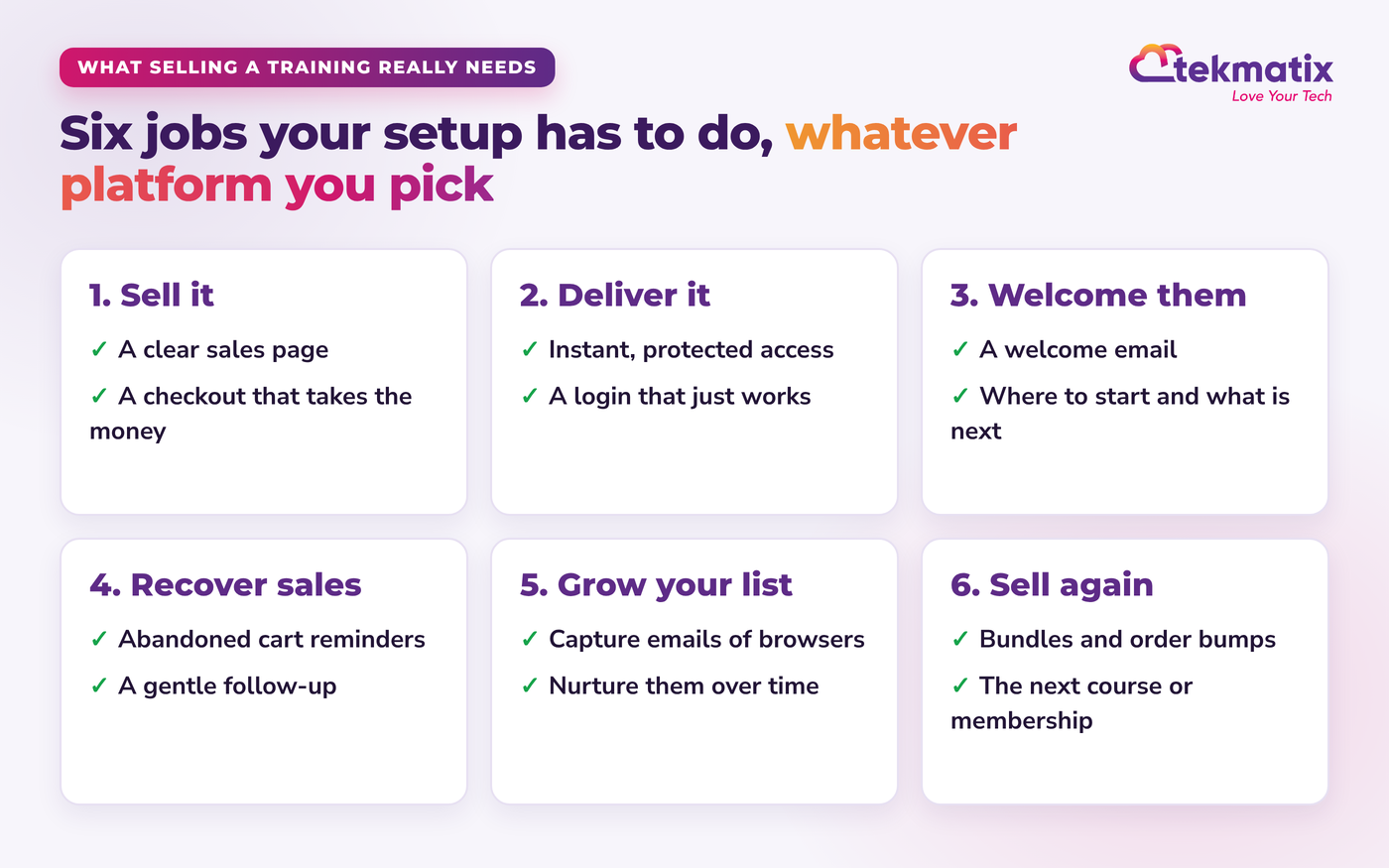
- Selling a training is more than hosting a video. You need a sales page, checkout, protected access, a welcome email, follow-up and a way to grow your list.
- Option 1: your website plus Stripe. Cheapest on paper, but you end up doing the delivery and follow-up by hand.
- Option 2: a digital product platform like Payhip. Easy and low cost to start, with a fee on each sale on the cheaper plans and great tax handling.
- Option 3: an all-in-one platform like Tekmatix. Course portal, memberships, funnels, checkout, emails and CRM in one account, with unlimited courses and no Tekmatix transaction fees.
- Want to see it first? Book a free demo.
I've been doing this for a long time
I'm a qualified curriculum developer. I spent seven years at university getting my teaching and curriculum design degrees, and I've been teaching people how to create courses and memberships for around 20 years.
In the early days, I did everything by hand. And when I started selling my own courses online, I had the classic setup. A website on one platform. Email marketing on another. A course platform on another. A checkout, a booking tool, a funnel builder... all separate, all billing me every month, and none of them talking to each other properly.
Every time my contact list grew, my email bill grew. Every time I created a new course, my subscription went up. I felt like I was being punished for growing. That's a big part of why I founded Tekmatix.
So yes, I'm biased. But I'm also going to be honest with you about when you don't need us yet.
Step 1: Find out if they'll sell before you spend
This is the bit most people skip. They spend weeks choosing a platform, and then launch to crickets.
Here's what I'd do with six low-cost trainings:
By the way, you don't need fancy gear or a script. A USB mic, a ring light and teaching it the way you'd explain it to a client is plenty. One of my favourite ways to create a training is to run it live as a workshop, record it and sell the replay.
Step 2: Know what your setup actually has to do
Whatever platform you choose, a training that sells needs to do six jobs. If your setup can't do one of them, that's where you'll be doing it by hand at 10pm.
Step 3: Compare your three real options
Option 1: Your own website plus Stripe
This is what she was weighing up, and it's the cheapest on paper. Stripe payment links are quick to create, and you only pay Stripe's processing fees when you sell.
The catch is everything that happens after the payment. Most websites aren't designed to protect video lessons, give each buyer a login, track their progress or send them the right emails at the right time. So you either do that by hand, or you start adding plugins and tools.
Option 2: A digital product platform like Payhip
Payhip came up in the comments, and it's a genuinely good place to start. When I checked their site in October 2026, it had a free plan with a 5% fee per sale, a Plus plan at $29 USD a month with a 2% fee, and a Pro plan at $99 USD a month with no fee per sale. Your Stripe or PayPal fees apply on top, on every plan.
It does more than a lot of people realise: courses, memberships, bundles, order bumps, abandoned cart recovery and a simple store builder. It also calculates, collects and pays sales tax and VAT for the US, Canada, the UK and the EU, which is a real plus if you sell into those countries.
Where you'll likely start adding other tools is the rest of your business. Your CRM and sales pipeline, booking calendars, SMS, social media scheduling, client onboarding and the automations that join it all together usually live somewhere else, connected by integrations. That's fine while you're small. It's the pile of subscriptions I was trying to get away from.
Option 3: An all-in-one platform like Tekmatix
This is where your course portal, memberships, sales pages and funnels, checkout, email marketing, CRM, booking calendars and social media planner all live in one Tekmatix account.
- Unlimited courses, contacts and users. Add your seventh training without your bill going up.
- Payments straight to your own Stripe or PayPal, with no Tekmatix transaction fees.
- Memberships built in, so you can sell all six as a monthly subscription instead of one-off trainings.
- Funnels with checkout, so the sales page, payment, access and welcome email are connected.
- Follow-up done for you: abandoned cart reminders, welcome emails and nudges for students who haven't logged in.
- Run it by talking to AI. More on that below.
Being upfront, it isn't the cheapest way to test one video. The Starter plan is $150 AUD or $97 USD a month (on our pricing page as at September 2026), plus pay as you go for the emails, texts, calls and AI you use. It makes sense when you're ready to treat your trainings as a business, and it usually replaces several other subscriptions you'd otherwise be paying for.
Side by side
| Website + Stripe | Payhip | Tekmatix | |
|---|---|---|---|
| Monthly cost to start | Your existing website, plus Stripe fees | $0 (5% per sale), $29 USD (2%) or $99 USD (0%), plus Stripe or PayPal fees | Starter $150 AUD or $97 USD, no Tekmatix transaction fees, plus pay as you go usage |
| Courses, memberships and bundles | Needs plugins or extra tools | Yes | Yes, unlimited courses |
| Order bumps and abandoned cart recovery | Needs extra tools | Yes | Yes |
| Sales tax and VAT | You set it up | Calculated, collected and paid for you in the US, Canada, UK and EU | You manage it through your own payment setup |
| CRM, pipelines, booking calendars and SMS | Separate tools | Through integrations such as Calendly and Zapier | Built in |
| Set it up by talking to AI | Depends on your tools | Check their current features | Ask AI built in, or connect Claude, ChatGPT or GrokBot |
| Human help | Whoever built your site | Support for every seller | 24/7 support, a free 60-minute set-up call and Teksperts |
Based on each provider's public pages in October 2026. Always check their current pricing before you decide.
Step 4: Set it up in minutes by telling your AI
Here's the bit that's changed everything. You don't have to learn the platform any more.
Inside every Tekmatix account there's Ask AI, an in-built AI assistant you just talk to. And you can connect the AI you already use, like Claude, ChatGPT or GrokBot, to your account (here is how to connect ChatGPT).
Tell it what you want. Make a cuppa. Come back and check it.
Your AI works from your own original material, in your voice, and it asks before it creates, changes or sends anything. For the full walkthrough, see how to build a funnel in seconds on Tekmatix with AI and how to create a sales page and funnel with ChatGPT.
Step 5: Make six low-cost trainings add up
- Bundle them. Sell each one on its own, then offer all six together at a better price.
- Add an order bump. Offer a second, related training at checkout for a small extra amount.
- Turn them into a membership. Six trainings plus a new one each month, for a monthly fee, is often easier to sell than six separate products.
- Put an offer inside the lessons. You can even add funnels inside your course lessons so the next step is right there.
- Get found. Answer your customers' questions on your blog so Google and AI assistants can recommend you. Here's how to get ChatGPT to recommend you as the expert.
So, which should you choose?
- Just testing one video this week? A payment link and a simple sales page is fine. Validate first.
- Only ever selling digital products? A platform like Payhip is a fair, low-cost choice.
- Building a business from your expertise? Courses, memberships, your list, bookings and follow-up all in one place, run by talking to AI: that's exactly why I founded Tekmatix.
Frequently asked questions
What is the cheapest way to sell training videos online?
The cheapest way to start is a payment link and a private video link, or a digital product platform with a free plan that takes a percentage of each sale. Both cost very little upfront. The catch is that you then do the delivery, follow-up and list building by hand, or pay for extra tools as you grow.
Is Payhip good for selling courses?
Yes, Payhip is a popular, easy option for courses, memberships and digital downloads, and its pricing is clear: a free plan with a 5% transaction fee, Plus at $29 USD a month with 2%, and Pro at $99 USD a month with no transaction fee, plus your normal Stripe or PayPal fees (as listed on payhip.com in October 2026). It also handles VAT and sales tax in the US, Canada, the UK and the EU. If selling digital products is all you need, it's a fair choice. If you want your CRM, bookings, email automations, funnels, website and courses all in one place and run by AI, an all-in-one platform like Tekmatix makes more sense.
Should I host my training videos on my own website?
You can, but a normal website isn't built to protect videos, give buyers a login, track their progress or send them the right emails. Put the videos in a proper course portal with protected access, and point your website to the sales page.
Does Tekmatix take a cut of my course sales?
No. Payments go straight to your own Stripe or PayPal account and Tekmatix doesn't add transaction fees. Stripe or PayPal still charge their normal processing fees.
Can AI set up my course for me in Tekmatix?
Yes, with you in charge. Ask AI, built into every Tekmatix account, can create course products, categories, lessons and offers. Your own AI, such as Claude, ChatGPT or GrokBot connected to your account, can build the sales page and checkout too. It works from your own material and shows you before anything goes live.
How many courses can I host on Tekmatix?
Unlimited. You also get unlimited contacts and users, so your bill doesn't jump every time you add a course or your list grows.
I'm not techy. Can someone just do it for me?
Absolutely. Every new account gets a free 60-minute set-up call. You can also join a free daily training call, book a Tekspert by the hour, or choose our done-for-you Course and Learning Portal Set-Up service.
Ready to turn your training videos into sales?
New to Tekmatix? Book a free demo and we'll show you how your course, sales page, checkout and emails can all live in one place, set up by talking to your AI.
Book your free demoSee plans and pricingWant a human to set it up with you?
- Done for you: our Course and Learning Portal Set-Up, Sales Funnel System and Membership Set-Up services.
- Book a Tekspert by the hour to set up your course and checkout with you. Book a Tekspert
- Already a customer? Bring your questions to a free daily training call.
Keep learning: Every way to use AI in Tekmatix: the complete guide.
Sarah x
Warning: you may get addicted to your productivity.
