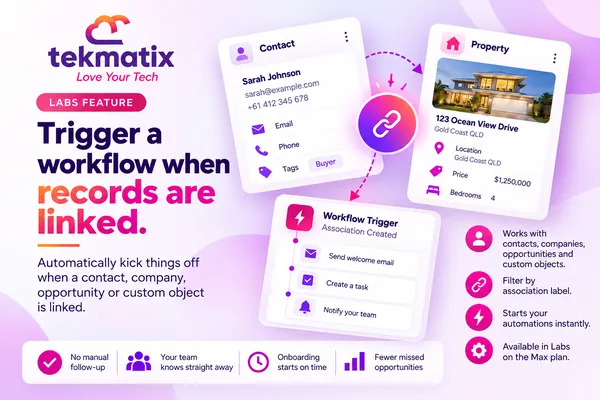
How do I trigger a workflow when records are linked on Tekmatix?
A buyer gets linked to a property. A contact gets linked to a new client company. A deal gets linked to an account. Each of those moments usually means someone on your team needs to do something next.
Tekmatix workflows now have an Association Created trigger. It starts a workflow the moment two records are linked, so the follow-up happens without anyone having to remember it.
This is a Labs feature. Once Association Created Trigger is switched on in Labs, go to Automation, then Workflows, open a standard, Custom Object or Company workflow, and add the Association Created trigger. Set Association created with to the record type you want to watch, add an Association label filter if you need one, then add your actions and publish.
What the Association Created trigger does
In Tekmatix, an association is a link between two records, like a contact and a company, or a contact and a custom object record such as a property. Each link can have a label that describes the relationship, such as "Buyer" or "Assigned Dealer".
The Association Created trigger watches for new links and starts your workflow when one is made.
- Works with these records: contacts, opportunities, companies and custom objects.
- Works in these workflows: standard workflows, Custom Object workflows and Company workflows. Opportunities can take part in associations, but you set the trigger up in one of those three workflow types.
- Two filters: Association created with picks the type of record being linked. The optional Association label filter limits it to one type of relationship.
Why this matters for your business
Nothing falls through the cracks. When a link is made, the next step starts on its own. No sticky notes, no "I thought you were doing that".
Your team hears about it straight away. Send an internal notification or create a task the moment a buyer, client or deal is linked to the right record.
Onboarding starts on time. Linking a contact to a new client company can kick off your welcome process, so new clients aren't left waiting.
It only fires when it should. Label filters mean the workflow runs for the relationship you care about, not every link in your account.
Before you start
- The Labs feature Association Created Trigger switched on.
- The objects and associations you want to use already set up, such as a company or custom object associated with contacts.
- The association labels you want to filter on created, if you plan to use the label filter.
- A decision on which record should enter the workflow. Pick the workflow type that matches that record, then choose the other record as the associated object.
Which Tekmatix plan do you need?
The Association Created trigger is currently in Labs, which is early access to new features. On Tekmatix, Labs is switched on for the Max plan. If you're on Max and can't see it yet, ask our team on live chat to check it for you.
Compare every plan at tekmatix.com/pricing, or change your plan here.
How to set up the Association Created trigger
- Open a supported workflowGo to Automation, then Workflows, and open a standard, Custom Object or Company workflow. Choose the type that matches the record you want to enrol.
- Add the triggerAdd a trigger and select Association Created.
- Choose the associated objectUnder Association created with, choose the type of record being linked to the workflow's record. For example, Properties, Companies or Opportunities.
- Filter by label (optional)Click Add filters, add an Association label filter and choose the label. If you use paired labels within the same object type, pick the role that should enrol.
- Add your actionsSave the trigger, then add the actions you want, such as a task, an internal notification or an email.
- Publish and testPublish the workflow. Then create a matching new link and check Enrollment history and Execution logs to make sure it ran.
Examples of how it can be set up
| Workflow type | Association created with | Label | What it does |
|---|---|---|---|
| Standard (contacts) | Properties | Buyer | Creates a follow-up task or notifies the team when a buyer is linked to a property |
| Custom Object (Cars) | Dealers | Assigned Dealer | Coordinates the handover when a car is assigned to a dealer |
| Company | Opportunities | Your chosen label | Sends an internal notification when a deal is linked to a company |
A few things to know
- New links only. The trigger runs when a new association is created. It doesn't run for links that already exist, so make a fresh link to test it.
- It doesn't create links. The trigger only listens for them. To create a link inside a workflow, you'd use a separate action.
- Creating a record isn't the same as linking it. Creating a contact or company and linking it to something are two separate events.
- Labels depend on your set-up. The labels you can choose come from the associations configured for the objects you selected.
Test it before you rely on it.
Publish the workflow, then open a test record and create a brand new link that matches your trigger, using the same associated object and label. Go back to the workflow and check Enrollment history to see the record enrolled, and Execution logs to see each action ran. If nothing shows, check the workflow is published, the object and label match, and the Labs feature is on.
Five ways to actually use this
- Welcome a new client's team. When a contact is linked to a client company, send them a short welcome email with how to reach you and what happens next.
- Give your team a heads up. When a buyer or applicant is linked to a listing, property or program, send an internal notification to the person who looks after it.
- Create the next task automatically. When a deal is linked to a company, create a task to send the proposal or book the kick-off call.
- Use labels to send the right message. Set up one workflow for a "Decision maker" label and another for a "Billing contact" label, so each person gets the information they actually need.
- Keep your records tidy. When a link is made, add a tag or update a field so your Smart Lists and reports stay accurate without manual updates.
Want it done for you?
A trigger is only the start. The real value is in what happens next. If you'd rather hand the build over, our Teksperts can set it up straight into your Tekmatix account.
New Client Onboarding System
We build a branded intake form, a welcome page, a kick-off call calendar, a five-email welcome sequence, internal team notifications when a client signs up or completes intake, task automation for each stage, and automatic tagging. You also get a snapshot backup so you can reuse it. New clients go from paid to onboarded with far less manual admin.
See the New Client Onboarding SystemAppointment Booking System
When a link means it's time to talk, make booking easy. We set up three branded calendars, two-way calendar sync, payment before paid bookings are confirmed, confirmation messages and reminders 24 hours, 1 hour and 10 minutes before each call, and a post-appointment workflow. Fewer no-shows, and fewer back-and-forth emails.
See the Appointment Booking SystemContracts, Proposals & Invoicing
For when a new link means paperwork. We set up a master contract with e-signature fields, a proposal template and an invoice template, plus a proposal follow-up workflow, a contract-signed workflow and a three-stage invoice reminder sequence. Less chasing, and a shorter wait to get paid.
See Contracts, Proposals & InvoicingSee every done-for-you package at tekmatix.com/services.
Frequently asked questions
Which records does the Association Created trigger work with?
Contacts, opportunities, companies and custom objects. You set it up in a standard, Custom Object or Company workflow.
Is the association label filter required?
No. It's optional. Add it when you only want the workflow to run for one type of relationship.
Why can't I find the label I want?
The association and label you're looking for may not be set up for the objects you selected. Check your association settings for those objects.
Does the trigger run for links that already exist?
No. It only runs when a new association is created. To test it, create a new matching link.
Does the trigger create the association for me?
No. It only starts a workflow when a link is made. Creating the link is a separate step.
Why isn't my workflow enrolling records?
Check the workflow is published, the associated object and label match the new link, and the Labs feature is switched on. Then look at Enrollment history and Execution logs.
Is this available in every Tekmatix account?
It's currently in Labs, which is early access. On Tekmatix, Labs is switched on for the Max plan.
Do I need to be on a particular Tekmatix plan?
Yes. Because this is a Labs feature, it's available on the Max plan, where Labs is switched on. You can compare the plans here and change your plan here.
Does the Association Created trigger cost extra?
There's no separate charge listed for this trigger. The actions in your workflow are billed as usual, for example emails at $0.001 USD each, and any Premium actions at $0.015 USD per action. You can see all current usage pricing at tekmatix.com/rebilling.
Need a hand?
Free daily group training
Jump on a free group session with a Tekspert and build your first Association Created workflow live.
Book free trainingHire a Tekspert for 60 minutes
Share your screen and we'll map out your associations, labels and follow-up workflows with you.
Book a Tekspert15 minute advanced tech support
Got one quick question, like why a workflow isn't enrolling? A focused 15 minutes sorts it out.
Book 15 minutes24/7 live chat
Our team is on live chat around the clock, right inside your Tekmatix account.
Get supportEvery new link is a signal that something should happen next. Now Tekmatix can make sure it does.
Happy Tekkin'!