

Tekmatix Help Articles
Love your help
Use the search bar below to find help guides and articles for using Tekmatix
Use the search bar below to look for help articles you need.
Create a Sales Page and Funnel with ChatGPT in Tekmatix
You can use ChatGPT or Claude to help create a branded sales page and a complete three-step funnel in Tekmatix. Give your AI the offer, your brand guide and the free funnel-builder prompt linked below. When your AI has supported account tools and the right permissions, it can also carry out the setup in your account.
That means your next workshop, course, service or seasonal offer can move from an idea to a working sales journey much faster. The prompt covers the sales page, native checkout, confirmation page, fulfilment emails, abandoned-cart recovery and testing. You bring the offer and make the business decisions. Your AI handles the build wherever its connected tools allow.
Get the full AI funnel-builder prompt for free
Copy it into your own AI and use it to build your sales page, checkout and confirmation journey. Start with ChatGPT or Claude; other assistants can use the instructions too, with account actions depending on their available tools.
Email me the free funnel-builder prompt
Get the full prompt to add into your own AI. We will email the complete prompt, plus a link back to this guide.
Watch the quick overview
In this 97-second video, I show the prompt and the parts of a Tekmatix funnel using a Black Friday offer as an example. The written steps below take you through the setup in more detail. The example is a demonstration of the process, rather than a checkout link for that offer.
What are you actually building?
A sales page explains your offer. A sales funnel connects that explanation to a purchase and then tells your customer what happens next. I recommend a simple three-step structure:
| Step | Purpose | What belongs here |
|---|---|---|
| 01 Sales Page | Help someone decide | Who it is for, the result, inclusions, price, genuine proof, FAQs and purchase buttons |
| 02 Checkout | Take the order | The existing payment product and Tekmatix’s native order form |
| 03 Confirmation | Explain the next step | Order acknowledgement, access or booking instructions and support |
Behind those pages, a fulfilment workflow delivers the purchase after the correct successful payment event. A separate recovery workflow can remind eligible people who entered their details but did not complete their purchase.
Before you begin: give your AI a useful brief
You do not need to know every button in the software. You do need to know what you are selling. Have these details ready:
- Your account: the exact Tekmatix business and sub-account the AI should use.
- Your offer: name, audience, main result, inclusions, exclusions and how it is delivered.
- Your pricing: currency, tax treatment, one-off or recurring billing, any trial and renewal terms. Identify the existing product if it is already in Payments.
- Your brand: logo, colour codes, fonts, approved images and tone of voice.
- Your practical links: domain, privacy policy, terms, refund information where relevant and support details.
- Your delivery details: course or offer to grant, download, booking link, or the secure process for creating account access.
- Your test: your own email address, access to that inbox and permission to use payment test mode.
Example offer brief
“Build a funnel for my live workshop, Launch Your First Online Course. It is for coaches and consultants who have an idea but need a clear launch plan. The price is AUD $99, paid once. It includes a two-hour live session and a workbook. Reuse my existing workshop product in Payments. Use my brand guide, link my current terms and privacy policy, and send the booking information after successful payment. Use my own email for testing and keep it in draft until the full journey passes.”
For a Black Friday campaign, add the real offer end date, timezone, eligible products, bonus delivery and any genuine limits. Do not ask AI to invent savings, testimonials or scarcity.
Step 1. Get the prompt and connect your AI
Request the free funnel-builder prompt here, then copy the entire prompt from your email into ChatGPT or Claude. Add your offer brief in the same conversation.
Ask the AI to identify the tools it can actually use. A supported Tekmatix MCP connection gives an assistant access to permitted account actions. Page editing or workflow editing may require a supported remote browser when those actions are not exposed by the connection. Availability depends on your AI, account and permissions.
Use a secure sign-in or account-connection process. Keep passwords and authentication codes out of the chat. Start with a read-only check: ask the AI to confirm your business name, the correct sub-account and the existing product or template it found. If the wrong account appears, stop before any edits.
For the connection walkthrough, see how to connect ChatGPT to Tekmatix. Give only the permissions the task needs. When you no longer want the connection, remove it from your AI’s connected apps and revoke the associated account access or token.
Before making changes, confirm the exact Tekmatix sub-account, list the tools you can use, and find my existing payment product and three-step funnel template. Tell me what requires browser access. Do not claim an action is complete unless you can verify it.
Step 2. Find or create the product in Payments
The payment product comes before the checkout setup. Ask your AI to search Payments for the existing offer and verify its price, currency and billing terms. Reuse the correct product and price instead of creating duplicates.
If there is no suitable product, provide the details needed to create one. Check every billing setting carefully, particularly subscriptions, trial periods and renewal amounts. A page that says “one-off” must not lead to a recurring payment product.
For a digital course or membership, also identify the native offer or access action that delivers the entitlement. A public confirmation page is not a secure way to grant paid access.
Step 3. Clone the three-step funnel template
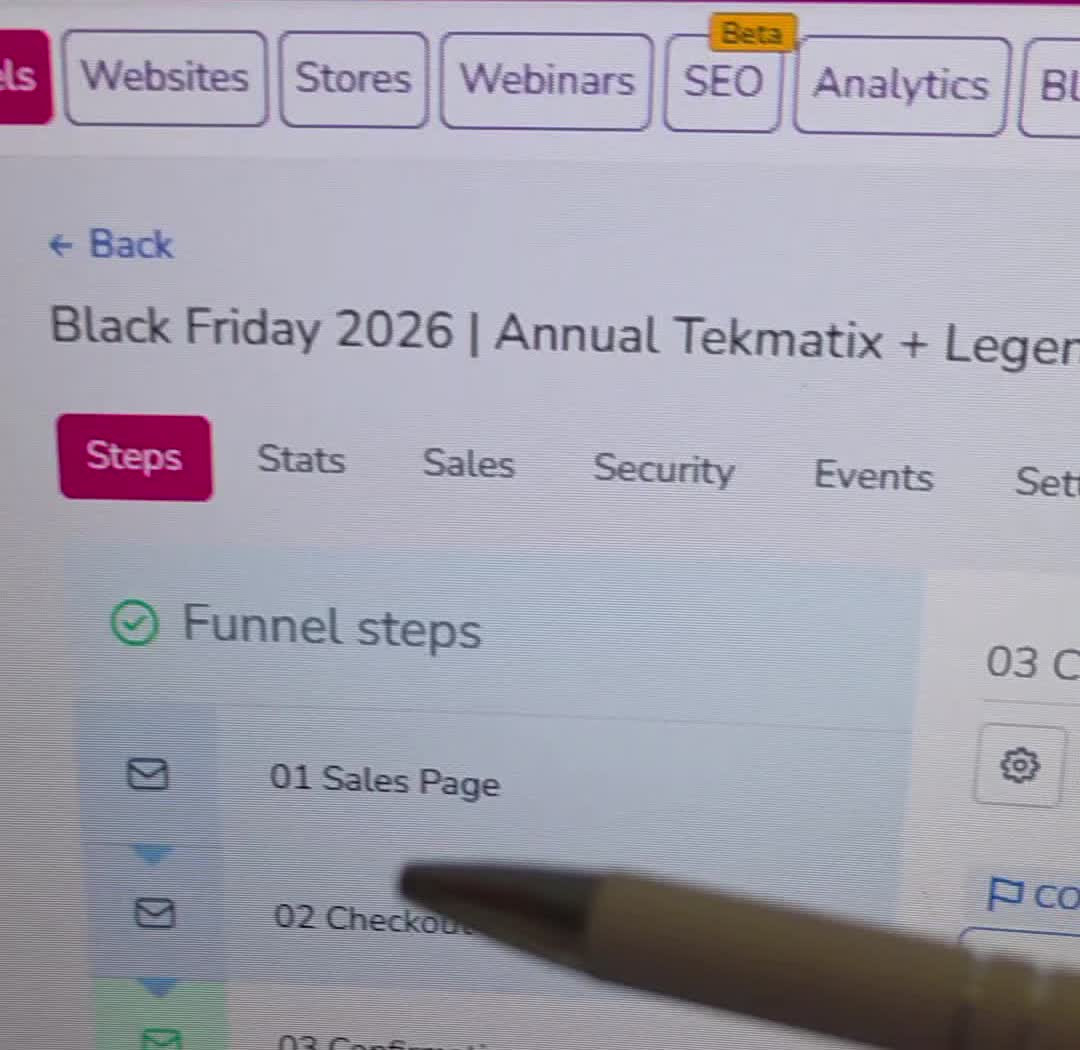
In Sites & Funnels, use the three-step template available in your Tekmatix account, such as “3 step funnel” or the standard three-page sales funnel template. Clone it, preserve the master and give your new funnel a clear offer-specific name.
Name the steps 01 Sales Page, 02 Checkout and 03 Confirmation. This makes the order obvious when you or your team comes back later. Ask the AI to check every inherited link, logo, page title and product so another business’s template details do not survive into your launch.
Step 4. Create the sales page as one branded HTML block
This is where you can save a lot of time. Ask your AI to create one complete HTML block for the sales page, styled to your brand guide. It should include the copy and responsive layout together, rather than giving you dozens of disconnected snippets to assemble.
Your page should answer: What is it? Who is it for? What result does it help them achieve? What is included? What does it cost? What happens after purchase? Why should they trust you? Use real evidence and address the objections your customers actually have.
The HTML should use styles scoped to its own wrapper so it does not change other parts of your site. Ask for clear headings, readable text, accessible buttons and a mobile layout. Every purchase button should link to the real checkout step. Terms and privacy links belong in the footer.
Create my complete sales page as one responsive HTML block using my brand guide. Include the offer, benefits, inclusions, transparent price and billing terms, genuine proof supplied by me, FAQs and footer policy links. Scope all CSS to the page wrapper. Point every purchase CTA to the verified checkout URL.
If your AI can edit the page through its connected tools, ask it to insert the block for you. If it cannot, it should give you the complete code and explain the exact supported next step. In the editor, use a Custom HTML/code element and paste the block once. Save and preview it on desktop and mobile.
Want the full build instructions?
The free prompt joins these steps into one task, including the workflows and test checks.
Step 5. Attach the product to the native checkout
Open the checkout step and add the correct payment product and price in that step’s Products settings. Then use Tekmatix’s native order form in the page editor. For a two-step order form, the first part captures the customer’s details and the second handles the payment.
The surrounding checkout copy can use a branded HTML block. The card collection and payment processing should remain in the native checkout element. Do not replace it with an AI-generated imitation payment form.
Check the displayed amount, currency, tax, trial and recurring terms against the actual product settings. Remove unnecessary shipping fields for a digital offer where the order form allows. Ensure a successful order moves to the confirmation step.
Step 6. Write a clear confirmation page
Tell your customer what to expect next: check their email, book their session, access their course or wait for onboarding. Include the correct support link and realistic delivery instructions.
A person loading this URL does not by itself prove a successful payment. Grant protected access through the verified payment and entitlement workflow. Keep passwords, private downloads and personal order details out of publicly accessible page code.
Step 7. Clone and customise the fulfilment workflow
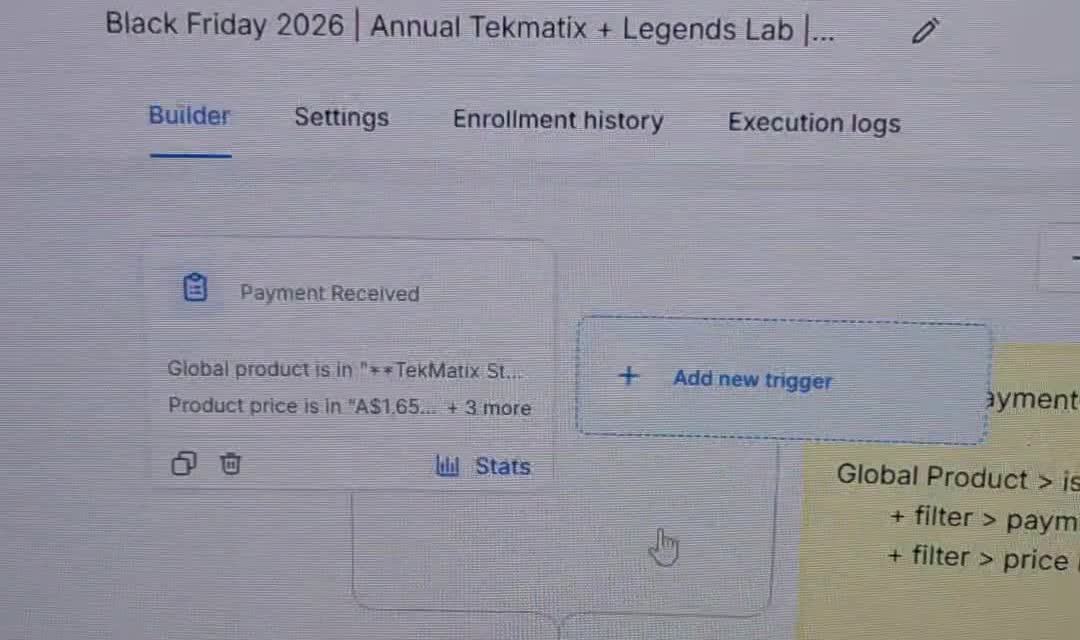
Clone the order fulfilment confirmation workflow template in your account. Rename the copy for this offer and leave the master intact. Configure its successful payment trigger for the correct product, price and funnel or other available offer-specific filters.
Fill in the email subject, sender, purchased item, delivery instructions and secure login or booking information. Use verified custom values and merge fields where needed, then make sure those values are populated. Do not leave “insert link here” in an email your customer will receive.
Include the native access grant where the purchase requires it, record the purchase and remove the buyer from that offer’s abandoned-cart recovery. Protect against duplicate fulfilment if the same successful event is processed again. Failed or unrelated payments must not grant access.
Step 8. Clone abandoned-cart recovery
Use the abandoned-cart workflow template appropriate to funnel order forms. Configure it for the specific funnel and checkout step. With a two-step order form, an opt-in submission can identify someone who entered their details but has not yet paid.
Add a wait, then check whether they bought before sending a reminder. Check again before every later reminder and stop recovery when a purchase is confirmed. A helpful sequence might start after an hour and follow up the next day, subject to your audience and consent settings.
Write a useful reminder with the correct checkout link and an invitation to ask a question. Respect email consent, unsubscribes and Do Not Disturb settings. Do not assume an ecommerce-store abandonment trigger applies to a sales funnel.
Step 9. Test the journey before publishing
Ask your AI to use your own email address and approved payment test mode. A real charge requires your explicit involvement; do not put live card details into the chat. Test the pages and the automation together, not just the appearance of the sales page.
- Every purchase button opens the correct checkout.
- The correct product, price and billing terms appear.
- A test purchase reaches the confirmation page.
- The fulfilment workflow enrols the test contact once and delivers the right access.
- The email actually arrives, its links work and no merge fields or placeholders are visible.
- An abandoned checkout can enter recovery, but a confirmed buyer does not keep receiving reminders.
- A failed payment does not trigger fulfilment.
- The page and checkout remain readable and usable on mobile.
Run an end-to-end test using my approved test email and payment test mode. Check the actual inbox and workflow execution logs. Report the URLs, product and price used, access granted, emails received and recovery stop behaviour. Keep anything that failed in draft and state the exact issue.
Once the checks pass, publish the pages and workflows you have approved, connect the correct domain and verify the public URLs. Ask for a completion report that distinguishes what was created, saved, published and tested.
Three offers you could launch with this approach
- Coach or consultant: a paid strategy session with a checkout, confirmation and booking instructions.
- Course creator: a live workshop or digital course with secure access and a welcome email.
- Service business: a clearly defined package with a payment step and an onboarding process.
For Black Friday, Christmas or a New Year promotion, use the same foundation and change the real offer details. Be clear about when the promotion ends, who qualifies and how bonuses are delivered.
Common questions
Can ChatGPT build the whole funnel for me?
It can create the copy, HTML and setup instructions. It can execute supported account actions when connected tools, permissions and browser capabilities allow. Ask it to identify limitations and verify the work rather than assuming every assistant can publish pages or edit workflows.
Does the prompt work with Claude and other AI assistants?
Yes, the written instructions can be used in other assistants. The ability to access your Tekmatix account and carry out each action depends on that assistant’s available integrations and remote browser support.
Can I create a sales page in minutes?
You can often generate the first copy and HTML quickly when your offer and brand are ready. The full launch also requires payment configuration, delivery, policies and testing. Timing varies with your account setup and the tools available; a generated page is not automatically a tested live funnel.
What if my AI cannot edit a page or workflow?
Ask it to explain the unavailable action and provide the complete code or configuration. Use a supported browser option where available, follow the guided manual steps, or get help from a Tekmatix Tekspert. Do not accept a claim that something is live without an actual verification.
What if the email or access does not arrive?
Check the trigger filters, contact enrolment and workflow execution logs. Verify the email sender, populated custom values, the correct native access grant and the contact’s consent and DND settings. Keep the launch in draft until the issue is fixed and retested.
Get the prompt and build your next offer
You have the idea. Give your AI a clear brief and use the full prompt to turn it into a connected customer journey.
Get my free AI sales funnel prompt
Send me the complete funnel-builder prompt to use in my own AI. Enter just your first name and email on the opt-in page.
Open the free prompt opt-in page to enter your first name and email. Your complete prompt and this guide will be emailed to you.
Want a hand getting it live?
Already using Tekmatix? Explore our sales funnel setup service or book time with a Tekspert. If you are exploring Tekmatix, book a demo to see how it fits your business. You can also join free daily training.

Latest Blog Posts
Create a Sales Page and Funnel with ChatGPT in Tekmatix
You can use ChatGPT or Claude to help create a branded sales page and a complete three-step funnel in Tekmatix. Give your AI the offer, your brand guide and the free funnel-builder prompt linked below. When your AI has supported account tools and the right permissions, it can also carry out the setup in your account.
That means your next workshop, course, service or seasonal offer can move from an idea to a working sales journey much faster. The prompt covers the sales page, native checkout, confirmation page, fulfilment emails, abandoned-cart recovery and testing. You bring the offer and make the business decisions. Your AI handles the build wherever its connected tools allow.
Get the full AI funnel-builder prompt for free
Copy it into your own AI and use it to build your sales page, checkout and confirmation journey. Start with ChatGPT or Claude; other assistants can use the instructions too, with account actions depending on their available tools.
Email me the free funnel-builder prompt
Get the full prompt to add into your own AI. We will email the complete prompt, plus a link back to this guide.
Watch the quick overview
In this 97-second video, I show the prompt and the parts of a Tekmatix funnel using a Black Friday offer as an example. The written steps below take you through the setup in more detail. The example is a demonstration of the process, rather than a checkout link for that offer.
What are you actually building?
A sales page explains your offer. A sales funnel connects that explanation to a purchase and then tells your customer what happens next. I recommend a simple three-step structure:
| Step | Purpose | What belongs here |
|---|---|---|
| 01 Sales Page | Help someone decide | Who it is for, the result, inclusions, price, genuine proof, FAQs and purchase buttons |
| 02 Checkout | Take the order | The existing payment product and Tekmatix’s native order form |
| 03 Confirmation | Explain the next step | Order acknowledgement, access or booking instructions and support |
Behind those pages, a fulfilment workflow delivers the purchase after the correct successful payment event. A separate recovery workflow can remind eligible people who entered their details but did not complete their purchase.
Before you begin: give your AI a useful brief
You do not need to know every button in the software. You do need to know what you are selling. Have these details ready:
- Your account: the exact Tekmatix business and sub-account the AI should use.
- Your offer: name, audience, main result, inclusions, exclusions and how it is delivered.
- Your pricing: currency, tax treatment, one-off or recurring billing, any trial and renewal terms. Identify the existing product if it is already in Payments.
- Your brand: logo, colour codes, fonts, approved images and tone of voice.
- Your practical links: domain, privacy policy, terms, refund information where relevant and support details.
- Your delivery details: course or offer to grant, download, booking link, or the secure process for creating account access.
- Your test: your own email address, access to that inbox and permission to use payment test mode.
Example offer brief
“Build a funnel for my live workshop, Launch Your First Online Course. It is for coaches and consultants who have an idea but need a clear launch plan. The price is AUD $99, paid once. It includes a two-hour live session and a workbook. Reuse my existing workshop product in Payments. Use my brand guide, link my current terms and privacy policy, and send the booking information after successful payment. Use my own email for testing and keep it in draft until the full journey passes.”
For a Black Friday campaign, add the real offer end date, timezone, eligible products, bonus delivery and any genuine limits. Do not ask AI to invent savings, testimonials or scarcity.
Step 1. Get the prompt and connect your AI
Request the free funnel-builder prompt here, then copy the entire prompt from your email into ChatGPT or Claude. Add your offer brief in the same conversation.
Ask the AI to identify the tools it can actually use. A supported Tekmatix MCP connection gives an assistant access to permitted account actions. Page editing or workflow editing may require a supported remote browser when those actions are not exposed by the connection. Availability depends on your AI, account and permissions.
Use a secure sign-in or account-connection process. Keep passwords and authentication codes out of the chat. Start with a read-only check: ask the AI to confirm your business name, the correct sub-account and the existing product or template it found. If the wrong account appears, stop before any edits.
For the connection walkthrough, see how to connect ChatGPT to Tekmatix. Give only the permissions the task needs. When you no longer want the connection, remove it from your AI’s connected apps and revoke the associated account access or token.
Before making changes, confirm the exact Tekmatix sub-account, list the tools you can use, and find my existing payment product and three-step funnel template. Tell me what requires browser access. Do not claim an action is complete unless you can verify it.
Step 2. Find or create the product in Payments
The payment product comes before the checkout setup. Ask your AI to search Payments for the existing offer and verify its price, currency and billing terms. Reuse the correct product and price instead of creating duplicates.
If there is no suitable product, provide the details needed to create one. Check every billing setting carefully, particularly subscriptions, trial periods and renewal amounts. A page that says “one-off” must not lead to a recurring payment product.
For a digital course or membership, also identify the native offer or access action that delivers the entitlement. A public confirmation page is not a secure way to grant paid access.
Step 3. Clone the three-step funnel template
In Sites & Funnels, use the three-step template available in your Tekmatix account, such as “3 step funnel” or the standard three-page sales funnel template. Clone it, preserve the master and give your new funnel a clear offer-specific name.
Name the steps 01 Sales Page, 02 Checkout and 03 Confirmation. This makes the order obvious when you or your team comes back later. Ask the AI to check every inherited link, logo, page title and product so another business’s template details do not survive into your launch.
Step 4. Create the sales page as one branded HTML block
This is where you can save a lot of time. Ask your AI to create one complete HTML block for the sales page, styled to your brand guide. It should include the copy and responsive layout together, rather than giving you dozens of disconnected snippets to assemble.
Your page should answer: What is it? Who is it for? What result does it help them achieve? What is included? What does it cost? What happens after purchase? Why should they trust you? Use real evidence and address the objections your customers actually have.
The HTML should use styles scoped to its own wrapper so it does not change other parts of your site. Ask for clear headings, readable text, accessible buttons and a mobile layout. Every purchase button should link to the real checkout step. Terms and privacy links belong in the footer.
Create my complete sales page as one responsive HTML block using my brand guide. Include the offer, benefits, inclusions, transparent price and billing terms, genuine proof supplied by me, FAQs and footer policy links. Scope all CSS to the page wrapper. Point every purchase CTA to the verified checkout URL.
If your AI can edit the page through its connected tools, ask it to insert the block for you. If it cannot, it should give you the complete code and explain the exact supported next step. In the editor, use a Custom HTML/code element and paste the block once. Save and preview it on desktop and mobile.
Want the full build instructions?
The free prompt joins these steps into one task, including the workflows and test checks.
Step 5. Attach the product to the native checkout
Open the checkout step and add the correct payment product and price in that step’s Products settings. Then use Tekmatix’s native order form in the page editor. For a two-step order form, the first part captures the customer’s details and the second handles the payment.
The surrounding checkout copy can use a branded HTML block. The card collection and payment processing should remain in the native checkout element. Do not replace it with an AI-generated imitation payment form.
Check the displayed amount, currency, tax, trial and recurring terms against the actual product settings. Remove unnecessary shipping fields for a digital offer where the order form allows. Ensure a successful order moves to the confirmation step.
Step 6. Write a clear confirmation page
Tell your customer what to expect next: check their email, book their session, access their course or wait for onboarding. Include the correct support link and realistic delivery instructions.
A person loading this URL does not by itself prove a successful payment. Grant protected access through the verified payment and entitlement workflow. Keep passwords, private downloads and personal order details out of publicly accessible page code.
Step 7. Clone and customise the fulfilment workflow
Clone the order fulfilment confirmation workflow template in your account. Rename the copy for this offer and leave the master intact. Configure its successful payment trigger for the correct product, price and funnel or other available offer-specific filters.
Fill in the email subject, sender, purchased item, delivery instructions and secure login or booking information. Use verified custom values and merge fields where needed, then make sure those values are populated. Do not leave “insert link here” in an email your customer will receive.
Include the native access grant where the purchase requires it, record the purchase and remove the buyer from that offer’s abandoned-cart recovery. Protect against duplicate fulfilment if the same successful event is processed again. Failed or unrelated payments must not grant access.
Step 8. Clone abandoned-cart recovery
Use the abandoned-cart workflow template appropriate to funnel order forms. Configure it for the specific funnel and checkout step. With a two-step order form, an opt-in submission can identify someone who entered their details but has not yet paid.
Add a wait, then check whether they bought before sending a reminder. Check again before every later reminder and stop recovery when a purchase is confirmed. A helpful sequence might start after an hour and follow up the next day, subject to your audience and consent settings.
Write a useful reminder with the correct checkout link and an invitation to ask a question. Respect email consent, unsubscribes and Do Not Disturb settings. Do not assume an ecommerce-store abandonment trigger applies to a sales funnel.
Step 9. Test the journey before publishing
Ask your AI to use your own email address and approved payment test mode. A real charge requires your explicit involvement; do not put live card details into the chat. Test the pages and the automation together, not just the appearance of the sales page.
- Every purchase button opens the correct checkout.
- The correct product, price and billing terms appear.
- A test purchase reaches the confirmation page.
- The fulfilment workflow enrols the test contact once and delivers the right access.
- The email actually arrives, its links work and no merge fields or placeholders are visible.
- An abandoned checkout can enter recovery, but a confirmed buyer does not keep receiving reminders.
- A failed payment does not trigger fulfilment.
- The page and checkout remain readable and usable on mobile.
Run an end-to-end test using my approved test email and payment test mode. Check the actual inbox and workflow execution logs. Report the URLs, product and price used, access granted, emails received and recovery stop behaviour. Keep anything that failed in draft and state the exact issue.
Once the checks pass, publish the pages and workflows you have approved, connect the correct domain and verify the public URLs. Ask for a completion report that distinguishes what was created, saved, published and tested.
Three offers you could launch with this approach
- Coach or consultant: a paid strategy session with a checkout, confirmation and booking instructions.
- Course creator: a live workshop or digital course with secure access and a welcome email.
- Service business: a clearly defined package with a payment step and an onboarding process.
For Black Friday, Christmas or a New Year promotion, use the same foundation and change the real offer details. Be clear about when the promotion ends, who qualifies and how bonuses are delivered.
Common questions
Can ChatGPT build the whole funnel for me?
It can create the copy, HTML and setup instructions. It can execute supported account actions when connected tools, permissions and browser capabilities allow. Ask it to identify limitations and verify the work rather than assuming every assistant can publish pages or edit workflows.
Does the prompt work with Claude and other AI assistants?
Yes, the written instructions can be used in other assistants. The ability to access your Tekmatix account and carry out each action depends on that assistant’s available integrations and remote browser support.
Can I create a sales page in minutes?
You can often generate the first copy and HTML quickly when your offer and brand are ready. The full launch also requires payment configuration, delivery, policies and testing. Timing varies with your account setup and the tools available; a generated page is not automatically a tested live funnel.
What if my AI cannot edit a page or workflow?
Ask it to explain the unavailable action and provide the complete code or configuration. Use a supported browser option where available, follow the guided manual steps, or get help from a Tekmatix Tekspert. Do not accept a claim that something is live without an actual verification.
What if the email or access does not arrive?
Check the trigger filters, contact enrolment and workflow execution logs. Verify the email sender, populated custom values, the correct native access grant and the contact’s consent and DND settings. Keep the launch in draft until the issue is fixed and retested.
Get the prompt and build your next offer
You have the idea. Give your AI a clear brief and use the full prompt to turn it into a connected customer journey.
Get my free AI sales funnel prompt
Send me the complete funnel-builder prompt to use in my own AI. Enter just your first name and email on the opt-in page.
Open the free prompt opt-in page to enter your first name and email. Your complete prompt and this guide will be emailed to you.
Want a hand getting it live?
Already using Tekmatix? Explore our sales funnel setup service or book time with a Tekspert. If you are exploring Tekmatix, book a demo to see how it fits your business. You can also join free daily training.