
Tekmatix Help Articles

Love your help


Use the search bar below to find help guides and articles for using Tekmatix

Use the search bar below to look for help articles you need.

New SEO Subscription Management Improvements in Tekmatix

New SEO Subscription Management Improvements in Tekmatix

June 14, 20261 min read

📝 Overview

We've improved SEO subscription management with a more guided cancellation experience and better visibility into subscription changes.

This update replaces the previous one-click unsubscribe process with a structured Manage Subscription workflow, giving users greater control over their SEO settings and subscription preferences before cancelling.

🆕 What's Improved

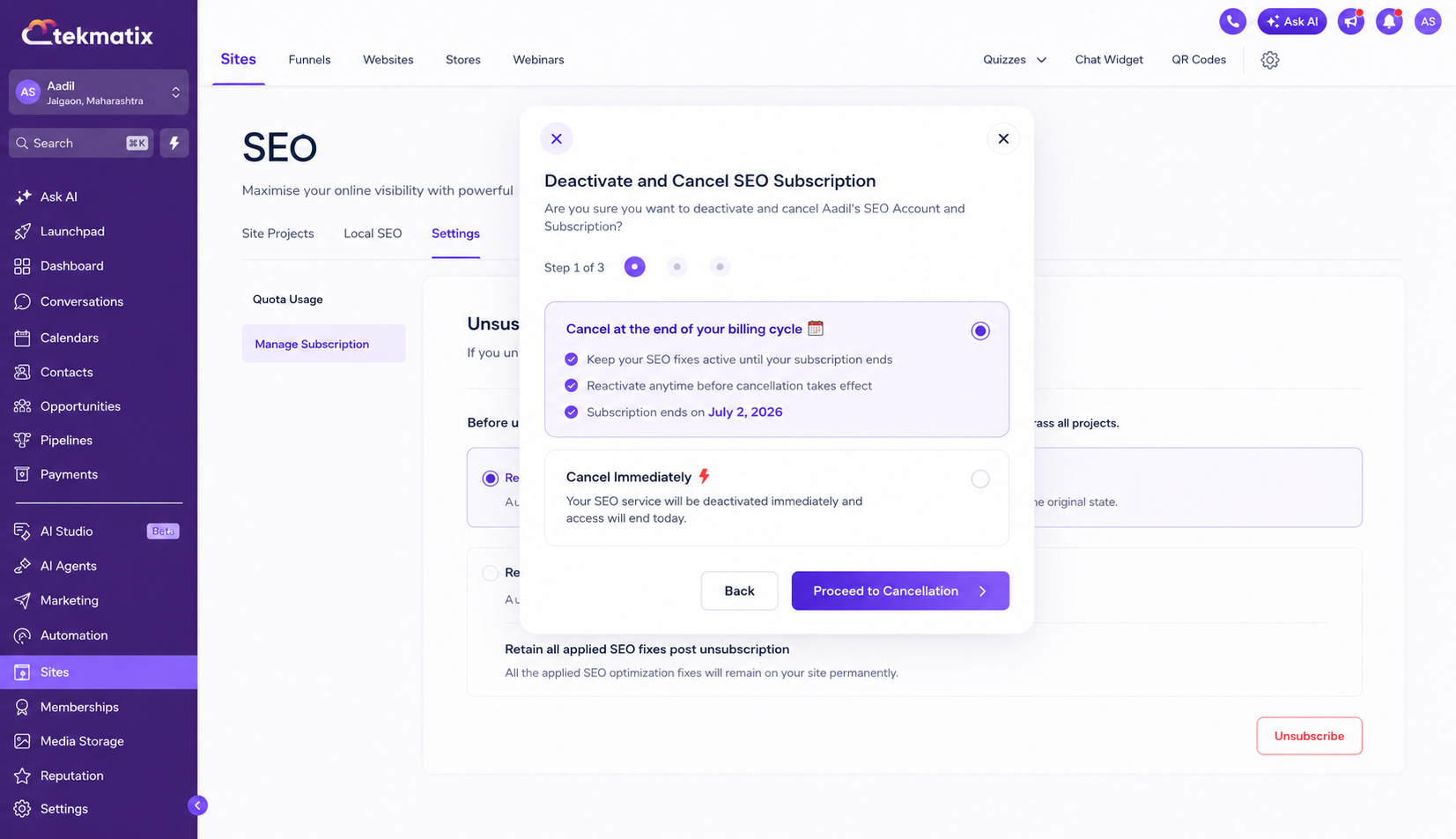
  • Cancellation now happens through a guided Manage Subscription flow instead of a single unsubscribe action.

  • Before cancelling, users can choose whether to keep their SEO fixes or revert them.

  • Users can now choose to cancel immediately or schedule cancellation at the end of their current billing cycle.

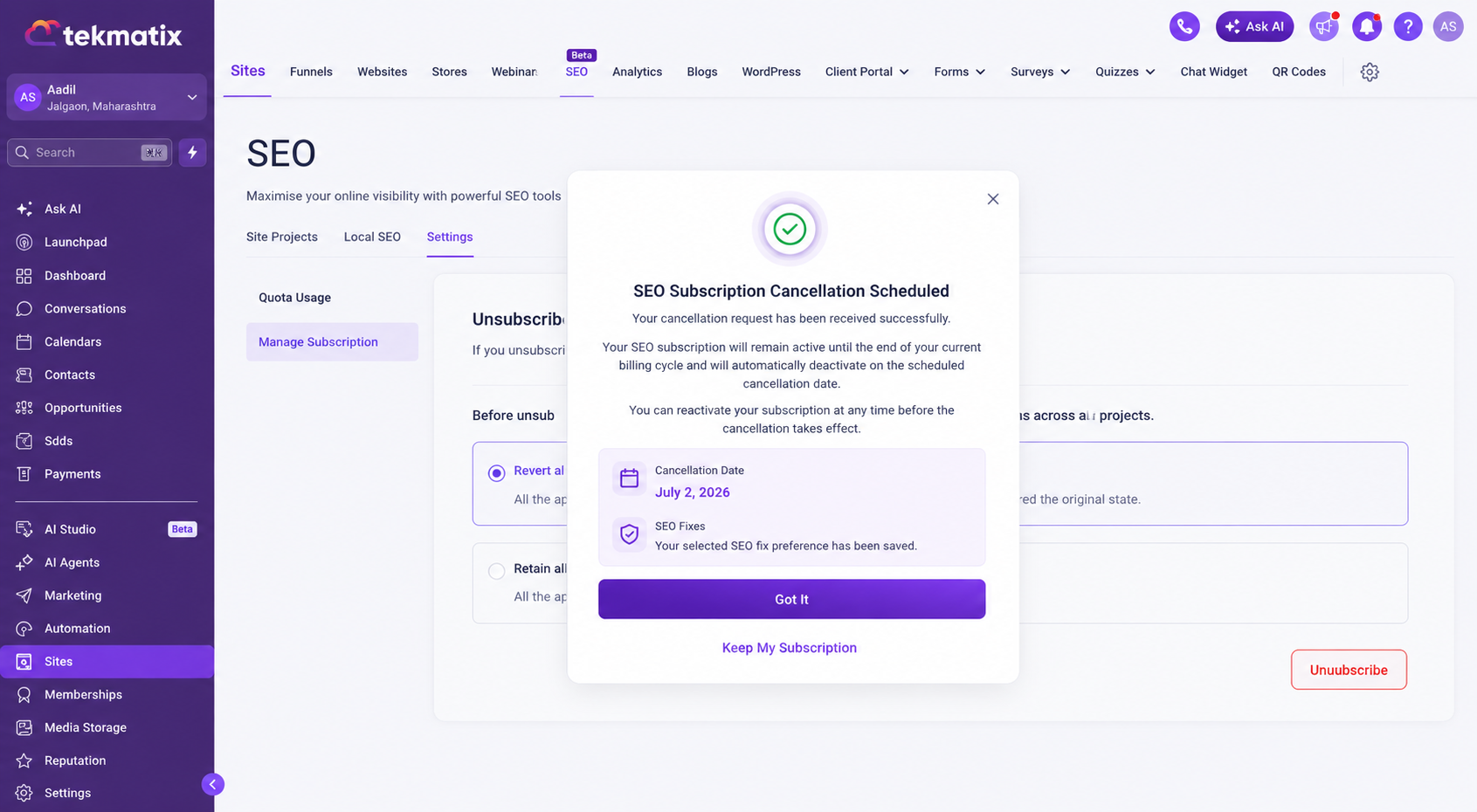
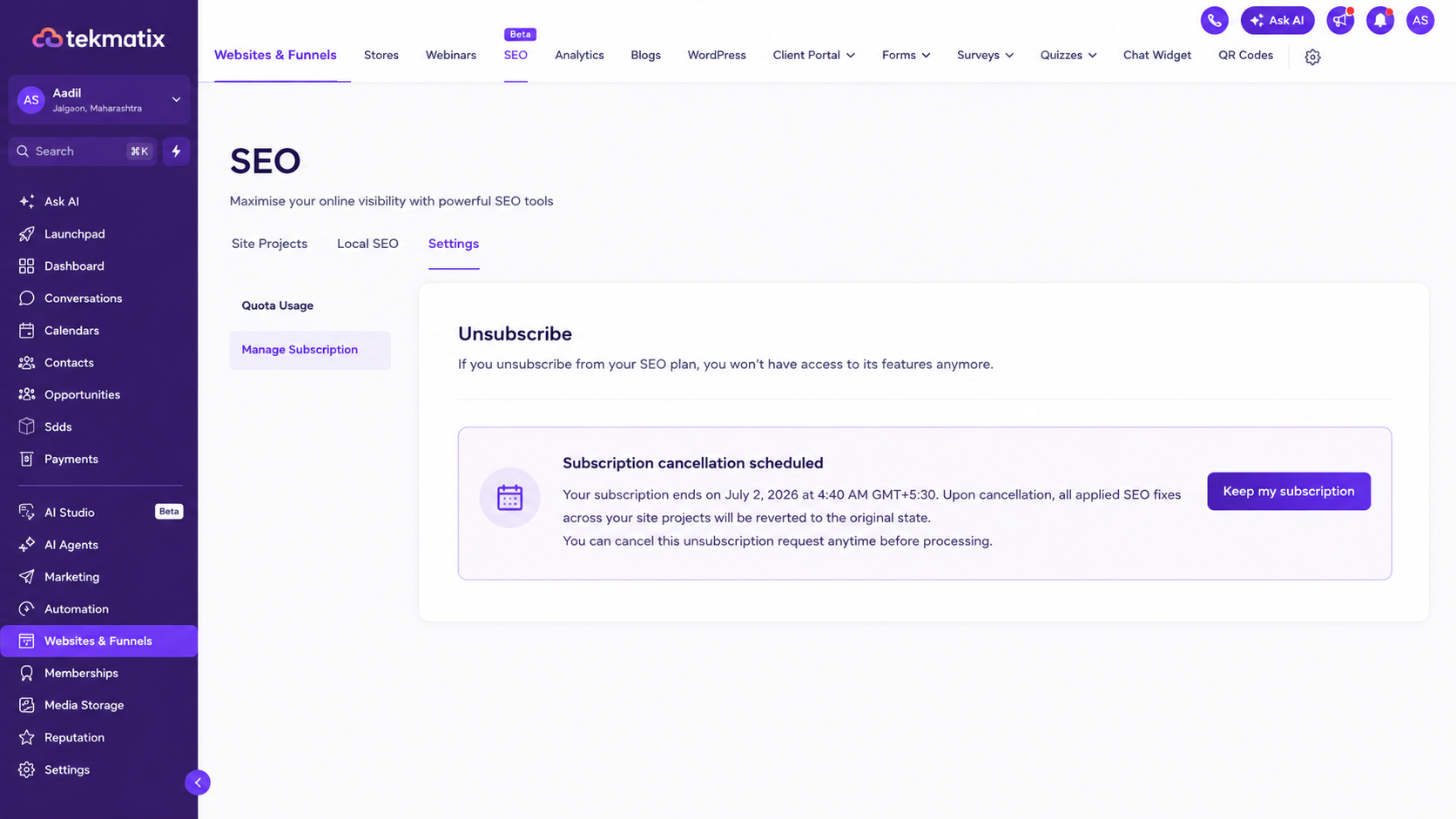
  • Scheduled cancellations can be revoked directly within the platform using the Keep My Subscription option.

  • Subscription changes are now tracked more clearly behind the scenes for improved visibility and consistency.

🔍 How to Access

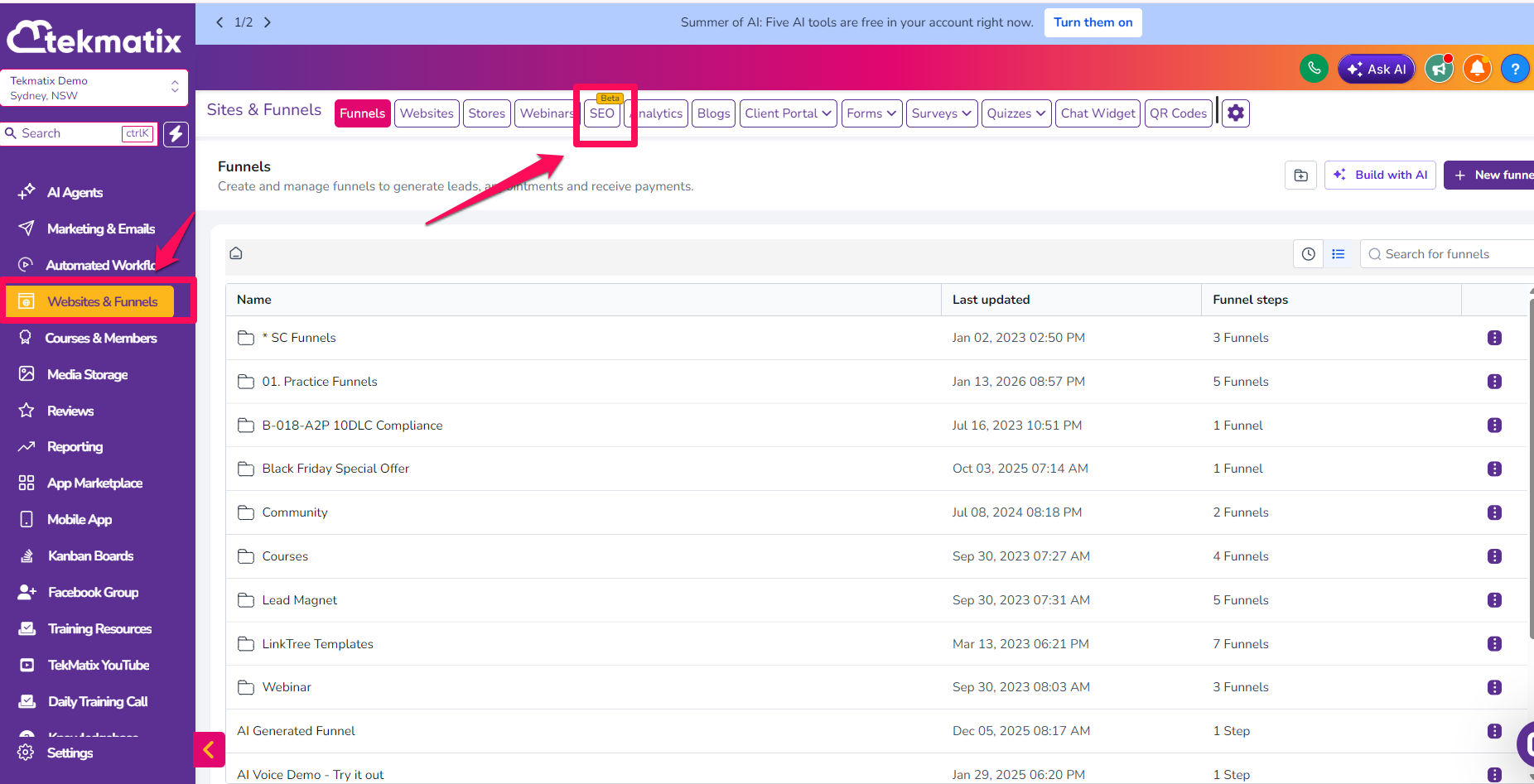
  1. Navigate to SEO

  2. Open Settings

  3. Click Manage Subscription

  4. Follow the cancellation workflow to choose whether to keep or discard your SEO fixes, then either cancel immediately or schedule your cancellation.

🎯 Why It Matters

  • Gives users greater control over their SEO work before cancelling.

  • Makes the cancellation process clearer and more predictable.

  • Allows users to reverse a scheduled cancellation without contacting support.

  • Creates a more seamless and consistent subscription management experience within TekMatix.
SEOSEO SubscriptionSubscription ManagementManage SubscriptionSEO SettingsCancellation FlowScheduled CancellationSEO FixesTekMatix UpdatesPlatform UpdatesSubscription ControlSEO ToolsUser ExperienceFeature UpdateTekMatix
Back to Blog

Latest Blog Posts

New SEO Subscription Management Improvements in Tekmatix

New SEO Subscription Management Improvements in Tekmatix

June 14, 20261 min read

📝 Overview

We've improved SEO subscription management with a more guided cancellation experience and better visibility into subscription changes.

This update replaces the previous one-click unsubscribe process with a structured Manage Subscription workflow, giving users greater control over their SEO settings and subscription preferences before cancelling.

🆕 What's Improved

  • Cancellation now happens through a guided Manage Subscription flow instead of a single unsubscribe action.

  • Before cancelling, users can choose whether to keep their SEO fixes or revert them.

  • Users can now choose to cancel immediately or schedule cancellation at the end of their current billing cycle.

  • Scheduled cancellations can be revoked directly within the platform using the Keep My Subscription option.

  • Subscription changes are now tracked more clearly behind the scenes for improved visibility and consistency.

🔍 How to Access

  1. Navigate to SEO

  2. Open Settings

  3. Click Manage Subscription

  4. Follow the cancellation workflow to choose whether to keep or discard your SEO fixes, then either cancel immediately or schedule your cancellation.

🎯 Why It Matters

  • Gives users greater control over their SEO work before cancelling.

  • Makes the cancellation process clearer and more predictable.

  • Allows users to reverse a scheduled cancellation without contacting support.

  • Creates a more seamless and consistent subscription management experience within TekMatix.
SEOSEO SubscriptionSubscription ManagementManage SubscriptionSEO SettingsCancellation FlowScheduled CancellationSEO FixesTekMatix UpdatesPlatform UpdatesSubscription ControlSEO ToolsUser ExperienceFeature UpdateTekMatix
Back to Blog

Marketing

New SEO Subscription Management Improvements in Tekmatix

New SEO Subscription Management Improvements in Tekmatix

June 14, 20261 min read

📝 Overview

We've improved SEO subscription management with a more guided cancellation experience and better visibility into subscription changes.

This update replaces the previous one-click unsubscribe process with a structured Manage Subscription workflow, giving users greater control over their SEO settings and subscription preferences before cancelling.

🆕 What's Improved

  • Cancellation now happens through a guided Manage Subscription flow instead of a single unsubscribe action.

  • Before cancelling, users can choose whether to keep their SEO fixes or revert them.

  • Users can now choose to cancel immediately or schedule cancellation at the end of their current billing cycle.

  • Scheduled cancellations can be revoked directly within the platform using the Keep My Subscription option.

  • Subscription changes are now tracked more clearly behind the scenes for improved visibility and consistency.

🔍 How to Access

  1. Navigate to SEO

  2. Open Settings

  3. Click Manage Subscription

  4. Follow the cancellation workflow to choose whether to keep or discard your SEO fixes, then either cancel immediately or schedule your cancellation.

🎯 Why It Matters

  • Gives users greater control over their SEO work before cancelling.

  • Makes the cancellation process clearer and more predictable.

  • Allows users to reverse a scheduled cancellation without contacting support.

  • Creates a more seamless and consistent subscription management experience within TekMatix.
SEOSEO SubscriptionSubscription ManagementManage SubscriptionSEO SettingsCancellation FlowScheduled CancellationSEO FixesTekMatix UpdatesPlatform UpdatesSubscription ControlSEO ToolsUser ExperienceFeature UpdateTekMatix
Back to Blog
New SEO Subscription Management Improvements in Tekmatix

New SEO Subscription Management Improvements in Tekmatix

June 14, 20261 min read

📝 Overview

We've improved SEO subscription management with a more guided cancellation experience and better visibility into subscription changes.

This update replaces the previous one-click unsubscribe process with a structured Manage Subscription workflow, giving users greater control over their SEO settings and subscription preferences before cancelling.

🆕 What's Improved

  • Cancellation now happens through a guided Manage Subscription flow instead of a single unsubscribe action.

  • Before cancelling, users can choose whether to keep their SEO fixes or revert them.

  • Users can now choose to cancel immediately or schedule cancellation at the end of their current billing cycle.

  • Scheduled cancellations can be revoked directly within the platform using the Keep My Subscription option.

  • Subscription changes are now tracked more clearly behind the scenes for improved visibility and consistency.

🔍 How to Access

  1. Navigate to SEO

  2. Open Settings

  3. Click Manage Subscription

  4. Follow the cancellation workflow to choose whether to keep or discard your SEO fixes, then either cancel immediately or schedule your cancellation.

🎯 Why It Matters

  • Gives users greater control over their SEO work before cancelling.

  • Makes the cancellation process clearer and more predictable.

  • Allows users to reverse a scheduled cancellation without contacting support.

  • Creates a more seamless and consistent subscription management experience within TekMatix.
SEOSEO SubscriptionSubscription ManagementManage SubscriptionSEO SettingsCancellation FlowScheduled CancellationSEO FixesTekMatix UpdatesPlatform UpdatesSubscription ControlSEO ToolsUser ExperienceFeature UpdateTekMatix
Back to Blog

CRM

New SEO Subscription Management Improvements in Tekmatix

New SEO Subscription Management Improvements in Tekmatix

June 14, 20261 min read

📝 Overview

We've improved SEO subscription management with a more guided cancellation experience and better visibility into subscription changes.

This update replaces the previous one-click unsubscribe process with a structured Manage Subscription workflow, giving users greater control over their SEO settings and subscription preferences before cancelling.

🆕 What's Improved

  • Cancellation now happens through a guided Manage Subscription flow instead of a single unsubscribe action.

  • Before cancelling, users can choose whether to keep their SEO fixes or revert them.

  • Users can now choose to cancel immediately or schedule cancellation at the end of their current billing cycle.

  • Scheduled cancellations can be revoked directly within the platform using the Keep My Subscription option.

  • Subscription changes are now tracked more clearly behind the scenes for improved visibility and consistency.

🔍 How to Access

  1. Navigate to SEO

  2. Open Settings

  3. Click Manage Subscription

  4. Follow the cancellation workflow to choose whether to keep or discard your SEO fixes, then either cancel immediately or schedule your cancellation.

🎯 Why It Matters

  • Gives users greater control over their SEO work before cancelling.

  • Makes the cancellation process clearer and more predictable.

  • Allows users to reverse a scheduled cancellation without contacting support.

  • Creates a more seamless and consistent subscription management experience within TekMatix.

SEOSEO SubscriptionSubscription ManagementManage SubscriptionSEO SettingsCancellation FlowScheduled CancellationSEO FixesTekMatix UpdatesPlatform UpdatesSubscription ControlSEO ToolsUser ExperienceFeature UpdateTekMatix
Back to Blog
New SEO Subscription Management Improvements in Tekmatix

New SEO Subscription Management Improvements in Tekmatix

June 14, 20261 min read

📝 Overview

We've improved SEO subscription management with a more guided cancellation experience and better visibility into subscription changes.

This update replaces the previous one-click unsubscribe process with a structured Manage Subscription workflow, giving users greater control over their SEO settings and subscription preferences before cancelling.

🆕 What's Improved

  • Cancellation now happens through a guided Manage Subscription flow instead of a single unsubscribe action.

  • Before cancelling, users can choose whether to keep their SEO fixes or revert them.

  • Users can now choose to cancel immediately or schedule cancellation at the end of their current billing cycle.

  • Scheduled cancellations can be revoked directly within the platform using the Keep My Subscription option.

  • Subscription changes are now tracked more clearly behind the scenes for improved visibility and consistency.

🔍 How to Access

  1. Navigate to SEO

  2. Open Settings

  3. Click Manage Subscription

  4. Follow the cancellation workflow to choose whether to keep or discard your SEO fixes, then either cancel immediately or schedule your cancellation.

🎯 Why It Matters

  • Gives users greater control over their SEO work before cancelling.

  • Makes the cancellation process clearer and more predictable.

  • Allows users to reverse a scheduled cancellation without contacting support.

  • Creates a more seamless and consistent subscription management experience within TekMatix.

SEOSEO SubscriptionSubscription ManagementManage SubscriptionSEO SettingsCancellation FlowScheduled CancellationSEO FixesTekMatix UpdatesPlatform UpdatesSubscription ControlSEO ToolsUser ExperienceFeature UpdateTekMatix
Back to Blog

Join The TekMatix Newsletter

Get sent regular tech and business growth tips.

Web Design

New SEO Subscription Management Improvements in Tekmatix

New SEO Subscription Management Improvements in Tekmatix

June 14, 20261 min read

📝 Overview

We've improved SEO subscription management with a more guided cancellation experience and better visibility into subscription changes.

This update replaces the previous one-click unsubscribe process with a structured Manage Subscription workflow, giving users greater control over their SEO settings and subscription preferences before cancelling.

🆕 What's Improved

  • Cancellation now happens through a guided Manage Subscription flow instead of a single unsubscribe action.

  • Before cancelling, users can choose whether to keep their SEO fixes or revert them.

  • Users can now choose to cancel immediately or schedule cancellation at the end of their current billing cycle.

  • Scheduled cancellations can be revoked directly within the platform using the Keep My Subscription option.

  • Subscription changes are now tracked more clearly behind the scenes for improved visibility and consistency.

🔍 How to Access

  1. Navigate to SEO

  2. Open Settings

  3. Click Manage Subscription

  4. Follow the cancellation workflow to choose whether to keep or discard your SEO fixes, then either cancel immediately or schedule your cancellation.

🎯 Why It Matters

  • Gives users greater control over their SEO work before cancelling.

  • Makes the cancellation process clearer and more predictable.

  • Allows users to reverse a scheduled cancellation without contacting support.

  • Creates a more seamless and consistent subscription management experience within TekMatix.

SEOSEO SubscriptionSubscription ManagementManage SubscriptionSEO SettingsCancellation FlowScheduled CancellationSEO FixesTekMatix UpdatesPlatform UpdatesSubscription ControlSEO ToolsUser ExperienceFeature UpdateTekMatix
Back to Blog
New SEO Subscription Management Improvements in Tekmatix

New SEO Subscription Management Improvements in Tekmatix

June 14, 20261 min read

📝 Overview

We've improved SEO subscription management with a more guided cancellation experience and better visibility into subscription changes.

This update replaces the previous one-click unsubscribe process with a structured Manage Subscription workflow, giving users greater control over their SEO settings and subscription preferences before cancelling.

🆕 What's Improved

  • Cancellation now happens through a guided Manage Subscription flow instead of a single unsubscribe action.

  • Before cancelling, users can choose whether to keep their SEO fixes or revert them.

  • Users can now choose to cancel immediately or schedule cancellation at the end of their current billing cycle.

  • Scheduled cancellations can be revoked directly within the platform using the Keep My Subscription option.

  • Subscription changes are now tracked more clearly behind the scenes for improved visibility and consistency.

🔍 How to Access

  1. Navigate to SEO

  2. Open Settings

  3. Click Manage Subscription

  4. Follow the cancellation workflow to choose whether to keep or discard your SEO fixes, then either cancel immediately or schedule your cancellation.

🎯 Why It Matters

  • Gives users greater control over their SEO work before cancelling.

  • Makes the cancellation process clearer and more predictable.

  • Allows users to reverse a scheduled cancellation without contacting support.

  • Creates a more seamless and consistent subscription management experience within TekMatix.

SEOSEO SubscriptionSubscription ManagementManage SubscriptionSEO SettingsCancellation FlowScheduled CancellationSEO FixesTekMatix UpdatesPlatform UpdatesSubscription ControlSEO ToolsUser ExperienceFeature UpdateTekMatix
Back to Blog

© TekMatix 2026

© TekMatix 2025