

Tekmatix Help Articles
Love your help
Use the search bar below to find help guides and articles for using Tekmatix
Use the search bar below to look for help articles you need.
How to Automate Your Deals and Internal Tasks in Tekmatix Without Needing a Contact
Not every job in your business starts with a customer record. A deal comes in from a partner before you know who the buyer is. Your team finishes an internal task and the next person needs to pick it up. Until now, you had to create or link a dummy contact before your automations would touch it.
Not any more. In Tekmatix, opportunities and tasks can now go into a workflow on their own, even when there is no contact attached. Tell your AI what should happen next. Make a cuppa. Done.
What is new
- Opportunities without a contact: start a workflow when an opportunity is created, changes, moves stage, changes status or goes stale.
- Tasks without a contact: use task triggers such as Task added, Task completed and Task reminder for internal tasks.
- Opportunity date reminders: use Custom date reminder with an opportunity date field to start a workflow from a date stored on the deal, such as a contract renewal or proposal expiry date.
What AI should I use?
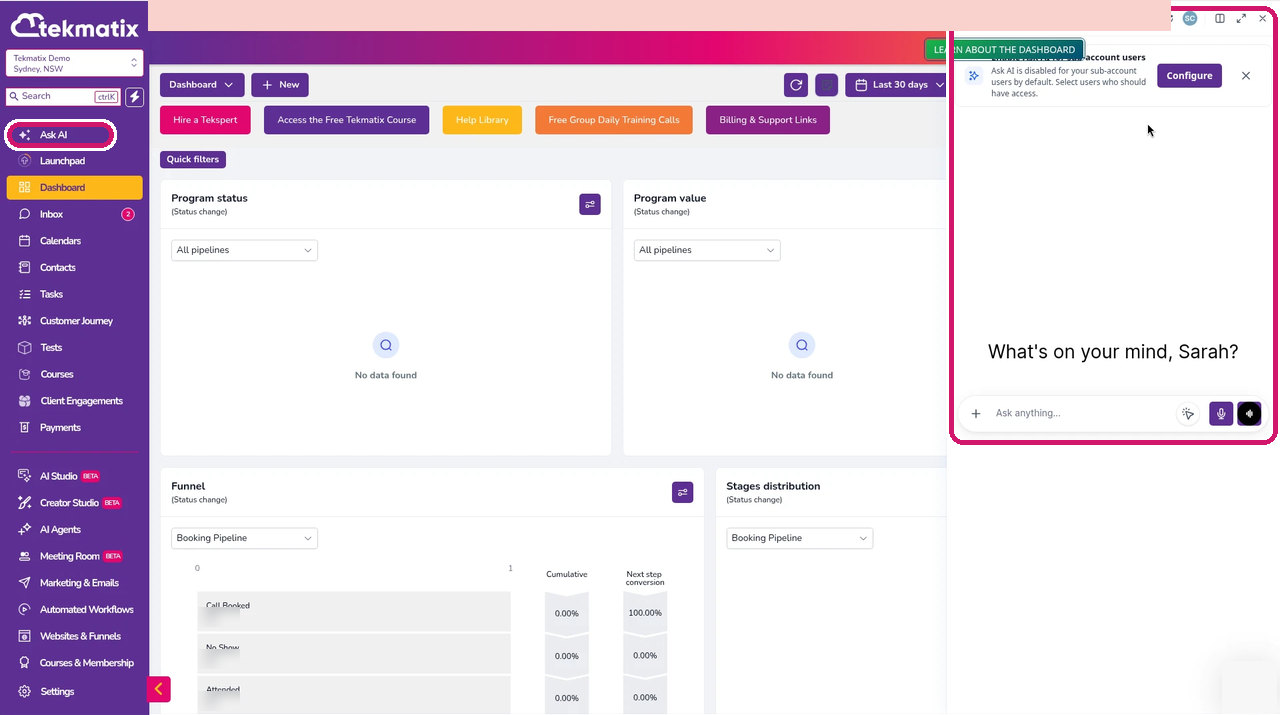
The prompts below should work in Ask AI, Claude, ChatGPT, GrokBot or any other AI you use. If you don't already pay for an external AI and don't want another subscription, start with Ask AI, built right into your Tekmatix dashboard. Click the sparkle icon at the top right of your dashboard (or Ask AI in the sidebar) to open it.
One honest note: Ask AI can read your workflows but can't build them yet. To have AI build the workflow for you, use your own AI (Claude, ChatGPT or GrokBot) with browser control connected to your Tekmatix account, and review it before you publish. Ask AI is perfect for checking which deals and tasks are sitting still.
*Tekmatix AI usage applies as a billable consumable. You can find out more about pricing on our public page: tekmatix.com/pricing.
How to set it up yourself
-
Go to Automated Workflows in the sidebar, then click Create workflow or open an existing workflow.
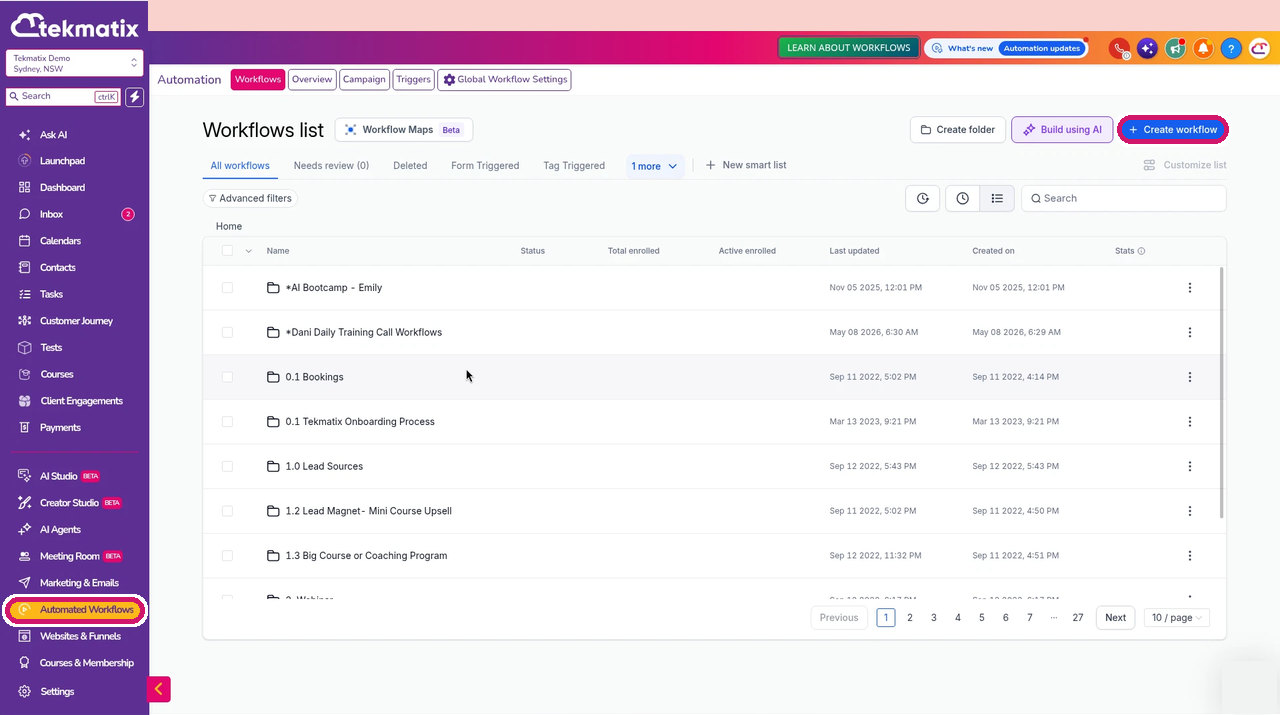
How to Find Workflows in Your Tekmatix Account -
Click Add trigger and search for opportunity. Choose the trigger you need, such as Opportunity created, Opportunity changed, Pipeline stage changed, Opportunity status changed or Stale opportunities, and add any filters you need. If you have renamed opportunities in your account (our demo account calls them Programs), the triggers use your name for them.
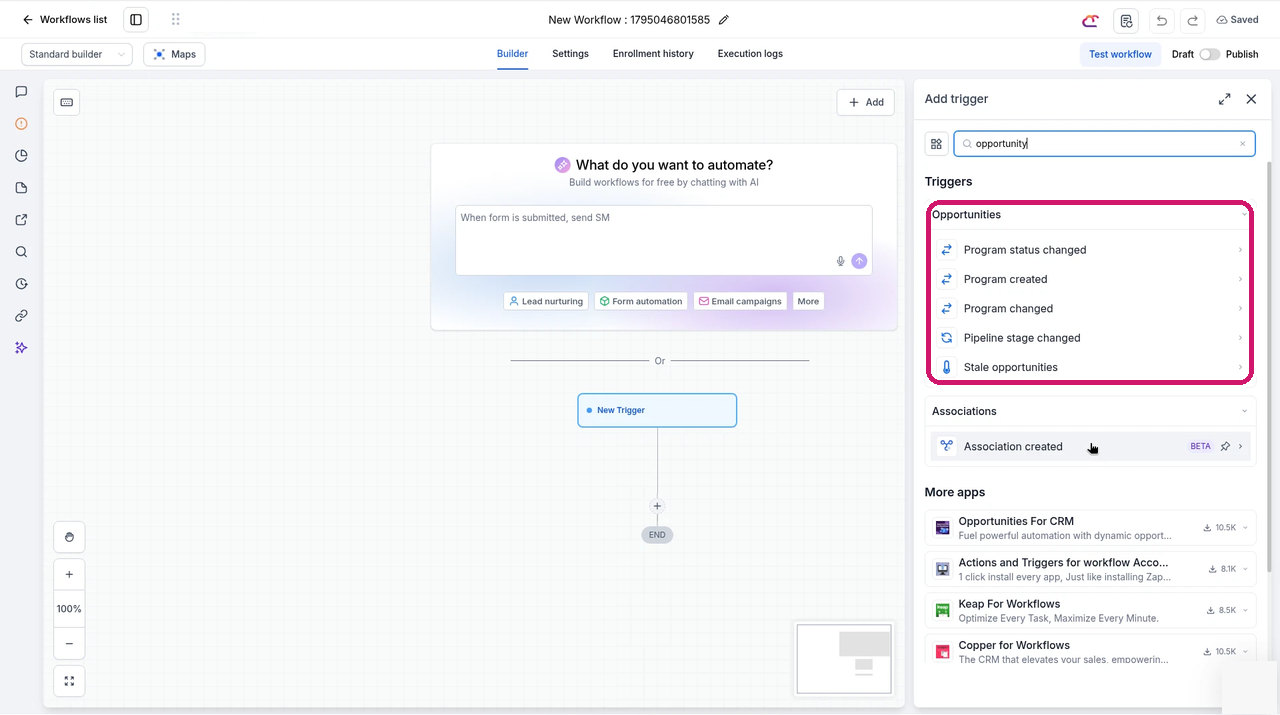
How to Choose an Opportunity Trigger in Tekmatix -
For internal tasks, search for task instead and choose Task added, Task completed or Task reminder.
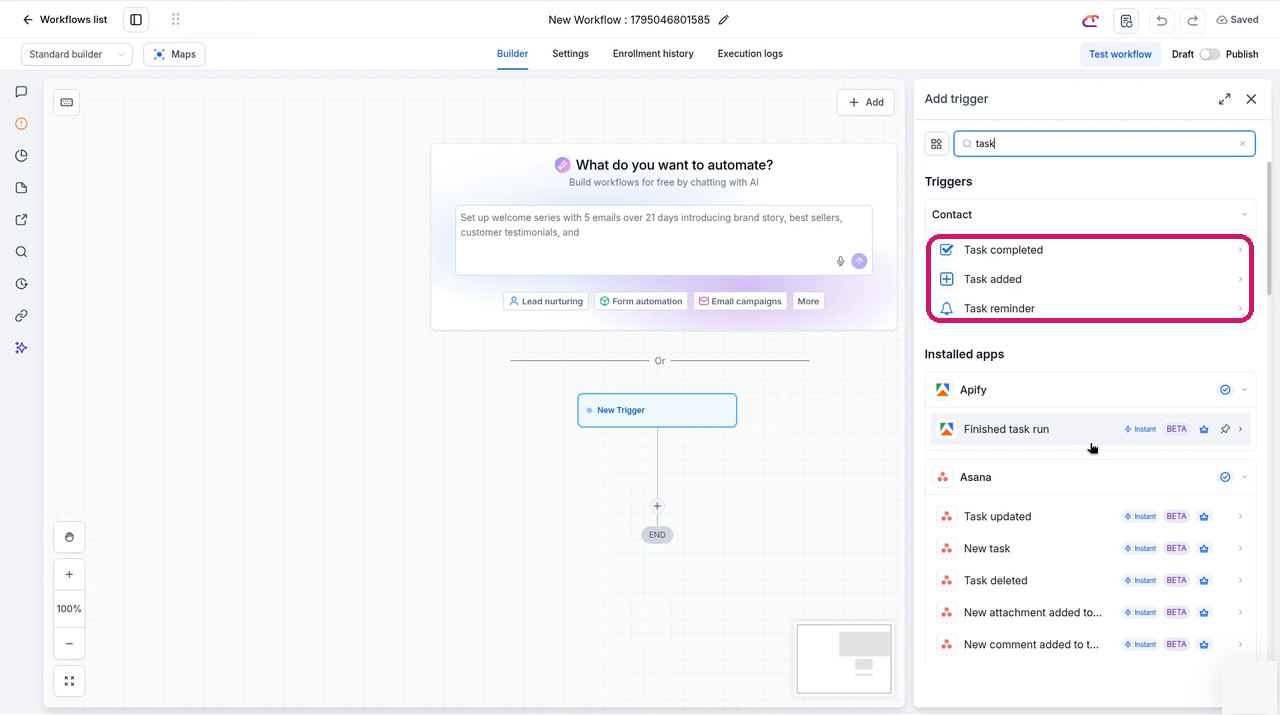
How to Choose a Task Trigger in Tekmatix -
For a date-based reminder, choose Custom date reminder, open the filters and select the opportunity date field, then pick the date field stored on your deal, such as a renewal date.
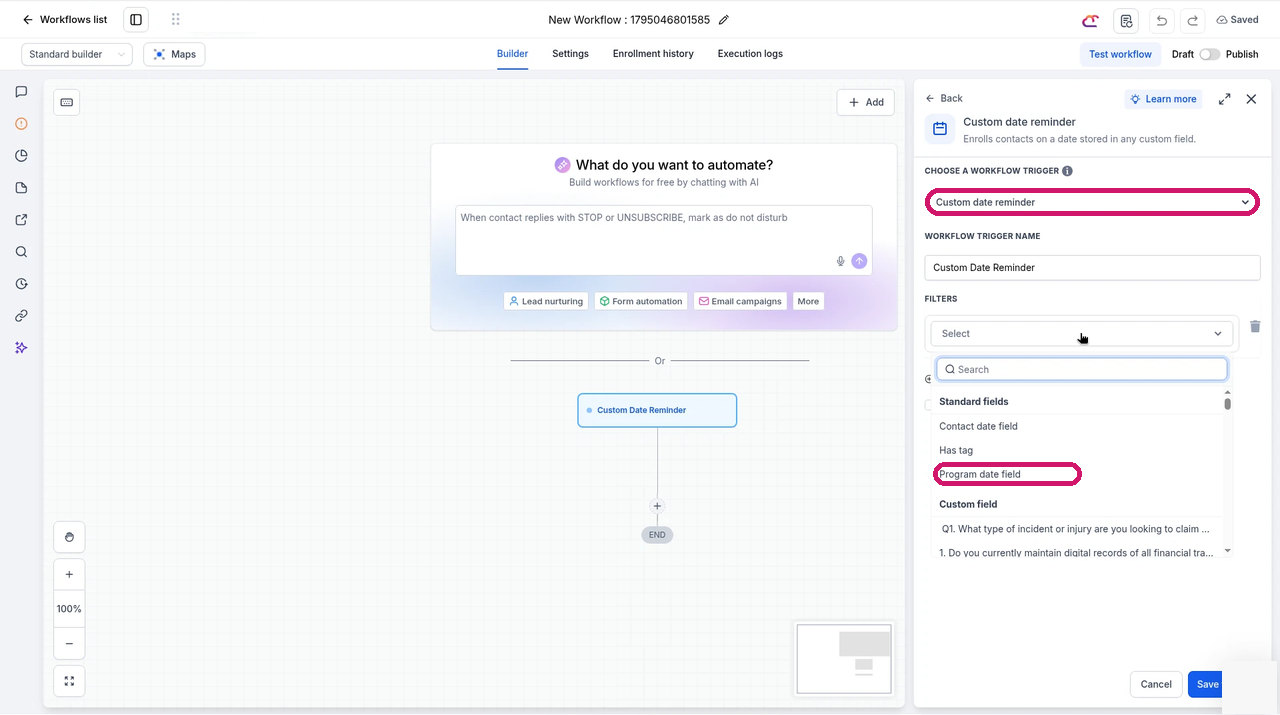
How to Trigger a Workflow From a Date on Your Deal in Tekmatix -
Add the actions for your process, such as assign owner, create task or send an internal notification, then save and publish.
Prompts you can copy
Find deals and tasks that need a process
Prompt to copy into Ask AI, GrokBot, Claude or ChatGPT
Taking everything you know about me and access to all of the data and systems you already have, log into my Tekmatix account and list every open opportunity that has no contact attached and every open task that has no contact attached. Group them by pipeline stage or task type, show how long each has been sitting there, and suggest which ones should be handled by an automated workflow.
Build the new deal workflow
Prompt to copy into GrokBot, Claude or ChatGPT with browser control
Taking everything you know about me and access to all of the data and systems you already have, log into my Tekmatix account and build a draft workflow called "New deal owner assignment". Trigger it when an opportunity is created in my [pipeline name] pipeline, including deals with no contact. Assign the deal to [team member or round robin], create a task to qualify the deal within 24 hours and send an internal notification to the owner. Leave it unpublished and show me the steps so I can approve it.
Automate an internal handoff
Prompt to copy into GrokBot, Claude or ChatGPT with browser control
Taking everything you know about me and access to all of the data and systems you already have, log into my Tekmatix account and build a draft workflow that starts when a task called "[task name]" is completed, even if it has no contact. Create the next handoff task for [team member] with a due date two business days later and notify them. Leave it unpublished until I approve it.
Set up a renewal reminder
Prompt to copy into GrokBot, Claude or ChatGPT with browser control
Taking everything you know about me and access to all of the data and systems you already have, log into my Tekmatix account and build a draft workflow using a Custom date reminder on the opportunity date field "[renewal date field]". Thirty days before the date, create a renewal task for the deal owner and move the opportunity to my "Renewal due" stage. Leave it unpublished and show me what you built.
Good to know
- Actions that need contact details, such as sending an email or SMS to the contact, won't have anyone to send to when there's no contact attached. Use internal actions (tasks, owner assignment, internal notifications, stage moves) for these workflows.
- Always review a workflow before you publish it.
Ideas for using it
- Give every new partner or referral deal an owner within minutes.
- Chain internal tasks so each handoff starts the next one automatically.
- Remind your team about renewals, contract end dates and proposal expiry dates stored on the deal.
- Move stale deals to a review stage without anyone having to remember.
Frequently asked questions
Can a workflow run on an opportunity that has no contact?
Yes. Opportunity triggers such as Opportunity created, Opportunity changed, Pipeline stage changed, Opportunity status changed and Stale opportunities can now start a workflow even when no contact is attached to the deal.
Which task triggers work without a contact?
Task added, Task completed and Task reminder can start a workflow for internal tasks that have no contact attached.
Can I trigger a workflow from a date on the deal?
Yes. Use the Custom date reminder trigger and choose an opportunity date field, such as a renewal date or proposal expiry date.
Can these workflows send emails or SMS?
Not to a contact, because there isn't one. Use internal actions instead, such as assigning an owner, creating tasks, sending internal notifications and moving pipeline stages.
Can Ask AI build the workflow for me?
Ask AI can read your workflows and tell you which deals and tasks need attention, but it can't build workflows yet. Use your own AI with browser control, such as Claude, ChatGPT or GrokBot, to build a draft, then review it before you publish.
Love Your Tech.

Latest Blog Posts
How to Automate Your Deals and Internal Tasks in Tekmatix Without Needing a Contact
Not every job in your business starts with a customer record. A deal comes in from a partner before you know who the buyer is. Your team finishes an internal task and the next person needs to pick it up. Until now, you had to create or link a dummy contact before your automations would touch it.
Not any more. In Tekmatix, opportunities and tasks can now go into a workflow on their own, even when there is no contact attached. Tell your AI what should happen next. Make a cuppa. Done.
What is new
- Opportunities without a contact: start a workflow when an opportunity is created, changes, moves stage, changes status or goes stale.
- Tasks without a contact: use task triggers such as Task added, Task completed and Task reminder for internal tasks.
- Opportunity date reminders: use Custom date reminder with an opportunity date field to start a workflow from a date stored on the deal, such as a contract renewal or proposal expiry date.
What AI should I use?
The prompts below should work in Ask AI, Claude, ChatGPT, GrokBot or any other AI you use. If you don't already pay for an external AI and don't want another subscription, start with Ask AI, built right into your Tekmatix dashboard. Click the sparkle icon at the top right of your dashboard (or Ask AI in the sidebar) to open it.
One honest note: Ask AI can read your workflows but can't build them yet. To have AI build the workflow for you, use your own AI (Claude, ChatGPT or GrokBot) with browser control connected to your Tekmatix account, and review it before you publish. Ask AI is perfect for checking which deals and tasks are sitting still.
*Tekmatix AI usage applies as a billable consumable. You can find out more about pricing on our public page: tekmatix.com/pricing.
How to set it up yourself
-
Go to Automated Workflows in the sidebar, then click Create workflow or open an existing workflow.
How to Find Workflows in Your Tekmatix Account -
Click Add trigger and search for opportunity. Choose the trigger you need, such as Opportunity created, Opportunity changed, Pipeline stage changed, Opportunity status changed or Stale opportunities, and add any filters you need. If you have renamed opportunities in your account (our demo account calls them Programs), the triggers use your name for them.
How to Choose an Opportunity Trigger in Tekmatix -
For internal tasks, search for task instead and choose Task added, Task completed or Task reminder.
How to Choose a Task Trigger in Tekmatix -
For a date-based reminder, choose Custom date reminder, open the filters and select the opportunity date field, then pick the date field stored on your deal, such as a renewal date.
How to Trigger a Workflow From a Date on Your Deal in Tekmatix -
Add the actions for your process, such as assign owner, create task or send an internal notification, then save and publish.
Prompts you can copy
Find deals and tasks that need a process
Prompt to copy into Ask AI, GrokBot, Claude or ChatGPT
Taking everything you know about me and access to all of the data and systems you already have, log into my Tekmatix account and list every open opportunity that has no contact attached and every open task that has no contact attached. Group them by pipeline stage or task type, show how long each has been sitting there, and suggest which ones should be handled by an automated workflow.
Build the new deal workflow
Prompt to copy into GrokBot, Claude or ChatGPT with browser control
Taking everything you know about me and access to all of the data and systems you already have, log into my Tekmatix account and build a draft workflow called "New deal owner assignment". Trigger it when an opportunity is created in my [pipeline name] pipeline, including deals with no contact. Assign the deal to [team member or round robin], create a task to qualify the deal within 24 hours and send an internal notification to the owner. Leave it unpublished and show me the steps so I can approve it.
Automate an internal handoff
Prompt to copy into GrokBot, Claude or ChatGPT with browser control
Taking everything you know about me and access to all of the data and systems you already have, log into my Tekmatix account and build a draft workflow that starts when a task called "[task name]" is completed, even if it has no contact. Create the next handoff task for [team member] with a due date two business days later and notify them. Leave it unpublished until I approve it.
Set up a renewal reminder
Prompt to copy into GrokBot, Claude or ChatGPT with browser control
Taking everything you know about me and access to all of the data and systems you already have, log into my Tekmatix account and build a draft workflow using a Custom date reminder on the opportunity date field "[renewal date field]". Thirty days before the date, create a renewal task for the deal owner and move the opportunity to my "Renewal due" stage. Leave it unpublished and show me what you built.
Good to know
- Actions that need contact details, such as sending an email or SMS to the contact, won't have anyone to send to when there's no contact attached. Use internal actions (tasks, owner assignment, internal notifications, stage moves) for these workflows.
- Always review a workflow before you publish it.
Ideas for using it
- Give every new partner or referral deal an owner within minutes.
- Chain internal tasks so each handoff starts the next one automatically.
- Remind your team about renewals, contract end dates and proposal expiry dates stored on the deal.
- Move stale deals to a review stage without anyone having to remember.
Frequently asked questions
Can a workflow run on an opportunity that has no contact?
Yes. Opportunity triggers such as Opportunity created, Opportunity changed, Pipeline stage changed, Opportunity status changed and Stale opportunities can now start a workflow even when no contact is attached to the deal.
Which task triggers work without a contact?
Task added, Task completed and Task reminder can start a workflow for internal tasks that have no contact attached.
Can I trigger a workflow from a date on the deal?
Yes. Use the Custom date reminder trigger and choose an opportunity date field, such as a renewal date or proposal expiry date.
Can these workflows send emails or SMS?
Not to a contact, because there isn't one. Use internal actions instead, such as assigning an owner, creating tasks, sending internal notifications and moving pipeline stages.
Can Ask AI build the workflow for me?
Ask AI can read your workflows and tell you which deals and tasks need attention, but it can't build workflows yet. Use your own AI with browser control, such as Claude, ChatGPT or GrokBot, to build a draft, then review it before you publish.
Love Your Tech.