
Use the search bar below to find help guides and articles for using Tekmatix

Managing large workflows just became significantly faster and more accurate.
Tekmatix AI Builder now delivers much more precise workflow editing by allowing you to target exactly which actions or triggers you want to update. Instead of manually editing dozens of workflow steps one by one, you can simply describe what you want to change, and AI Builder applies the update only where you specify.
Whether you're updating email copy, changing pipeline stages, or modifying sender details, AI Builder can now make bulk changes in a single instruction while leaving every other workflow action untouched.
AI Builder now understands exactly which workflow actions or triggers you want to edit.
Simply specify whether you want to update:
Every action in the workflow
A specific group of actions
Individual actions or triggers
The first or last set of actions
Any custom selection you describe
Only the selected items are updated, while everything else remains exactly as it was.
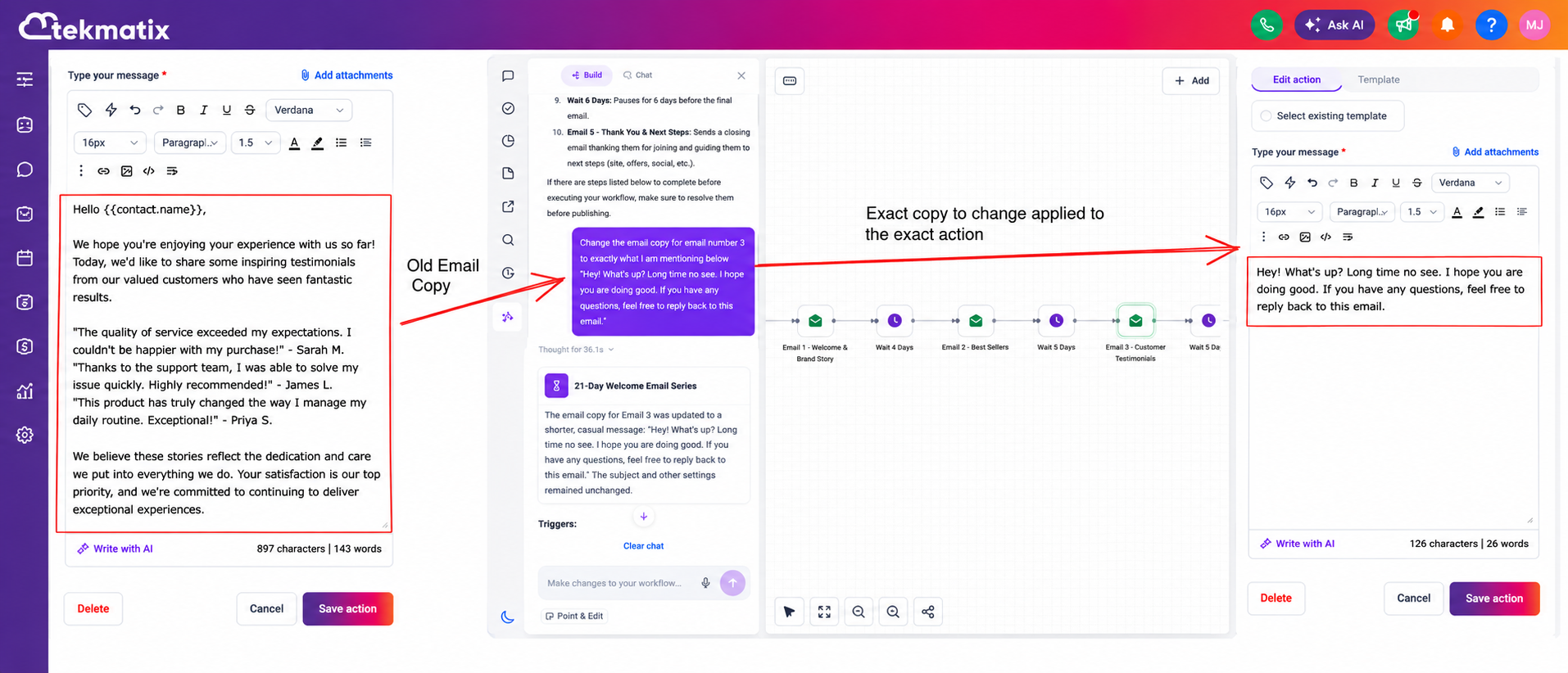
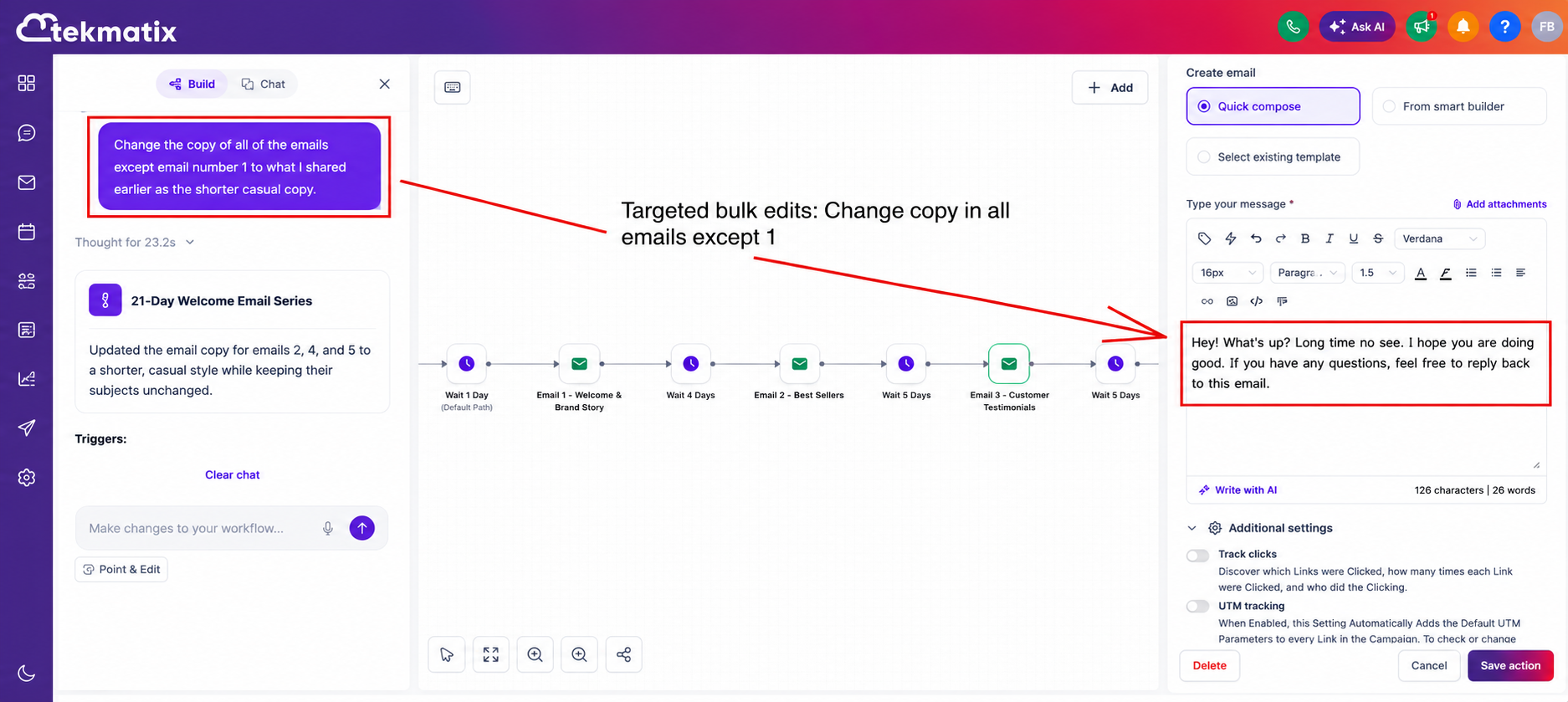
Need to refresh messaging across multiple workflow steps?
AI Builder can now update:
Email content
SMS messages
Any other messaging actions
All in a single instruction, saving you from opening and editing each action individually.
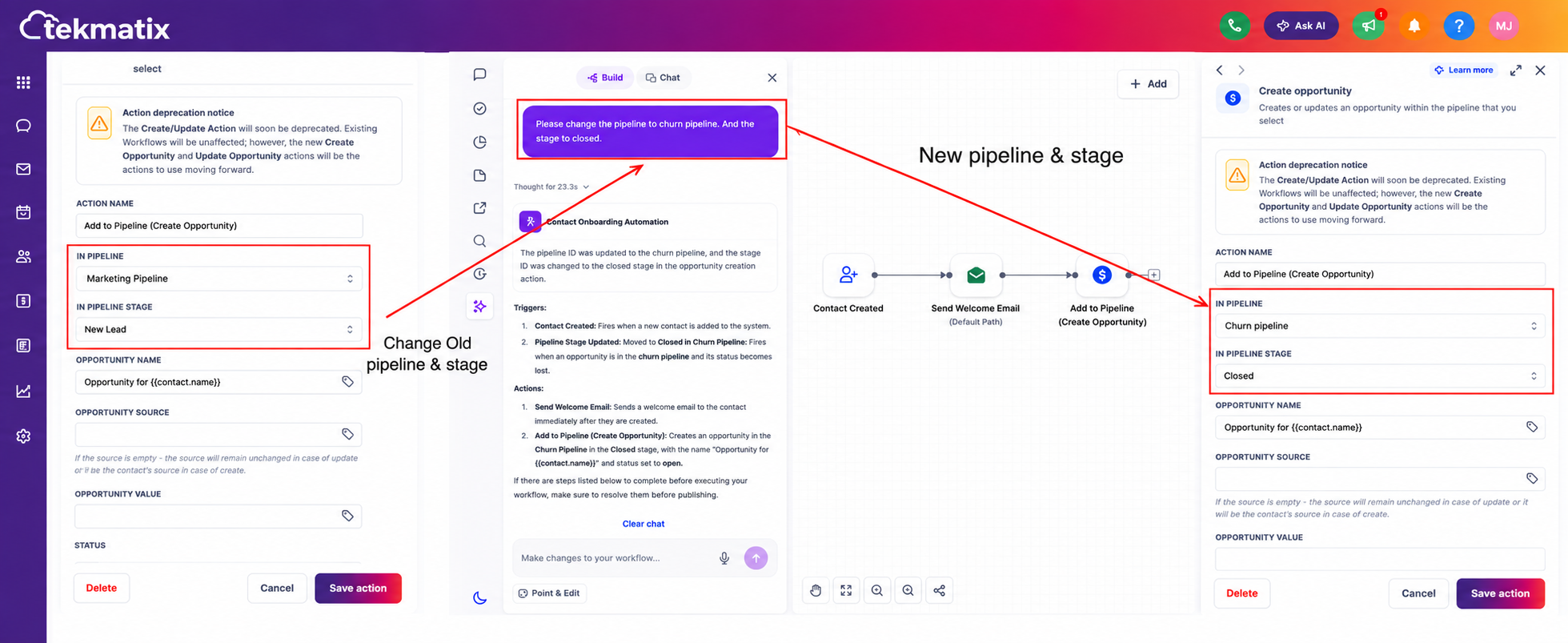
Moving opportunities into a different pipeline stage is now much easier.
Update pipeline stages across:
All workflow actions
Selected actions
Specific triggers
Everything happens in one operation without manually editing each workflow step.
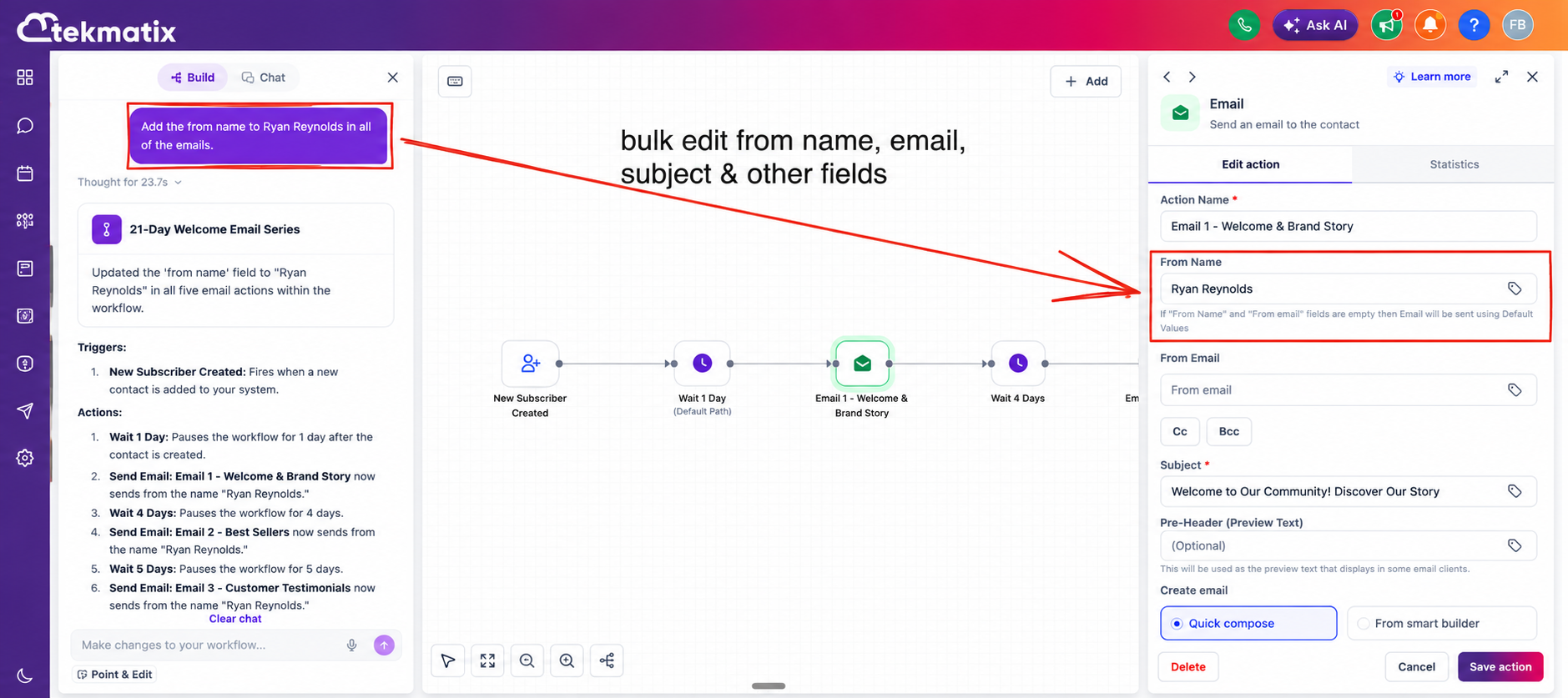
Need to change the sender information across multiple emails?
AI Builder can now update:
From Name
From Email address
Across all or selected email actions instantly.
You stay in complete control of what gets changed.
For example, if your workflow contains 50 email actions but you only want to update 20 of them, AI Builder edits only those 20 while leaving the remaining emails completely unchanged.
Open your workflow inside Tekmatix.
Launch the AI Builder assistant from the workflow sidebar.
Describe both:
What you want to change.
Which workflow actions should be updated.
For example:
"Set the From Name to Sarah across all email actions."
"Update the SMS message in only the first two SMS actions."
"Move every opportunity to the Qualified stage."
"Update the copy in emails 5 through 15."
Review the suggested changes.
Save your workflow.
As workflows become larger and more sophisticated, making updates manually can quickly become one of the most time-consuming parts of automation management.
This enhancement dramatically reduces that workload by allowing AI Builder to perform targeted bulk edits in seconds.
The benefits include:
Save hours editing large workflows.
Reduce repetitive manual work.
Make bulk updates with greater confidence.
Avoid accidental changes to unrelated workflow actions.
Maintain consistency across emails, SMS messages, pipeline stages, and other workflow components.
Scale complex automations without increasing maintenance time.
With more accurate scoping and intelligent bulk editing, Tekmatix AI Builder makes it easier than ever to maintain even your most advanced automations while keeping every change exactly where you intended.

Managing large workflows just became significantly faster and more accurate.
Tekmatix AI Builder now delivers much more precise workflow editing by allowing you to target exactly which actions or triggers you want to update. Instead of manually editing dozens of workflow steps one by one, you can simply describe what you want to change, and AI Builder applies the update only where you specify.
Whether you're updating email copy, changing pipeline stages, or modifying sender details, AI Builder can now make bulk changes in a single instruction while leaving every other workflow action untouched.
AI Builder now understands exactly which workflow actions or triggers you want to edit.
Simply specify whether you want to update:
Every action in the workflow
A specific group of actions
Individual actions or triggers
The first or last set of actions
Any custom selection you describe
Only the selected items are updated, while everything else remains exactly as it was.

Need to refresh messaging across multiple workflow steps?
AI Builder can now update:
Email content
SMS messages
Any other messaging actions
All in a single instruction, saving you from opening and editing each action individually.

Moving opportunities into a different pipeline stage is now much easier.
Update pipeline stages across:
All workflow actions
Selected actions
Specific triggers
Everything happens in one operation without manually editing each workflow step.

Need to change the sender information across multiple emails?
AI Builder can now update:
From Name
From Email address
Across all or selected email actions instantly.

You stay in complete control of what gets changed.
For example, if your workflow contains 50 email actions but you only want to update 20 of them, AI Builder edits only those 20 while leaving the remaining emails completely unchanged.
Open your workflow inside Tekmatix.
Launch the AI Builder assistant from the workflow sidebar.
Describe both:
What you want to change.
Which workflow actions should be updated.
For example:
"Set the From Name to Sarah across all email actions."
"Update the SMS message in only the first two SMS actions."
"Move every opportunity to the Qualified stage."
"Update the copy in emails 5 through 15."
Review the suggested changes.
Save your workflow.
As workflows become larger and more sophisticated, making updates manually can quickly become one of the most time-consuming parts of automation management.
This enhancement dramatically reduces that workload by allowing AI Builder to perform targeted bulk edits in seconds.
The benefits include:
Save hours editing large workflows.
Reduce repetitive manual work.
Make bulk updates with greater confidence.
Avoid accidental changes to unrelated workflow actions.
Maintain consistency across emails, SMS messages, pipeline stages, and other workflow components.
Scale complex automations without increasing maintenance time.
With more accurate scoping and intelligent bulk editing, Tekmatix AI Builder makes it easier than ever to maintain even your most advanced automations while keeping every change exactly where you intended.


Managing large workflows just became significantly faster and more accurate.
Tekmatix AI Builder now delivers much more precise workflow editing by allowing you to target exactly which actions or triggers you want to update. Instead of manually editing dozens of workflow steps one by one, you can simply describe what you want to change, and AI Builder applies the update only where you specify.
Whether you're updating email copy, changing pipeline stages, or modifying sender details, AI Builder can now make bulk changes in a single instruction while leaving every other workflow action untouched.
AI Builder now understands exactly which workflow actions or triggers you want to edit.
Simply specify whether you want to update:
Every action in the workflow
A specific group of actions
Individual actions or triggers
The first or last set of actions
Any custom selection you describe
Only the selected items are updated, while everything else remains exactly as it was.

Need to refresh messaging across multiple workflow steps?
AI Builder can now update:
Email content
SMS messages
Any other messaging actions
All in a single instruction, saving you from opening and editing each action individually.

Moving opportunities into a different pipeline stage is now much easier.
Update pipeline stages across:
All workflow actions
Selected actions
Specific triggers
Everything happens in one operation without manually editing each workflow step.

Need to change the sender information across multiple emails?
AI Builder can now update:
From Name
From Email address
Across all or selected email actions instantly.

You stay in complete control of what gets changed.
For example, if your workflow contains 50 email actions but you only want to update 20 of them, AI Builder edits only those 20 while leaving the remaining emails completely unchanged.
Open your workflow inside Tekmatix.
Launch the AI Builder assistant from the workflow sidebar.
Describe both:
What you want to change.
Which workflow actions should be updated.
For example:
"Set the From Name to Sarah across all email actions."
"Update the SMS message in only the first two SMS actions."
"Move every opportunity to the Qualified stage."
"Update the copy in emails 5 through 15."
Review the suggested changes.
Save your workflow.
As workflows become larger and more sophisticated, making updates manually can quickly become one of the most time-consuming parts of automation management.
This enhancement dramatically reduces that workload by allowing AI Builder to perform targeted bulk edits in seconds.
The benefits include:
Save hours editing large workflows.
Reduce repetitive manual work.
Make bulk updates with greater confidence.
Avoid accidental changes to unrelated workflow actions.
Maintain consistency across emails, SMS messages, pipeline stages, and other workflow components.
Scale complex automations without increasing maintenance time.
With more accurate scoping and intelligent bulk editing, Tekmatix AI Builder makes it easier than ever to maintain even your most advanced automations while keeping every change exactly where you intended.

Managing large workflows just became significantly faster and more accurate.
Tekmatix AI Builder now delivers much more precise workflow editing by allowing you to target exactly which actions or triggers you want to update. Instead of manually editing dozens of workflow steps one by one, you can simply describe what you want to change, and AI Builder applies the update only where you specify.
Whether you're updating email copy, changing pipeline stages, or modifying sender details, AI Builder can now make bulk changes in a single instruction while leaving every other workflow action untouched.
AI Builder now understands exactly which workflow actions or triggers you want to edit.
Simply specify whether you want to update:
Every action in the workflow
A specific group of actions
Individual actions or triggers
The first or last set of actions
Any custom selection you describe
Only the selected items are updated, while everything else remains exactly as it was.

Need to refresh messaging across multiple workflow steps?
AI Builder can now update:
Email content
SMS messages
Any other messaging actions
All in a single instruction, saving you from opening and editing each action individually.

Moving opportunities into a different pipeline stage is now much easier.
Update pipeline stages across:
All workflow actions
Selected actions
Specific triggers
Everything happens in one operation without manually editing each workflow step.

Need to change the sender information across multiple emails?
AI Builder can now update:
From Name
From Email address
Across all or selected email actions instantly.

You stay in complete control of what gets changed.
For example, if your workflow contains 50 email actions but you only want to update 20 of them, AI Builder edits only those 20 while leaving the remaining emails completely unchanged.
Open your workflow inside Tekmatix.
Launch the AI Builder assistant from the workflow sidebar.
Describe both:
What you want to change.
Which workflow actions should be updated.
For example:
"Set the From Name to Sarah across all email actions."
"Update the SMS message in only the first two SMS actions."
"Move every opportunity to the Qualified stage."
"Update the copy in emails 5 through 15."
Review the suggested changes.
Save your workflow.
As workflows become larger and more sophisticated, making updates manually can quickly become one of the most time-consuming parts of automation management.
This enhancement dramatically reduces that workload by allowing AI Builder to perform targeted bulk edits in seconds.
The benefits include:
Save hours editing large workflows.
Reduce repetitive manual work.
Make bulk updates with greater confidence.
Avoid accidental changes to unrelated workflow actions.
Maintain consistency across emails, SMS messages, pipeline stages, and other workflow components.
Scale complex automations without increasing maintenance time.
With more accurate scoping and intelligent bulk editing, Tekmatix AI Builder makes it easier than ever to maintain even your most advanced automations while keeping every change exactly where you intended.

Managing large workflows just became significantly faster and more accurate.
Tekmatix AI Builder now delivers much more precise workflow editing by allowing you to target exactly which actions or triggers you want to update. Instead of manually editing dozens of workflow steps one by one, you can simply describe what you want to change, and AI Builder applies the update only where you specify.
Whether you're updating email copy, changing pipeline stages, or modifying sender details, AI Builder can now make bulk changes in a single instruction while leaving every other workflow action untouched.
AI Builder now understands exactly which workflow actions or triggers you want to edit.
Simply specify whether you want to update:
Every action in the workflow
A specific group of actions
Individual actions or triggers
The first or last set of actions
Any custom selection you describe
Only the selected items are updated, while everything else remains exactly as it was.

Need to refresh messaging across multiple workflow steps?
AI Builder can now update:
Email content
SMS messages
Any other messaging actions
All in a single instruction, saving you from opening and editing each action individually.

Moving opportunities into a different pipeline stage is now much easier.
Update pipeline stages across:
All workflow actions
Selected actions
Specific triggers
Everything happens in one operation without manually editing each workflow step.

Need to change the sender information across multiple emails?
AI Builder can now update:
From Name
From Email address
Across all or selected email actions instantly.

You stay in complete control of what gets changed.
For example, if your workflow contains 50 email actions but you only want to update 20 of them, AI Builder edits only those 20 while leaving the remaining emails completely unchanged.
Open your workflow inside Tekmatix.
Launch the AI Builder assistant from the workflow sidebar.
Describe both:
What you want to change.
Which workflow actions should be updated.
For example:
"Set the From Name to Sarah across all email actions."
"Update the SMS message in only the first two SMS actions."
"Move every opportunity to the Qualified stage."
"Update the copy in emails 5 through 15."
Review the suggested changes.
Save your workflow.
As workflows become larger and more sophisticated, making updates manually can quickly become one of the most time-consuming parts of automation management.
This enhancement dramatically reduces that workload by allowing AI Builder to perform targeted bulk edits in seconds.
The benefits include:
Save hours editing large workflows.
Reduce repetitive manual work.
Make bulk updates with greater confidence.
Avoid accidental changes to unrelated workflow actions.
Maintain consistency across emails, SMS messages, pipeline stages, and other workflow components.
Scale complex automations without increasing maintenance time.
With more accurate scoping and intelligent bulk editing, Tekmatix AI Builder makes it easier than ever to maintain even your most advanced automations while keeping every change exactly where you intended.

Managing large workflows just became significantly faster and more accurate.
Tekmatix AI Builder now delivers much more precise workflow editing by allowing you to target exactly which actions or triggers you want to update. Instead of manually editing dozens of workflow steps one by one, you can simply describe what you want to change, and AI Builder applies the update only where you specify.
Whether you're updating email copy, changing pipeline stages, or modifying sender details, AI Builder can now make bulk changes in a single instruction while leaving every other workflow action untouched.
AI Builder now understands exactly which workflow actions or triggers you want to edit.
Simply specify whether you want to update:
Every action in the workflow
A specific group of actions
Individual actions or triggers
The first or last set of actions
Any custom selection you describe
Only the selected items are updated, while everything else remains exactly as it was.

Need to refresh messaging across multiple workflow steps?
AI Builder can now update:
Email content
SMS messages
Any other messaging actions
All in a single instruction, saving you from opening and editing each action individually.

Moving opportunities into a different pipeline stage is now much easier.
Update pipeline stages across:
All workflow actions
Selected actions
Specific triggers
Everything happens in one operation without manually editing each workflow step.

Need to change the sender information across multiple emails?
AI Builder can now update:
From Name
From Email address
Across all or selected email actions instantly.

You stay in complete control of what gets changed.
For example, if your workflow contains 50 email actions but you only want to update 20 of them, AI Builder edits only those 20 while leaving the remaining emails completely unchanged.
Open your workflow inside Tekmatix.
Launch the AI Builder assistant from the workflow sidebar.
Describe both:
What you want to change.
Which workflow actions should be updated.
For example:
"Set the From Name to Sarah across all email actions."
"Update the SMS message in only the first two SMS actions."
"Move every opportunity to the Qualified stage."
"Update the copy in emails 5 through 15."
Review the suggested changes.
Save your workflow.
As workflows become larger and more sophisticated, making updates manually can quickly become one of the most time-consuming parts of automation management.
This enhancement dramatically reduces that workload by allowing AI Builder to perform targeted bulk edits in seconds.
The benefits include:
Save hours editing large workflows.
Reduce repetitive manual work.
Make bulk updates with greater confidence.
Avoid accidental changes to unrelated workflow actions.
Maintain consistency across emails, SMS messages, pipeline stages, and other workflow components.
Scale complex automations without increasing maintenance time.
With more accurate scoping and intelligent bulk editing, Tekmatix AI Builder makes it easier than ever to maintain even your most advanced automations while keeping every change exactly where you intended.


Managing large workflows just became significantly faster and more accurate.
Tekmatix AI Builder now delivers much more precise workflow editing by allowing you to target exactly which actions or triggers you want to update. Instead of manually editing dozens of workflow steps one by one, you can simply describe what you want to change, and AI Builder applies the update only where you specify.
Whether you're updating email copy, changing pipeline stages, or modifying sender details, AI Builder can now make bulk changes in a single instruction while leaving every other workflow action untouched.
AI Builder now understands exactly which workflow actions or triggers you want to edit.
Simply specify whether you want to update:
Every action in the workflow
A specific group of actions
Individual actions or triggers
The first or last set of actions
Any custom selection you describe
Only the selected items are updated, while everything else remains exactly as it was.

Need to refresh messaging across multiple workflow steps?
AI Builder can now update:
Email content
SMS messages
Any other messaging actions
All in a single instruction, saving you from opening and editing each action individually.

Moving opportunities into a different pipeline stage is now much easier.
Update pipeline stages across:
All workflow actions
Selected actions
Specific triggers
Everything happens in one operation without manually editing each workflow step.

Need to change the sender information across multiple emails?
AI Builder can now update:
From Name
From Email address
Across all or selected email actions instantly.

You stay in complete control of what gets changed.
For example, if your workflow contains 50 email actions but you only want to update 20 of them, AI Builder edits only those 20 while leaving the remaining emails completely unchanged.
Open your workflow inside Tekmatix.
Launch the AI Builder assistant from the workflow sidebar.
Describe both:
What you want to change.
Which workflow actions should be updated.
For example:
"Set the From Name to Sarah across all email actions."
"Update the SMS message in only the first two SMS actions."
"Move every opportunity to the Qualified stage."
"Update the copy in emails 5 through 15."
Review the suggested changes.
Save your workflow.
As workflows become larger and more sophisticated, making updates manually can quickly become one of the most time-consuming parts of automation management.
This enhancement dramatically reduces that workload by allowing AI Builder to perform targeted bulk edits in seconds.
The benefits include:
Save hours editing large workflows.
Reduce repetitive manual work.
Make bulk updates with greater confidence.
Avoid accidental changes to unrelated workflow actions.
Maintain consistency across emails, SMS messages, pipeline stages, and other workflow components.
Scale complex automations without increasing maintenance time.
With more accurate scoping and intelligent bulk editing, Tekmatix AI Builder makes it easier than ever to maintain even your most advanced automations while keeping every change exactly where you intended.

Managing large workflows just became significantly faster and more accurate.
Tekmatix AI Builder now delivers much more precise workflow editing by allowing you to target exactly which actions or triggers you want to update. Instead of manually editing dozens of workflow steps one by one, you can simply describe what you want to change, and AI Builder applies the update only where you specify.
Whether you're updating email copy, changing pipeline stages, or modifying sender details, AI Builder can now make bulk changes in a single instruction while leaving every other workflow action untouched.
AI Builder now understands exactly which workflow actions or triggers you want to edit.
Simply specify whether you want to update:
Every action in the workflow
A specific group of actions
Individual actions or triggers
The first or last set of actions
Any custom selection you describe
Only the selected items are updated, while everything else remains exactly as it was.

Need to refresh messaging across multiple workflow steps?
AI Builder can now update:
Email content
SMS messages
Any other messaging actions
All in a single instruction, saving you from opening and editing each action individually.

Moving opportunities into a different pipeline stage is now much easier.
Update pipeline stages across:
All workflow actions
Selected actions
Specific triggers
Everything happens in one operation without manually editing each workflow step.

Need to change the sender information across multiple emails?
AI Builder can now update:
From Name
From Email address
Across all or selected email actions instantly.

You stay in complete control of what gets changed.
For example, if your workflow contains 50 email actions but you only want to update 20 of them, AI Builder edits only those 20 while leaving the remaining emails completely unchanged.
Open your workflow inside Tekmatix.
Launch the AI Builder assistant from the workflow sidebar.
Describe both:
What you want to change.
Which workflow actions should be updated.
For example:
"Set the From Name to Sarah across all email actions."
"Update the SMS message in only the first two SMS actions."
"Move every opportunity to the Qualified stage."
"Update the copy in emails 5 through 15."
Review the suggested changes.
Save your workflow.
As workflows become larger and more sophisticated, making updates manually can quickly become one of the most time-consuming parts of automation management.
This enhancement dramatically reduces that workload by allowing AI Builder to perform targeted bulk edits in seconds.
The benefits include:
Save hours editing large workflows.
Reduce repetitive manual work.
Make bulk updates with greater confidence.
Avoid accidental changes to unrelated workflow actions.
Maintain consistency across emails, SMS messages, pipeline stages, and other workflow components.
Scale complex automations without increasing maintenance time.
With more accurate scoping and intelligent bulk editing, Tekmatix AI Builder makes it easier than ever to maintain even your most advanced automations while keeping every change exactly where you intended.