

Tekmatix Help Articles
Love your help
Use the search bar below to find help guides and articles for using Tekmatix
Use the search bar below to look for help articles you need.
How to Get Your AI Agent to Watch, Summarise and Repurpose Your Videos in Tekmatix
You have a 60-minute webinar replay, ten coaching call recordings and a folder of ad videos you've been meaning to review. Watching them all again to find the good bits? Not happening.
Tekmatix Managed Agents can now watch your videos for you. They understand both what is shown and what is said, so they can summarise a recording, pull out key moments with timestamps, write a transcript, answer questions about the video and turn it into content. Tell your agent what you want. Make a cuppa. Done.
Managed Agents work like Claude or GrokBot, but directly inside your Tekmatix account, so the video insights can flow straight into your next job, such as a social post, an email draft or a follow-up task.
What is new
- Built-in Video Analysis: Managed Agents can watch and understand video content, including the visuals and the audio.
- Summaries, transcripts and timestamped highlights: ask for a short summary, a full transcript or the key moments with timestamps.
- Ask questions about any video: "What did I say about pricing?" or "Does our logo appear in the first five seconds?"
- YouTube and Media Storage support: analyse public YouTube links (including Shorts and supported live links) or videos stored in your Tekmatix Media Storage. Copy the link from Media Storage and paste it into the agent chat, paste a YouTube link, or attach a file from your computer.
- Popular formats: MP4, MOV, WebM, AVI, MPEG and more, up to 2 GB per file.
- No setup: it's switched on automatically for every Managed Agent, in test chats and in triggered agent runs.
What AI should I use?
Video Analysis lives inside Managed Agents in your Tekmatix account, so that's the place to run the video prompts below. Ask AI (built into your dashboard) is the easiest place to start for everything else in your account. If you already use Claude, ChatGPT or GrokBot connected to your Tekmatix account, you can also ask it to take the agent's summary and turn it into posts, emails or tasks. If you don't already pay for an external AI and don't want another subscription, start with Ask AI and Managed Agents.
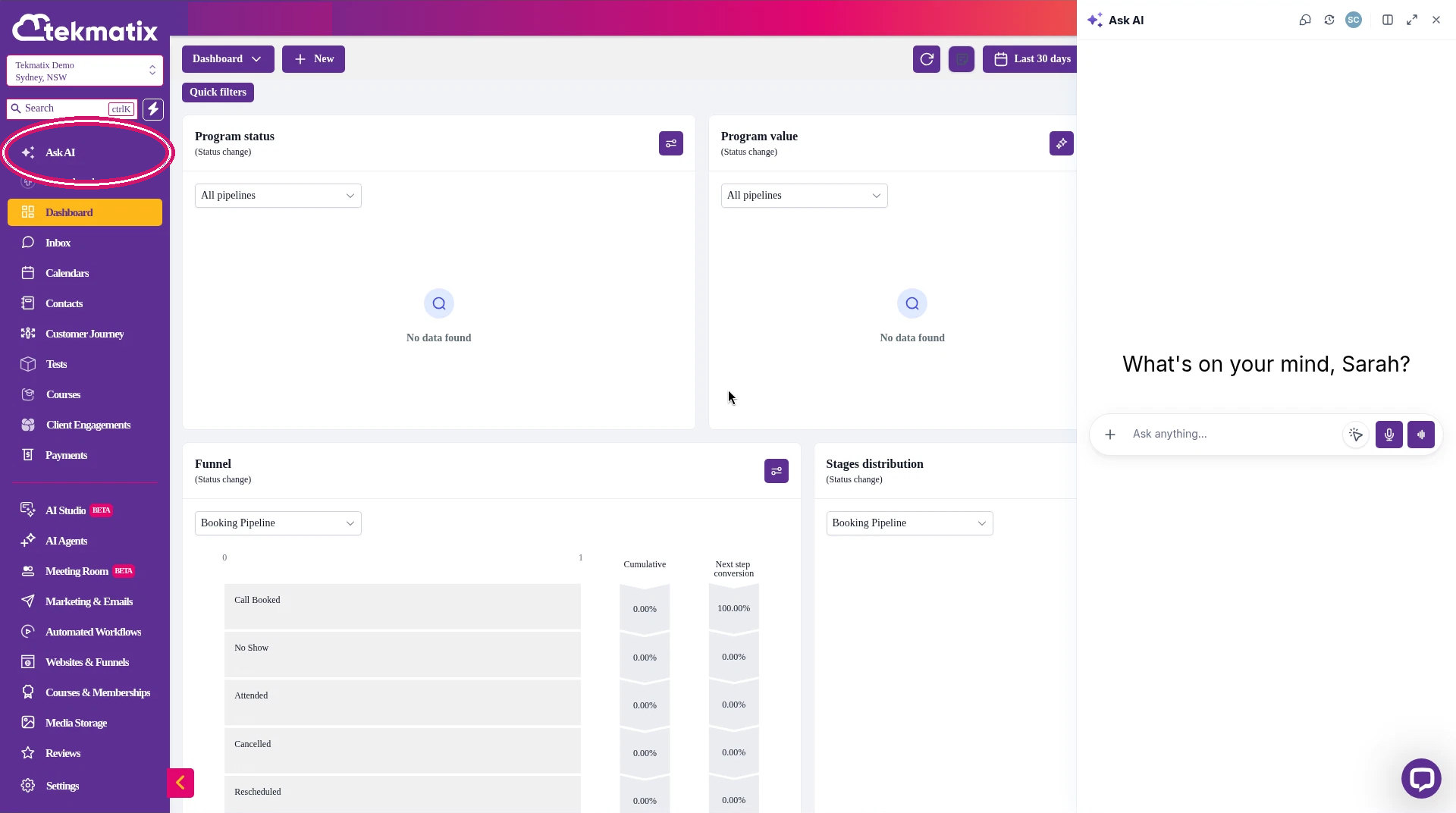
*Tekmatix AI usage applies as a billable consumable. You can find out more about pricing on our public page: tekmatix.com/pricing.
How to get started
-
In the sidebar, go to AI Agents, then open the Agent Studio tab and choose Managed Agents. You'll see your existing agents, plus buttons to create a new Managed Agent or a new folder.
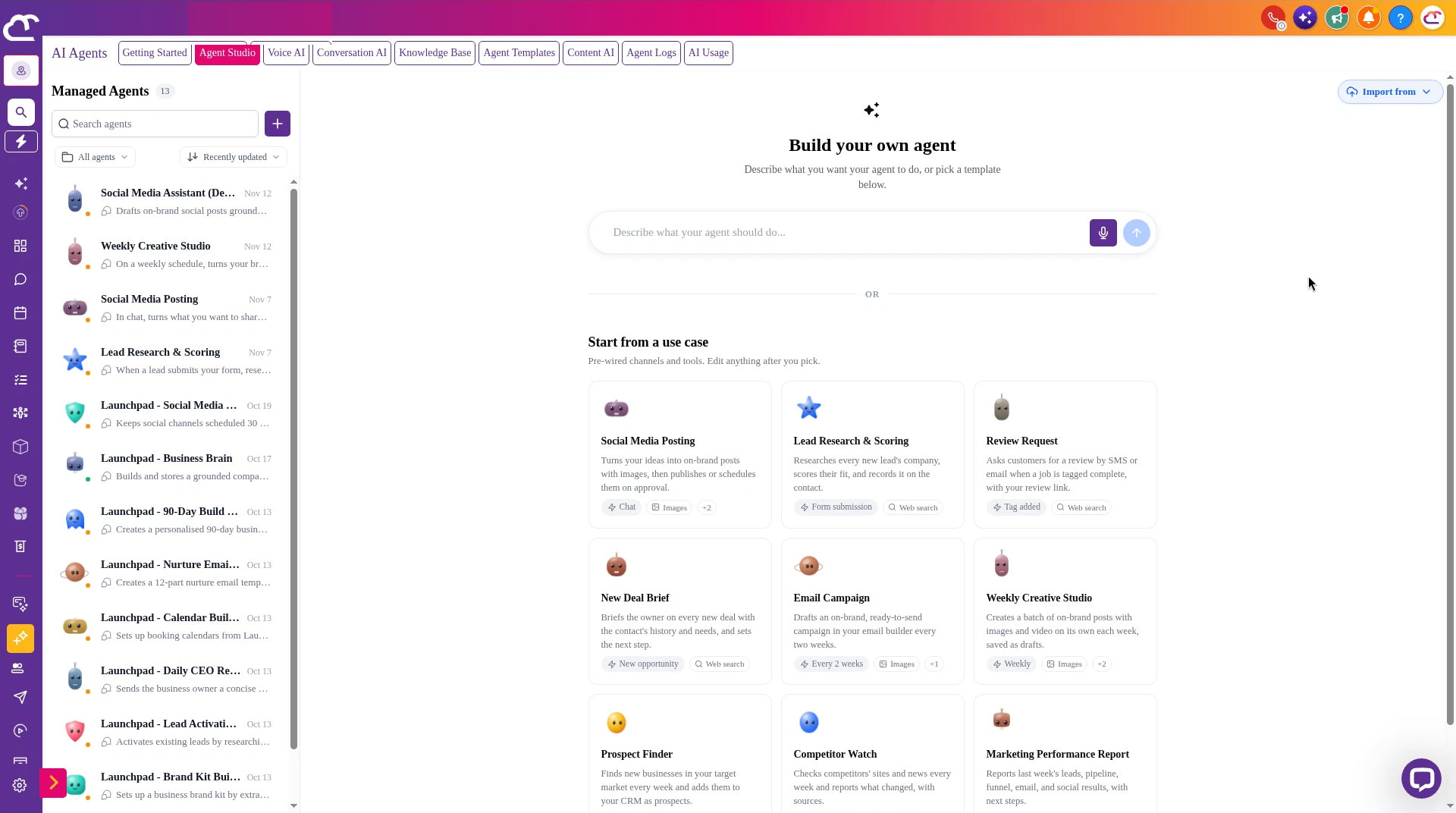
How to Find Managed Agents in Your Tekmatix Account -
Open an existing Managed Agent, or create a new one. In the agent chat, you can start a New Chat and use Test Mode to try a prompt safely.
-
Your agent can't browse Media Storage on its own, so you need to give it the video. To use a video already in your account, go to Media Storage in the sidebar, click the video, choose Copy link, then paste that link into the agent chat. You can also paste a public YouTube link, including Shorts and supported live links. To use a file from your computer, use Attach files, which opens your computer's file chooser. There is no Media Library picker inside the chat.
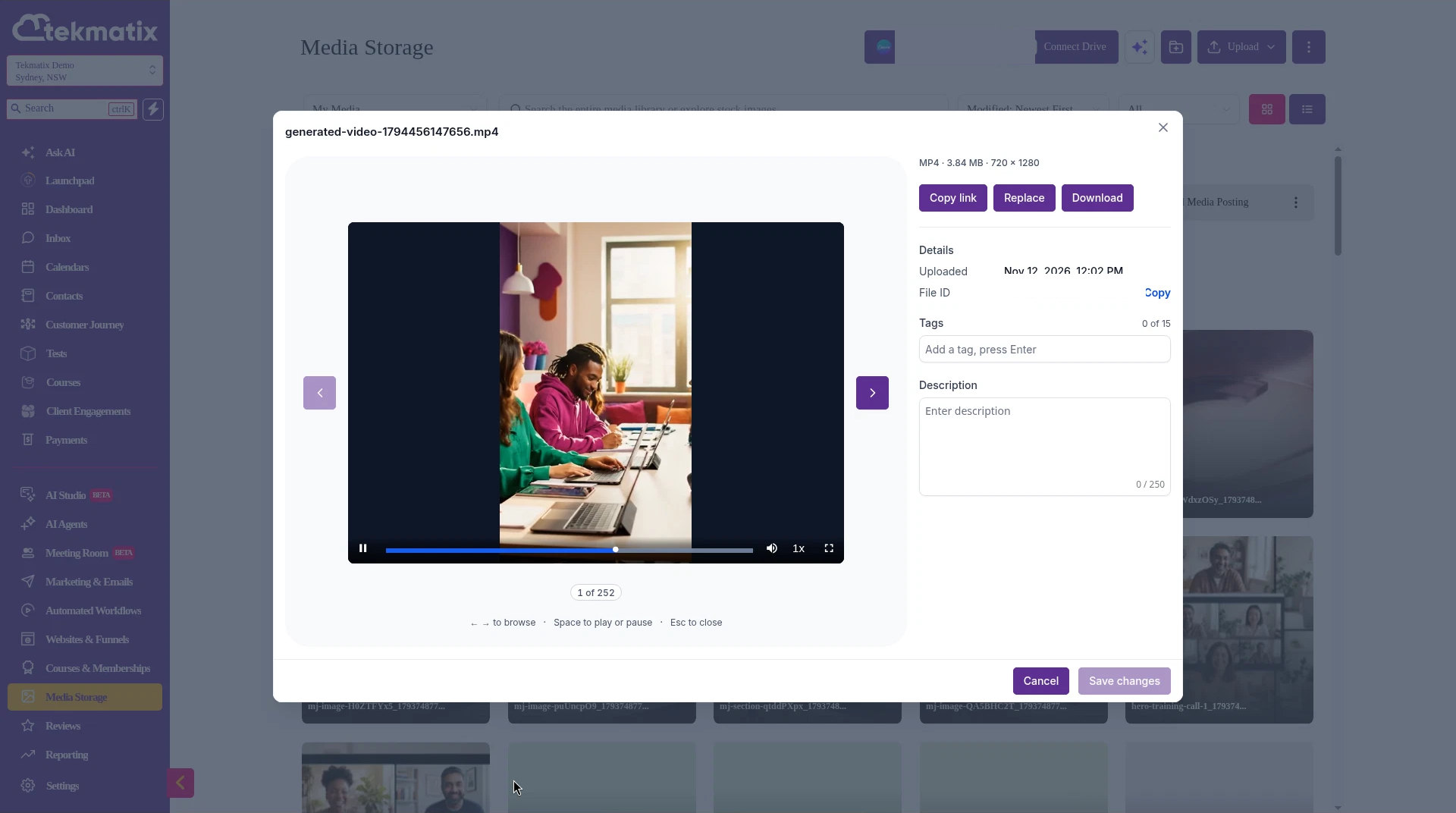
How to Copy a Video Link from Media Storage in Tekmatix 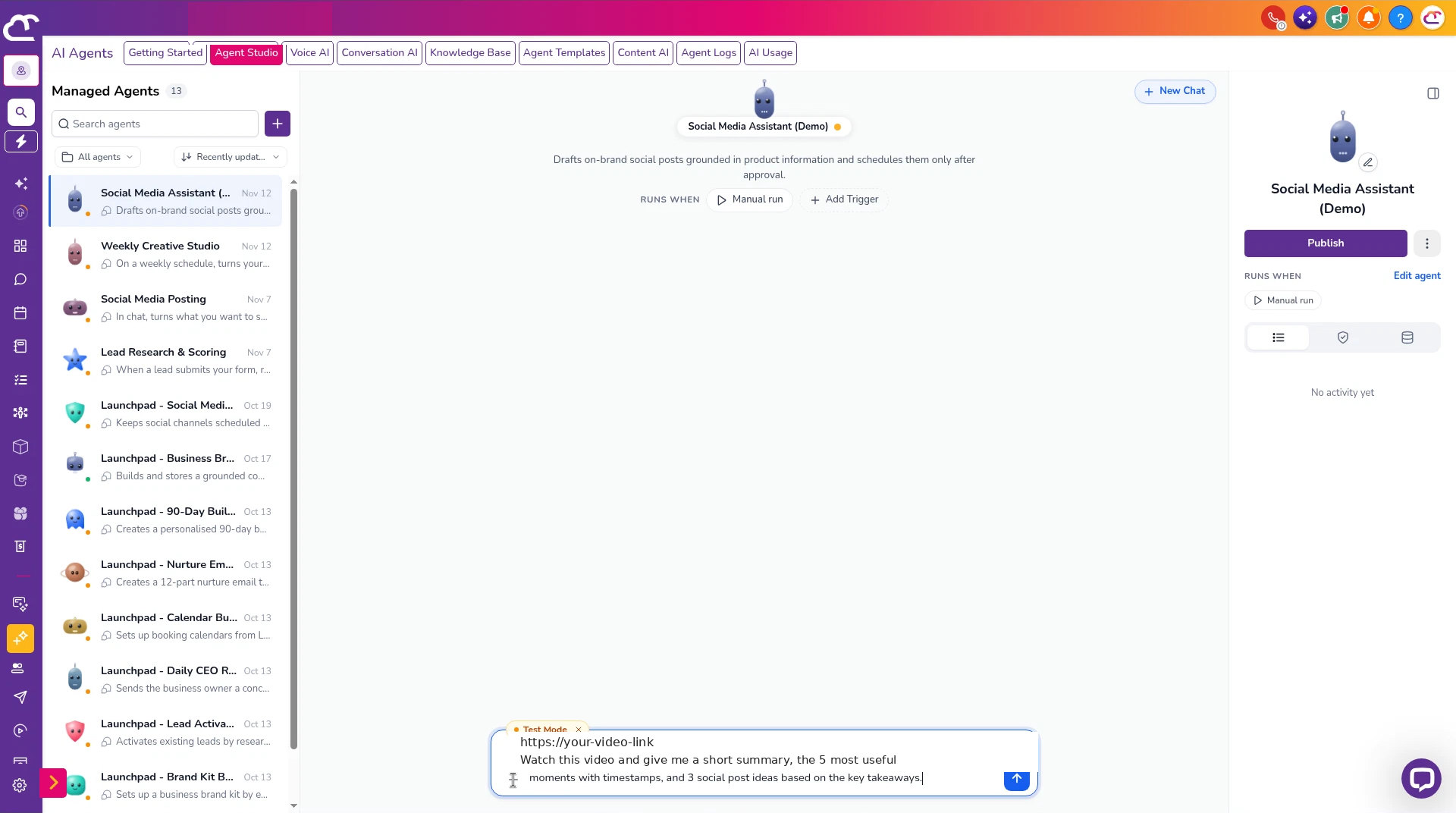
How to Paste a Video Link into Your Tekmatix Managed Agent -
Ask your agent to analyse the video, using one of the prompts below.
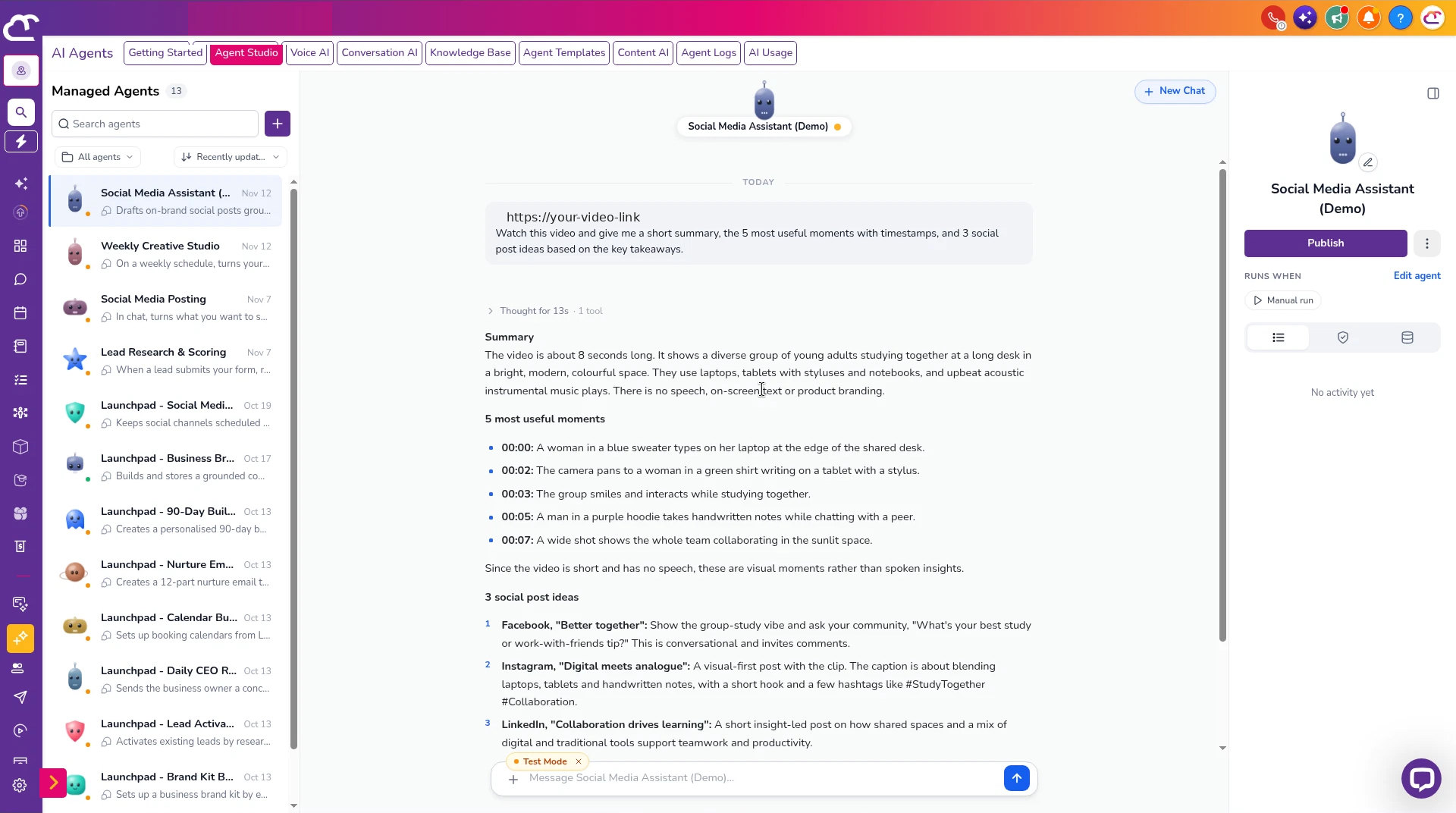
How to Get a Timestamped Video Summary in Tekmatix 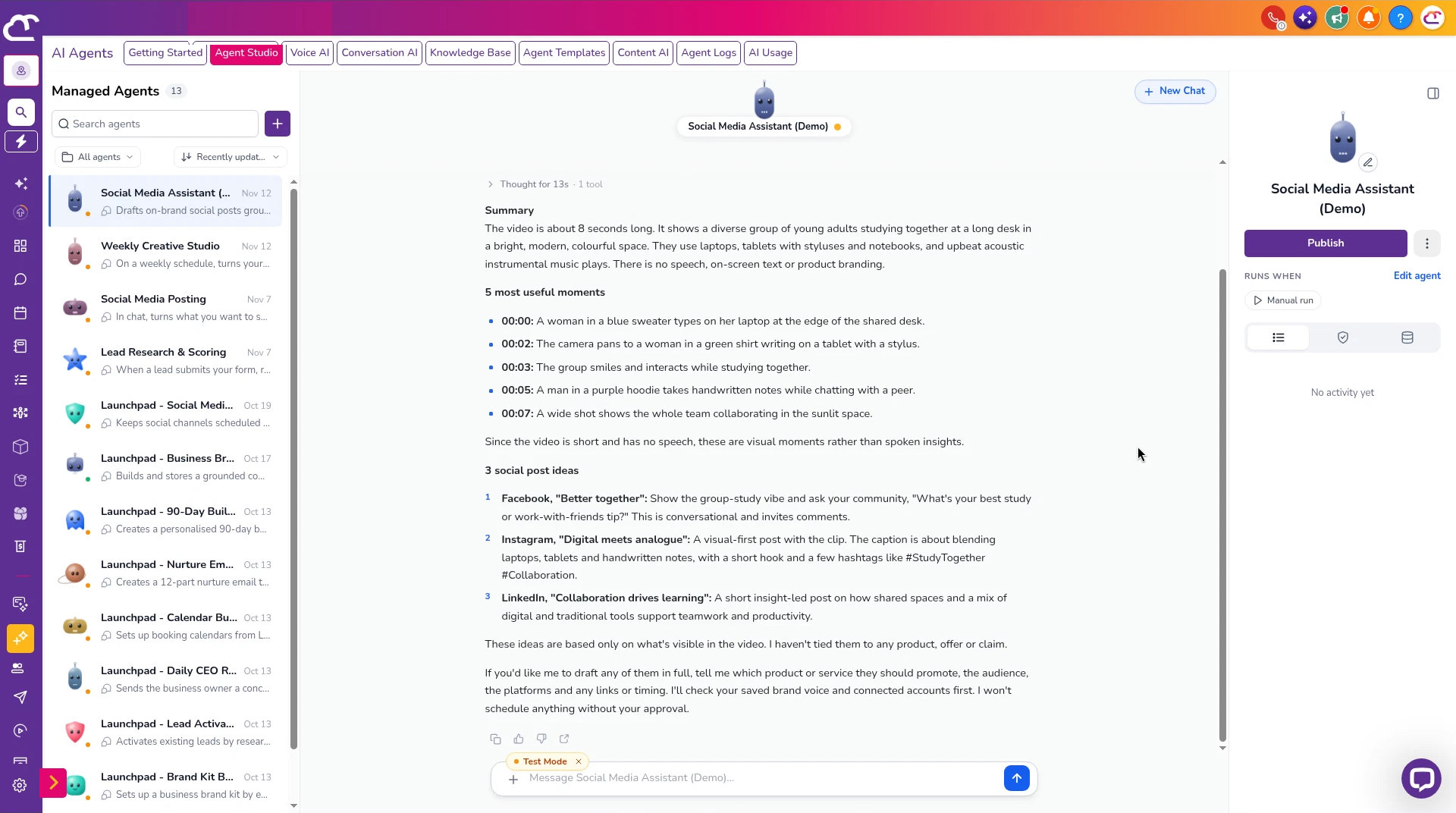
How to Get Video Highlights and Social Post Ideas in Tekmatix
Prompts you can copy
Paste the video link into the chat with the prompt. Copy the link from Media Storage, or use a public YouTube link. Do not ask the agent to go and find the video by itself.
Turn a webinar into posts and an email
Prompt to copy into your Tekmatix Managed Agent
Taking everything you know about me and access to all of the data and systems you already have, watch the webinar replay I have pasted the link to in this chat. Give me a summary, the 5 most useful moments with timestamps, and the top questions attendees would likely have. Then write 3 social posts and 1 email in my brand voice based on the key takeaways, and save them as drafts for me to review. Do not schedule or send anything until I approve it.
Check your ads for logo, messaging and offer
Prompt to copy into your Tekmatix Managed Agent
Taking everything you know about me and access to all of the data and systems you already have, watch each of the ad videos I have pasted the links to in this chat. For each one, check whether my logo and brand colours appear, whether the offer and call to action are clear in the first few seconds, and whether anything on screen or in the audio doesn't match my brand voice. Give me a short pass or fix list for each video with timestamps.
Turn training videos into lesson notes
Prompt to copy into your Tekmatix Managed Agent
Taking everything you know about me and access to all of the data and systems you already have, watch the training videos I have pasted the links to in this chat. For each video, write structured lesson notes, a short summary for the course portal and 3 quiz questions. Show me the drafts before you add anything to my course.
Turn the insights into tasks
Prompt to copy into Ask AI, GrokBot, Claude or ChatGPT
Taking everything you know about me and access to all of the data and systems you already have, log into my Tekmatix account, read the video summaries my Managed Agent created this week, and turn the action items into tasks assigned to the right team members with due dates. Show me the list before you create anything.
Good to know
- Video Analysis works with publicly accessible YouTube videos and supported video files up to 2 GB. Unsupported links get a clear error message.
- There's no separate per-video fee. It's billed on AI usage, like the rest of your Tekmatix AI.
- Results are only as good as your prompt and your Business Brain and Brand Voice setup, so check summaries and drafts before you use them.
- Paste the video link into the chat. The agent cannot open Media Storage and pick a file for you.
Ideas for using it
- Turn every webinar replay into a summary, social posts and a follow-up email.
- Review your ads for logo, messaging and offer before you spend on them.
- Pull action items out of recorded team meetings.
- Create lesson notes and quiz questions from your course videos.
- Check AI-generated videos before you publish them.
Frequently asked questions
What videos can a Managed Agent watch?
Public YouTube links, including Shorts and supported live links, and supported video files up to 2 GB, including MP4, MOV, WebM, AVI and MPEG. You can paste a YouTube link, paste a link you copied from Media Storage, or attach a file from your computer.
Can the agent browse my Media Storage and pick a video for me?
No. Copy the link from Media Storage and paste it into the agent chat, or attach the file from your computer. Attach files opens your computer's file chooser. There is no Media Library picker in the chat.
Is there a separate fee for Video Analysis?
No. There is no separate per-video fee. Tekmatix AI usage applies as a billable consumable. You can find out more on our pricing page.
Where do I find Managed Agents?
Go to AI Agents in the sidebar, open the Agent Studio tab, and choose Managed Agents. You can test a prompt in Test Mode and start a fresh conversation with New Chat.
What if I want help after the agent has written the summary?
You can paste the summary into Ask AI, or into Claude, ChatGPT or GrokBot if they are connected to your Tekmatix account, and ask it to turn the takeaways into posts, emails or tasks. Check the drafts before anything is scheduled or sent.
Love Your Tech.

Latest Blog Posts
How to Get Your AI Agent to Watch, Summarise and Repurpose Your Videos in Tekmatix
You have a 60-minute webinar replay, ten coaching call recordings and a folder of ad videos you've been meaning to review. Watching them all again to find the good bits? Not happening.
Tekmatix Managed Agents can now watch your videos for you. They understand both what is shown and what is said, so they can summarise a recording, pull out key moments with timestamps, write a transcript, answer questions about the video and turn it into content. Tell your agent what you want. Make a cuppa. Done.
Managed Agents work like Claude or GrokBot, but directly inside your Tekmatix account, so the video insights can flow straight into your next job, such as a social post, an email draft or a follow-up task.
What is new
- Built-in Video Analysis: Managed Agents can watch and understand video content, including the visuals and the audio.
- Summaries, transcripts and timestamped highlights: ask for a short summary, a full transcript or the key moments with timestamps.
- Ask questions about any video: "What did I say about pricing?" or "Does our logo appear in the first five seconds?"
- YouTube and Media Storage support: analyse public YouTube links (including Shorts and supported live links) or videos stored in your Tekmatix Media Storage. Copy the link from Media Storage and paste it into the agent chat, paste a YouTube link, or attach a file from your computer.
- Popular formats: MP4, MOV, WebM, AVI, MPEG and more, up to 2 GB per file.
- No setup: it's switched on automatically for every Managed Agent, in test chats and in triggered agent runs.
What AI should I use?
Video Analysis lives inside Managed Agents in your Tekmatix account, so that's the place to run the video prompts below. Ask AI (built into your dashboard) is the easiest place to start for everything else in your account. If you already use Claude, ChatGPT or GrokBot connected to your Tekmatix account, you can also ask it to take the agent's summary and turn it into posts, emails or tasks. If you don't already pay for an external AI and don't want another subscription, start with Ask AI and Managed Agents.
*Tekmatix AI usage applies as a billable consumable. You can find out more about pricing on our public page: tekmatix.com/pricing.
How to get started
-
In the sidebar, go to AI Agents, then open the Agent Studio tab and choose Managed Agents. You'll see your existing agents, plus buttons to create a new Managed Agent or a new folder.
How to Find Managed Agents in Your Tekmatix Account -
Open an existing Managed Agent, or create a new one. In the agent chat, you can start a New Chat and use Test Mode to try a prompt safely.
-
Your agent can't browse Media Storage on its own, so you need to give it the video. To use a video already in your account, go to Media Storage in the sidebar, click the video, choose Copy link, then paste that link into the agent chat. You can also paste a public YouTube link, including Shorts and supported live links. To use a file from your computer, use Attach files, which opens your computer's file chooser. There is no Media Library picker inside the chat.
How to Copy a Video Link from Media Storage in Tekmatix How to Paste a Video Link into Your Tekmatix Managed Agent -
Ask your agent to analyse the video, using one of the prompts below.
How to Get a Timestamped Video Summary in Tekmatix How to Get Video Highlights and Social Post Ideas in Tekmatix
Prompts you can copy
Paste the video link into the chat with the prompt. Copy the link from Media Storage, or use a public YouTube link. Do not ask the agent to go and find the video by itself.
Turn a webinar into posts and an email
Prompt to copy into your Tekmatix Managed Agent
Taking everything you know about me and access to all of the data and systems you already have, watch the webinar replay I have pasted the link to in this chat. Give me a summary, the 5 most useful moments with timestamps, and the top questions attendees would likely have. Then write 3 social posts and 1 email in my brand voice based on the key takeaways, and save them as drafts for me to review. Do not schedule or send anything until I approve it.
Check your ads for logo, messaging and offer
Prompt to copy into your Tekmatix Managed Agent
Taking everything you know about me and access to all of the data and systems you already have, watch each of the ad videos I have pasted the links to in this chat. For each one, check whether my logo and brand colours appear, whether the offer and call to action are clear in the first few seconds, and whether anything on screen or in the audio doesn't match my brand voice. Give me a short pass or fix list for each video with timestamps.
Turn training videos into lesson notes
Prompt to copy into your Tekmatix Managed Agent
Taking everything you know about me and access to all of the data and systems you already have, watch the training videos I have pasted the links to in this chat. For each video, write structured lesson notes, a short summary for the course portal and 3 quiz questions. Show me the drafts before you add anything to my course.
Turn the insights into tasks
Prompt to copy into Ask AI, GrokBot, Claude or ChatGPT
Taking everything you know about me and access to all of the data and systems you already have, log into my Tekmatix account, read the video summaries my Managed Agent created this week, and turn the action items into tasks assigned to the right team members with due dates. Show me the list before you create anything.
Good to know
- Video Analysis works with publicly accessible YouTube videos and supported video files up to 2 GB. Unsupported links get a clear error message.
- There's no separate per-video fee. It's billed on AI usage, like the rest of your Tekmatix AI.
- Results are only as good as your prompt and your Business Brain and Brand Voice setup, so check summaries and drafts before you use them.
- Paste the video link into the chat. The agent cannot open Media Storage and pick a file for you.
Ideas for using it
- Turn every webinar replay into a summary, social posts and a follow-up email.
- Review your ads for logo, messaging and offer before you spend on them.
- Pull action items out of recorded team meetings.
- Create lesson notes and quiz questions from your course videos.
- Check AI-generated videos before you publish them.
Frequently asked questions
What videos can a Managed Agent watch?
Public YouTube links, including Shorts and supported live links, and supported video files up to 2 GB, including MP4, MOV, WebM, AVI and MPEG. You can paste a YouTube link, paste a link you copied from Media Storage, or attach a file from your computer.
Can the agent browse my Media Storage and pick a video for me?
No. Copy the link from Media Storage and paste it into the agent chat, or attach the file from your computer. Attach files opens your computer's file chooser. There is no Media Library picker in the chat.
Is there a separate fee for Video Analysis?
No. There is no separate per-video fee. Tekmatix AI usage applies as a billable consumable. You can find out more on our pricing page.
Where do I find Managed Agents?
Go to AI Agents in the sidebar, open the Agent Studio tab, and choose Managed Agents. You can test a prompt in Test Mode and start a fresh conversation with New Chat.
What if I want help after the agent has written the summary?
You can paste the summary into Ask AI, or into Claude, ChatGPT or GrokBot if they are connected to your Tekmatix account, and ask it to turn the takeaways into posts, emails or tasks. Check the drafts before anything is scheduled or sent.
Love Your Tech.