
Use the search bar below to find help guides and articles for using Tekmatix

Targeting the right audience is key to running successful ad campaigns. With Tekmatix Ad Manager, you can use your own customer data to create Custom Audiences, reaching specific individuals on Facebook and Instagram for highly relevant campaigns. This guide walks you through creating Customer List Custom Audiences, including options for static or dynamic audiences using Smart Lists, and shows how to use them in campaigns effectively.
A Customer List Custom Audience allows you to:
Precisely target existing customers using email addresses, phone numbers, or other identifiers.
Improve ad relevance and campaign performance by reaching people who already know your brand.
Re-engage past customers to encourage repeat purchases or service upgrades.
Segment your audience to create high-value or niche-specific campaigns.
Build Lookalike Audiences to find new potential customers similar to your existing base.
Using this feature ensures your marketing budget is spent on the people most likely to convert.
You can create audiences in two main ways:
During Campaign Creation:
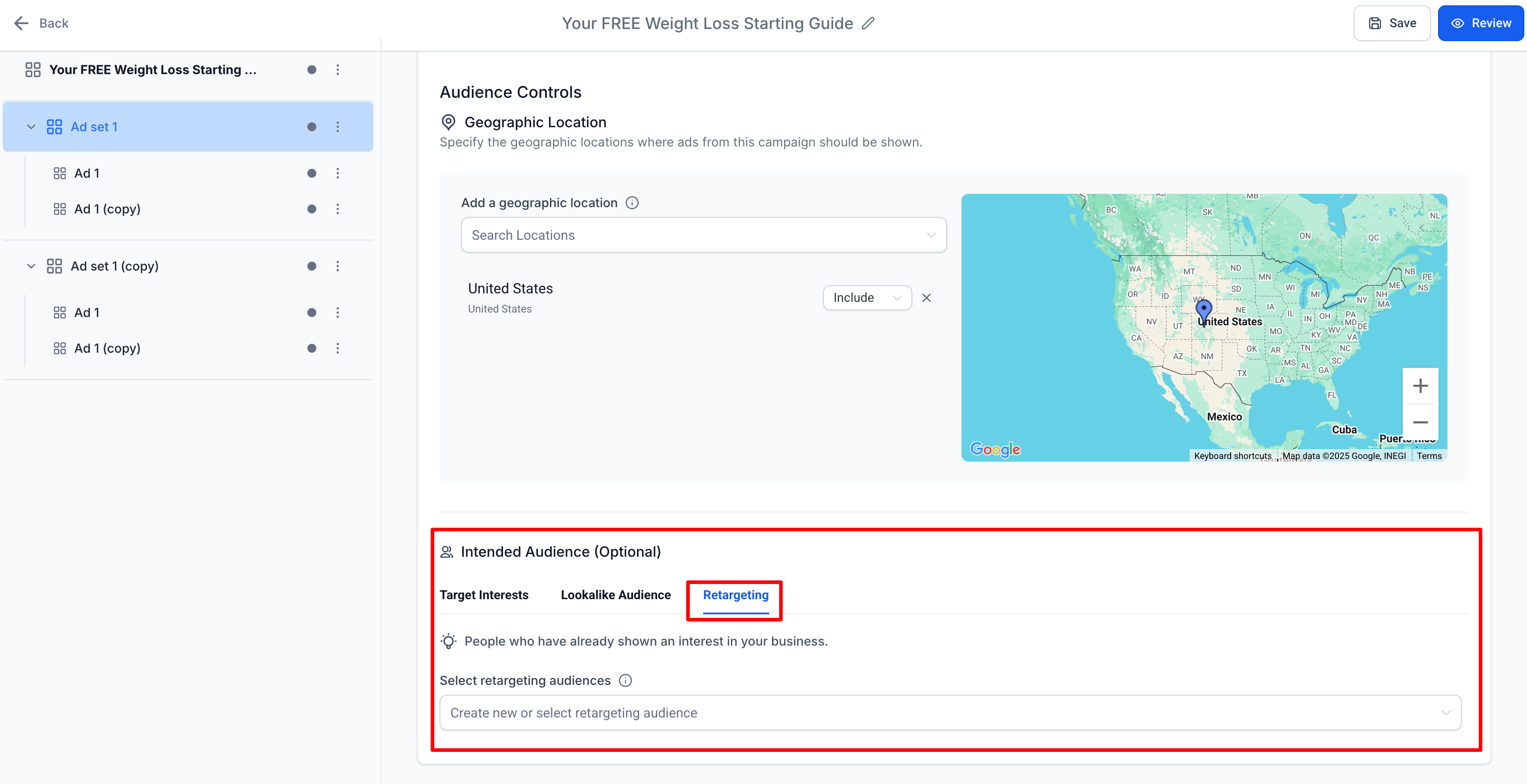
Go to the ad set level → Audience Controls → Intended Audience.
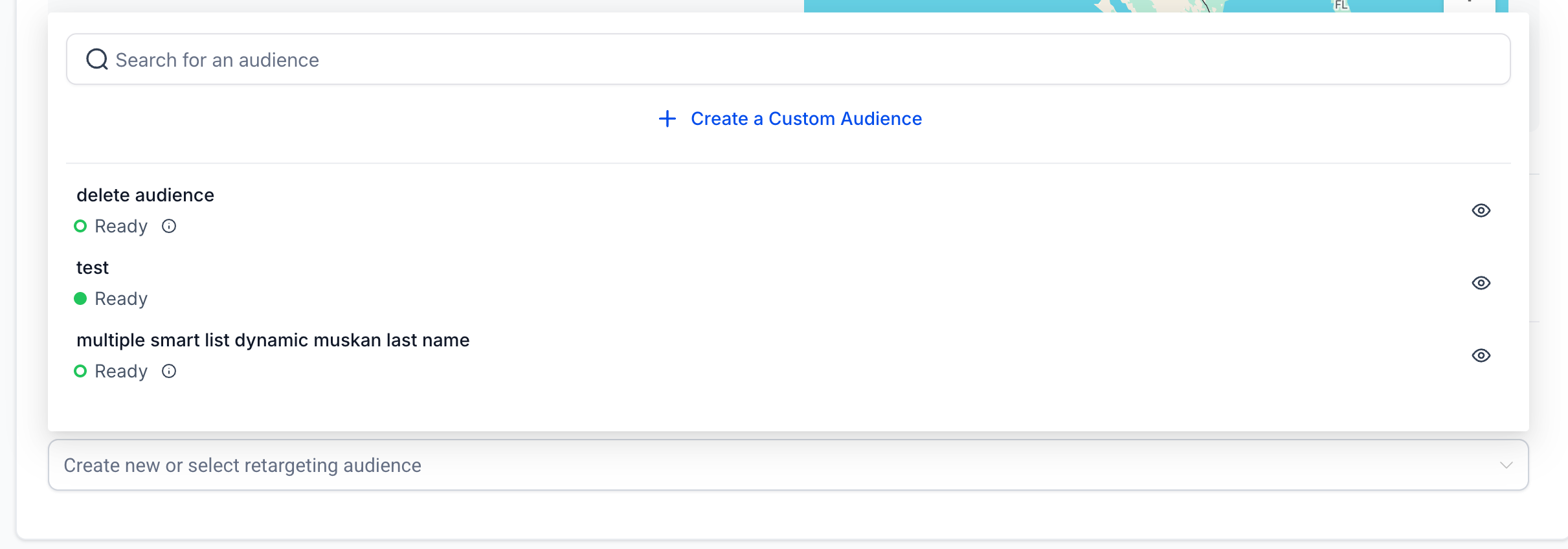
Under the Retargeting tab, click the dropdown for “Create new or select retargeting audience” → Create a Custom Audience.
From Ad Manager Settings:
Navigate to Ad Manager Settings → Meta Audiences.
Create audiences in advance for use in future campaigns.


Click Create a Custom Audience (campaign flow or Audiences tab).
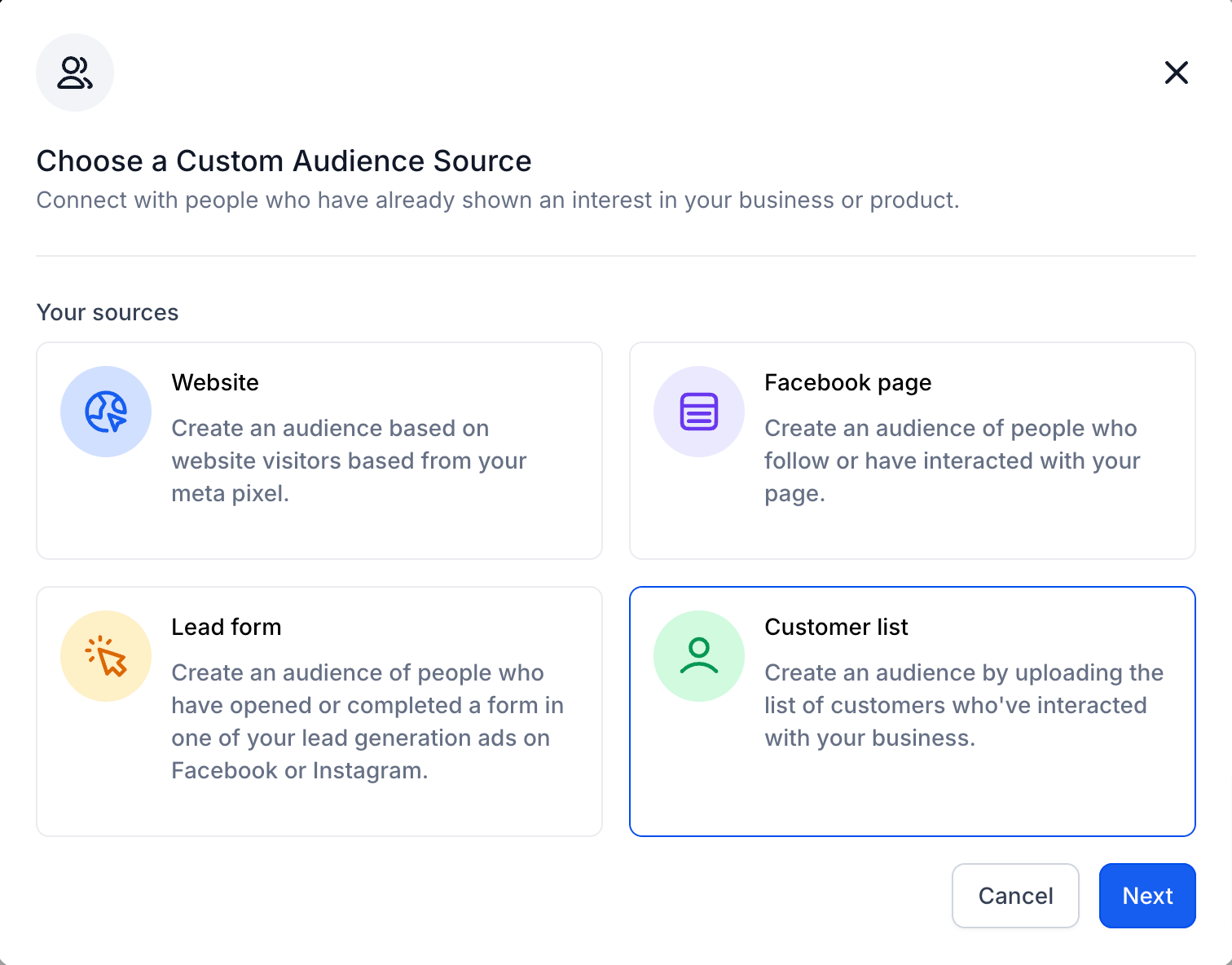
Select Customer List as the source.

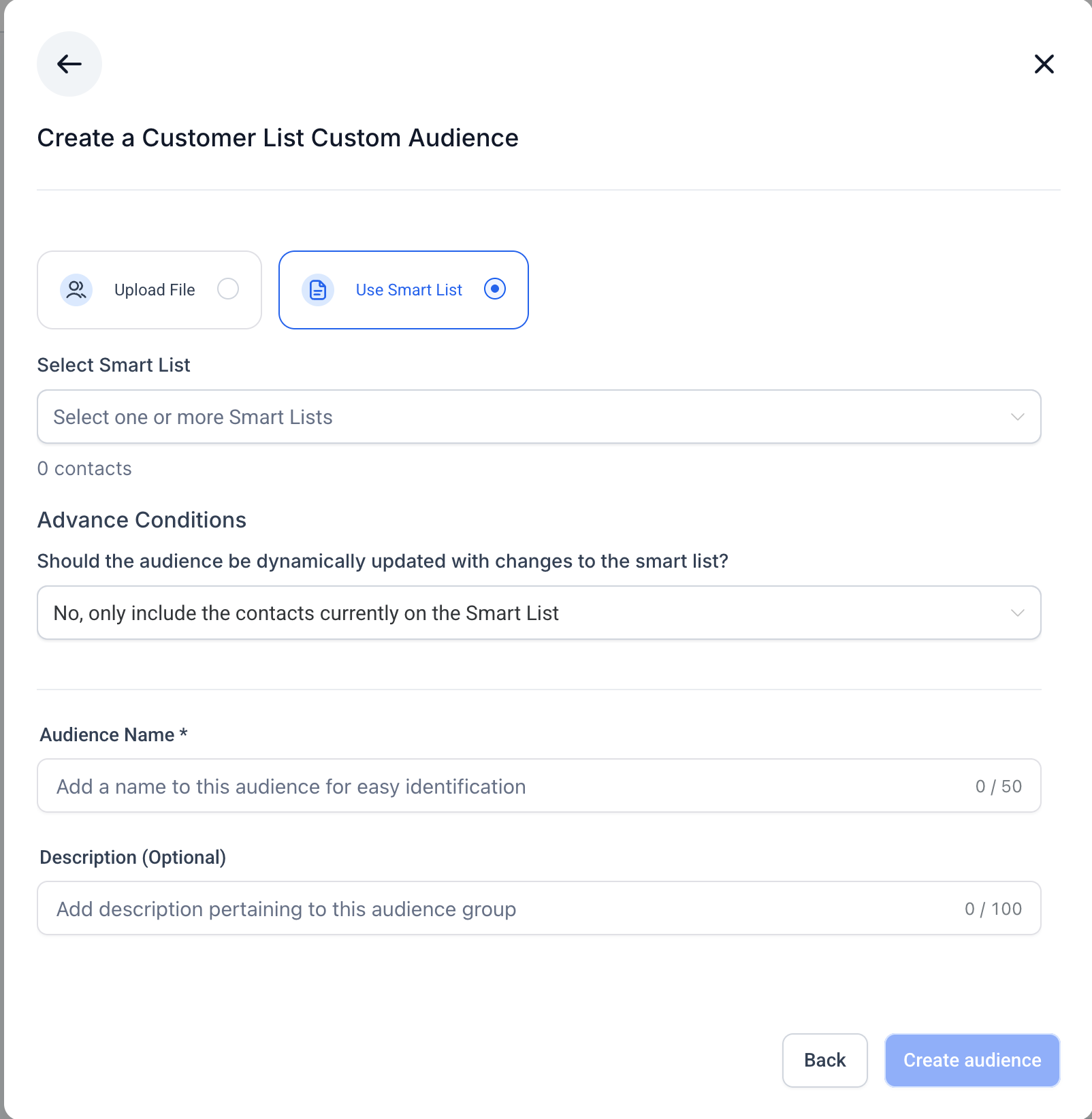
You have two methods:
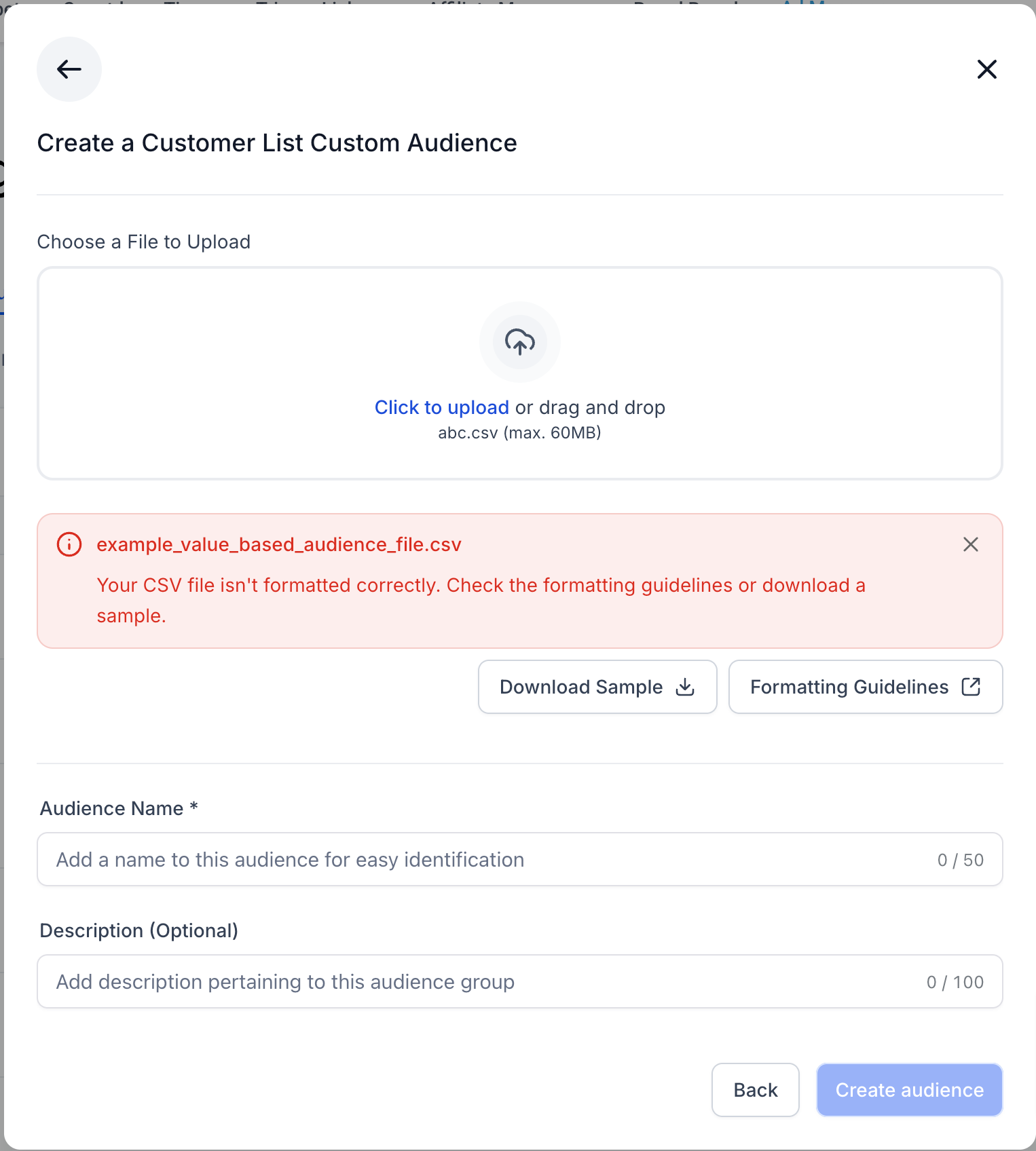
A. CSV Upload
Upload a CSV file with customer data (emails, phone numbers, etc.).
Follow Tekmatix formatting guidelines and use the sample file provided.
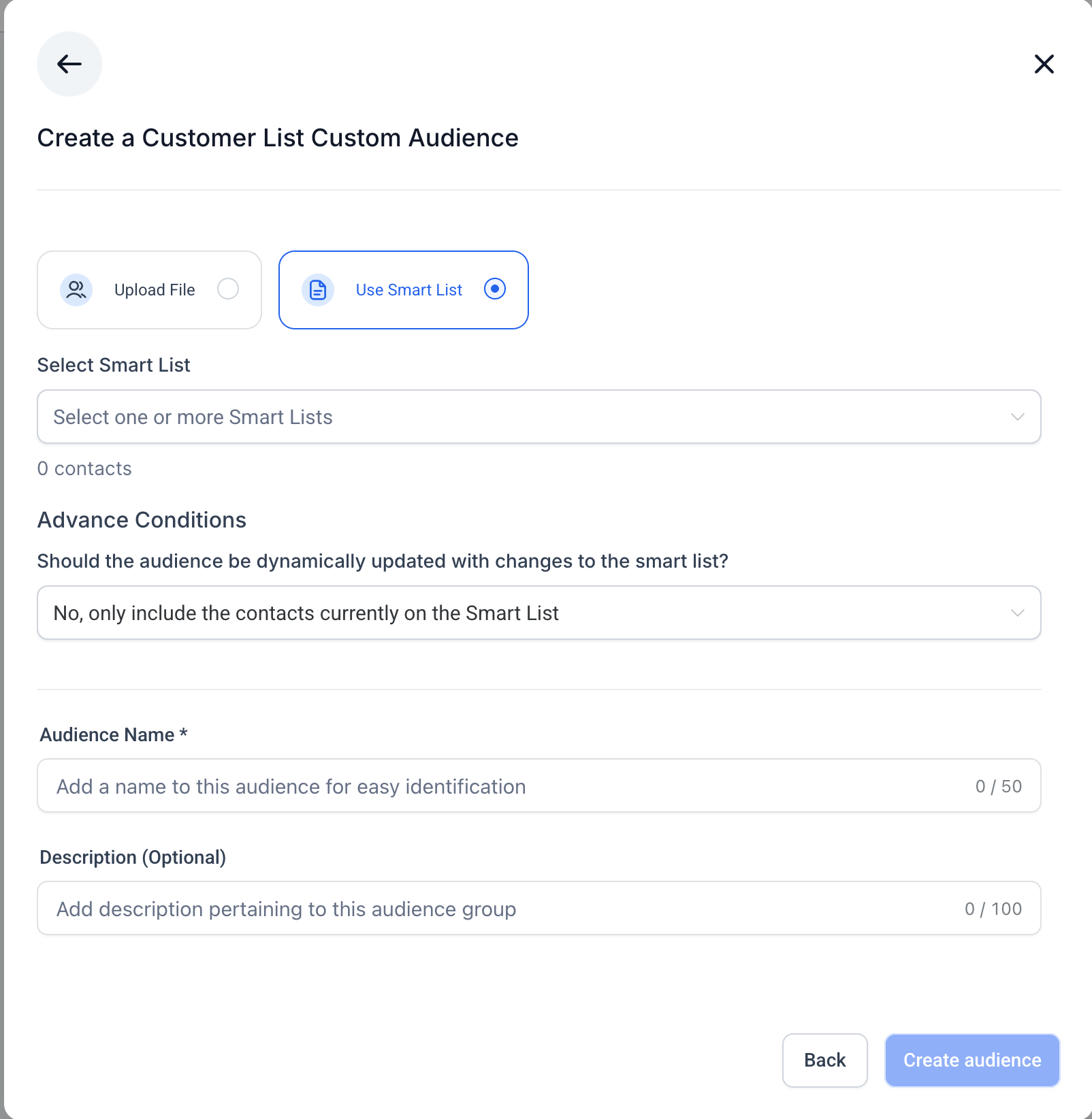
B. Use Smart Lists (Static vs Dynamic)
Choose Use Smart List.
Select one or more Smart Lists from your Contacts section.
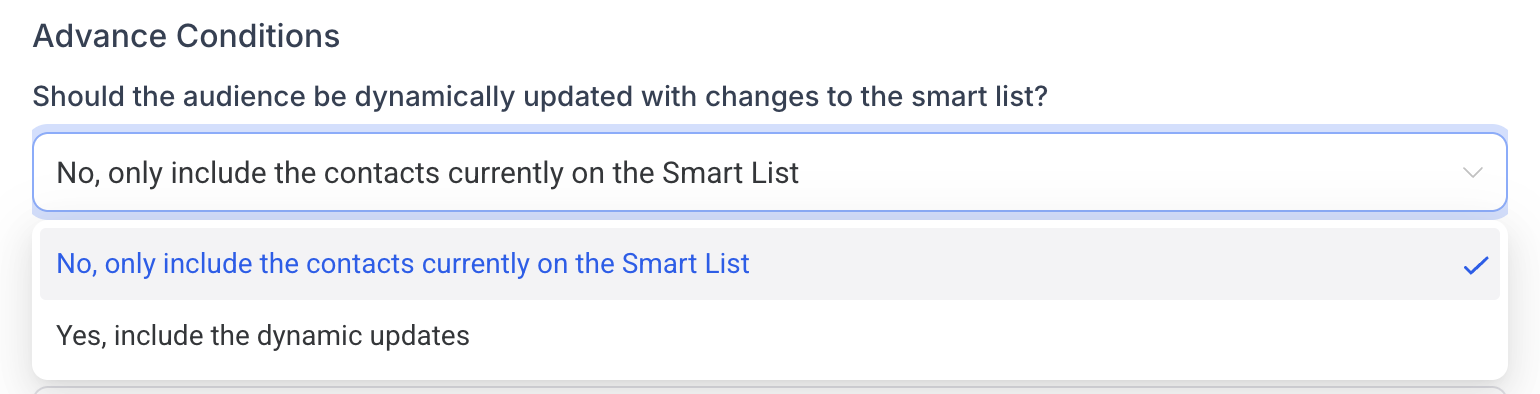
Decide if the audience should be Static or Dynamic:
Static Audience
Includes only contacts present at the time of creation.
Does not update automatically.
Ideal for controlled targeting or one-time campaigns.
Dynamic Audience
Automatically updates when the Smart List changes.
New contacts are added, removed contacts are excluded.
Ideal for ongoing campaigns with continuously updated contacts.
Review total contact count, add an audience name and optional description.
Click Create Audience. The summary will indicate whether the audience is static or dynamic.
Minimum audience size requirements apply for campaign use.
Incorrect CSV formatting can cause upload errors.
Always accept Tekmatix’s Customer List Custom Audience Terms of Service before creating an audience.
Once created, the audience appears in the Retargeting Audience dropdown and the Audiences tab for campaign selection.
Mandy runs an e-commerce store and wants to launch a campaign promoting accessories to customers who purchased shoes in the last 30 days.
Steps:
Create a Smart List of customers who bought shoes in the last 30 days.
Use this Smart List to create a Dynamic Customer List Custom Audience in Tekmatix Ad Manager.
Launch a retargeting campaign targeting this audience with personalized ads featuring shoe accessories.
Outcome:
New buyers added to the Smart List automatically receive the campaign.
Customers who return or unsubscribe are excluded dynamically.
Mandy maximizes engagement and improves ROI by targeting only relevant, recent buyers.

Targeting the right audience is key to running successful ad campaigns. With Tekmatix Ad Manager, you can use your own customer data to create Custom Audiences, reaching specific individuals on Facebook and Instagram for highly relevant campaigns. This guide walks you through creating Customer List Custom Audiences, including options for static or dynamic audiences using Smart Lists, and shows how to use them in campaigns effectively.
A Customer List Custom Audience allows you to:
Precisely target existing customers using email addresses, phone numbers, or other identifiers.
Improve ad relevance and campaign performance by reaching people who already know your brand.
Re-engage past customers to encourage repeat purchases or service upgrades.
Segment your audience to create high-value or niche-specific campaigns.
Build Lookalike Audiences to find new potential customers similar to your existing base.
Using this feature ensures your marketing budget is spent on the people most likely to convert.
You can create audiences in two main ways:
During Campaign Creation:
Go to the ad set level → Audience Controls → Intended Audience.
Under the Retargeting tab, click the dropdown for “Create new or select retargeting audience” → Create a Custom Audience.


From Ad Manager Settings:
Navigate to Ad Manager Settings → Meta Audiences.
Create audiences in advance for use in future campaigns.


Click Create a Custom Audience (campaign flow or Audiences tab).

Select Customer List as the source.


You have two methods:
A. CSV Upload
Upload a CSV file with customer data (emails, phone numbers, etc.).
Follow Tekmatix formatting guidelines and use the sample file provided.
B. Use Smart Lists (Static vs Dynamic)
Choose Use Smart List.
Select one or more Smart Lists from your Contacts section.
Decide if the audience should be Static or Dynamic:
Static Audience
Includes only contacts present at the time of creation.
Does not update automatically.
Ideal for controlled targeting or one-time campaigns.
Dynamic Audience
Automatically updates when the Smart List changes.
New contacts are added, removed contacts are excluded.
Ideal for ongoing campaigns with continuously updated contacts.
Review total contact count, add an audience name and optional description.
Click Create Audience. The summary will indicate whether the audience is static or dynamic.


Minimum audience size requirements apply for campaign use.
Incorrect CSV formatting can cause upload errors.
Always accept Tekmatix’s Customer List Custom Audience Terms of Service before creating an audience.
Once created, the audience appears in the Retargeting Audience dropdown and the Audiences tab for campaign selection.

Mandy runs an e-commerce store and wants to launch a campaign promoting accessories to customers who purchased shoes in the last 30 days.
Steps:
Create a Smart List of customers who bought shoes in the last 30 days.
Use this Smart List to create a Dynamic Customer List Custom Audience in Tekmatix Ad Manager.
Launch a retargeting campaign targeting this audience with personalized ads featuring shoe accessories.
Outcome:
New buyers added to the Smart List automatically receive the campaign.
Customers who return or unsubscribe are excluded dynamically.
Mandy maximizes engagement and improves ROI by targeting only relevant, recent buyers.


Targeting the right audience is key to running successful ad campaigns. With Tekmatix Ad Manager, you can use your own customer data to create Custom Audiences, reaching specific individuals on Facebook and Instagram for highly relevant campaigns. This guide walks you through creating Customer List Custom Audiences, including options for static or dynamic audiences using Smart Lists, and shows how to use them in campaigns effectively.
A Customer List Custom Audience allows you to:
Precisely target existing customers using email addresses, phone numbers, or other identifiers.
Improve ad relevance and campaign performance by reaching people who already know your brand.
Re-engage past customers to encourage repeat purchases or service upgrades.
Segment your audience to create high-value or niche-specific campaigns.
Build Lookalike Audiences to find new potential customers similar to your existing base.
Using this feature ensures your marketing budget is spent on the people most likely to convert.
You can create audiences in two main ways:
During Campaign Creation:
Go to the ad set level → Audience Controls → Intended Audience.
Under the Retargeting tab, click the dropdown for “Create new or select retargeting audience” → Create a Custom Audience.


From Ad Manager Settings:
Navigate to Ad Manager Settings → Meta Audiences.
Create audiences in advance for use in future campaigns.


Click Create a Custom Audience (campaign flow or Audiences tab).

Select Customer List as the source.


You have two methods:
A. CSV Upload
Upload a CSV file with customer data (emails, phone numbers, etc.).
Follow Tekmatix formatting guidelines and use the sample file provided.
B. Use Smart Lists (Static vs Dynamic)
Choose Use Smart List.
Select one or more Smart Lists from your Contacts section.
Decide if the audience should be Static or Dynamic:
Static Audience
Includes only contacts present at the time of creation.
Does not update automatically.
Ideal for controlled targeting or one-time campaigns.
Dynamic Audience
Automatically updates when the Smart List changes.
New contacts are added, removed contacts are excluded.
Ideal for ongoing campaigns with continuously updated contacts.
Review total contact count, add an audience name and optional description.
Click Create Audience. The summary will indicate whether the audience is static or dynamic.


Minimum audience size requirements apply for campaign use.
Incorrect CSV formatting can cause upload errors.
Always accept Tekmatix’s Customer List Custom Audience Terms of Service before creating an audience.
Once created, the audience appears in the Retargeting Audience dropdown and the Audiences tab for campaign selection.

Mandy runs an e-commerce store and wants to launch a campaign promoting accessories to customers who purchased shoes in the last 30 days.
Steps:
Create a Smart List of customers who bought shoes in the last 30 days.
Use this Smart List to create a Dynamic Customer List Custom Audience in Tekmatix Ad Manager.
Launch a retargeting campaign targeting this audience with personalized ads featuring shoe accessories.
Outcome:
New buyers added to the Smart List automatically receive the campaign.
Customers who return or unsubscribe are excluded dynamically.
Mandy maximizes engagement and improves ROI by targeting only relevant, recent buyers.

Targeting the right audience is key to running successful ad campaigns. With Tekmatix Ad Manager, you can use your own customer data to create Custom Audiences, reaching specific individuals on Facebook and Instagram for highly relevant campaigns. This guide walks you through creating Customer List Custom Audiences, including options for static or dynamic audiences using Smart Lists, and shows how to use them in campaigns effectively.
A Customer List Custom Audience allows you to:
Precisely target existing customers using email addresses, phone numbers, or other identifiers.
Improve ad relevance and campaign performance by reaching people who already know your brand.
Re-engage past customers to encourage repeat purchases or service upgrades.
Segment your audience to create high-value or niche-specific campaigns.
Build Lookalike Audiences to find new potential customers similar to your existing base.
Using this feature ensures your marketing budget is spent on the people most likely to convert.
You can create audiences in two main ways:
During Campaign Creation:
Go to the ad set level → Audience Controls → Intended Audience.
Under the Retargeting tab, click the dropdown for “Create new or select retargeting audience” → Create a Custom Audience.


From Ad Manager Settings:
Navigate to Ad Manager Settings → Meta Audiences.
Create audiences in advance for use in future campaigns.


Click Create a Custom Audience (campaign flow or Audiences tab).

Select Customer List as the source.


You have two methods:
A. CSV Upload
Upload a CSV file with customer data (emails, phone numbers, etc.).
Follow Tekmatix formatting guidelines and use the sample file provided.
B. Use Smart Lists (Static vs Dynamic)
Choose Use Smart List.
Select one or more Smart Lists from your Contacts section.
Decide if the audience should be Static or Dynamic:
Static Audience
Includes only contacts present at the time of creation.
Does not update automatically.
Ideal for controlled targeting or one-time campaigns.
Dynamic Audience
Automatically updates when the Smart List changes.
New contacts are added, removed contacts are excluded.
Ideal for ongoing campaigns with continuously updated contacts.
Review total contact count, add an audience name and optional description.
Click Create Audience. The summary will indicate whether the audience is static or dynamic.


Minimum audience size requirements apply for campaign use.
Incorrect CSV formatting can cause upload errors.
Always accept Tekmatix’s Customer List Custom Audience Terms of Service before creating an audience.
Once created, the audience appears in the Retargeting Audience dropdown and the Audiences tab for campaign selection.

Mandy runs an e-commerce store and wants to launch a campaign promoting accessories to customers who purchased shoes in the last 30 days.
Steps:
Create a Smart List of customers who bought shoes in the last 30 days.
Use this Smart List to create a Dynamic Customer List Custom Audience in Tekmatix Ad Manager.
Launch a retargeting campaign targeting this audience with personalized ads featuring shoe accessories.
Outcome:
New buyers added to the Smart List automatically receive the campaign.
Customers who return or unsubscribe are excluded dynamically.
Mandy maximizes engagement and improves ROI by targeting only relevant, recent buyers.

Targeting the right audience is key to running successful ad campaigns. With Tekmatix Ad Manager, you can use your own customer data to create Custom Audiences, reaching specific individuals on Facebook and Instagram for highly relevant campaigns. This guide walks you through creating Customer List Custom Audiences, including options for static or dynamic audiences using Smart Lists, and shows how to use them in campaigns effectively.
A Customer List Custom Audience allows you to:
Precisely target existing customers using email addresses, phone numbers, or other identifiers.
Improve ad relevance and campaign performance by reaching people who already know your brand.
Re-engage past customers to encourage repeat purchases or service upgrades.
Segment your audience to create high-value or niche-specific campaigns.
Build Lookalike Audiences to find new potential customers similar to your existing base.
Using this feature ensures your marketing budget is spent on the people most likely to convert.
You can create audiences in two main ways:
During Campaign Creation:
Go to the ad set level → Audience Controls → Intended Audience.
Under the Retargeting tab, click the dropdown for “Create new or select retargeting audience” → Create a Custom Audience.


From Ad Manager Settings:
Navigate to Ad Manager Settings → Meta Audiences.
Create audiences in advance for use in future campaigns.


Click Create a Custom Audience (campaign flow or Audiences tab).

Select Customer List as the source.


You have two methods:
A. CSV Upload
Upload a CSV file with customer data (emails, phone numbers, etc.).
Follow Tekmatix formatting guidelines and use the sample file provided.
B. Use Smart Lists (Static vs Dynamic)
Choose Use Smart List.
Select one or more Smart Lists from your Contacts section.
Decide if the audience should be Static or Dynamic:
Static Audience
Includes only contacts present at the time of creation.
Does not update automatically.
Ideal for controlled targeting or one-time campaigns.
Dynamic Audience
Automatically updates when the Smart List changes.
New contacts are added, removed contacts are excluded.
Ideal for ongoing campaigns with continuously updated contacts.
Review total contact count, add an audience name and optional description.
Click Create Audience. The summary will indicate whether the audience is static or dynamic.


Minimum audience size requirements apply for campaign use.
Incorrect CSV formatting can cause upload errors.
Always accept Tekmatix’s Customer List Custom Audience Terms of Service before creating an audience.
Once created, the audience appears in the Retargeting Audience dropdown and the Audiences tab for campaign selection.

Mandy runs an e-commerce store and wants to launch a campaign promoting accessories to customers who purchased shoes in the last 30 days.
Steps:
Create a Smart List of customers who bought shoes in the last 30 days.
Use this Smart List to create a Dynamic Customer List Custom Audience in Tekmatix Ad Manager.
Launch a retargeting campaign targeting this audience with personalized ads featuring shoe accessories.
Outcome:
New buyers added to the Smart List automatically receive the campaign.
Customers who return or unsubscribe are excluded dynamically.
Mandy maximizes engagement and improves ROI by targeting only relevant, recent buyers.

Targeting the right audience is key to running successful ad campaigns. With Tekmatix Ad Manager, you can use your own customer data to create Custom Audiences, reaching specific individuals on Facebook and Instagram for highly relevant campaigns. This guide walks you through creating Customer List Custom Audiences, including options for static or dynamic audiences using Smart Lists, and shows how to use them in campaigns effectively.
A Customer List Custom Audience allows you to:
Precisely target existing customers using email addresses, phone numbers, or other identifiers.
Improve ad relevance and campaign performance by reaching people who already know your brand.
Re-engage past customers to encourage repeat purchases or service upgrades.
Segment your audience to create high-value or niche-specific campaigns.
Build Lookalike Audiences to find new potential customers similar to your existing base.
Using this feature ensures your marketing budget is spent on the people most likely to convert.
You can create audiences in two main ways:
During Campaign Creation:
Go to the ad set level → Audience Controls → Intended Audience.
Under the Retargeting tab, click the dropdown for “Create new or select retargeting audience” → Create a Custom Audience.


From Ad Manager Settings:
Navigate to Ad Manager Settings → Meta Audiences.
Create audiences in advance for use in future campaigns.


Click Create a Custom Audience (campaign flow or Audiences tab).

Select Customer List as the source.


You have two methods:
A. CSV Upload
Upload a CSV file with customer data (emails, phone numbers, etc.).
Follow Tekmatix formatting guidelines and use the sample file provided.
B. Use Smart Lists (Static vs Dynamic)
Choose Use Smart List.
Select one or more Smart Lists from your Contacts section.
Decide if the audience should be Static or Dynamic:
Static Audience
Includes only contacts present at the time of creation.
Does not update automatically.
Ideal for controlled targeting or one-time campaigns.
Dynamic Audience
Automatically updates when the Smart List changes.
New contacts are added, removed contacts are excluded.
Ideal for ongoing campaigns with continuously updated contacts.
Review total contact count, add an audience name and optional description.
Click Create Audience. The summary will indicate whether the audience is static or dynamic.


Minimum audience size requirements apply for campaign use.
Incorrect CSV formatting can cause upload errors.
Always accept Tekmatix’s Customer List Custom Audience Terms of Service before creating an audience.
Once created, the audience appears in the Retargeting Audience dropdown and the Audiences tab for campaign selection.

Mandy runs an e-commerce store and wants to launch a campaign promoting accessories to customers who purchased shoes in the last 30 days.
Steps:
Create a Smart List of customers who bought shoes in the last 30 days.
Use this Smart List to create a Dynamic Customer List Custom Audience in Tekmatix Ad Manager.
Launch a retargeting campaign targeting this audience with personalized ads featuring shoe accessories.
Outcome:
New buyers added to the Smart List automatically receive the campaign.
Customers who return or unsubscribe are excluded dynamically.
Mandy maximizes engagement and improves ROI by targeting only relevant, recent buyers.


Targeting the right audience is key to running successful ad campaigns. With Tekmatix Ad Manager, you can use your own customer data to create Custom Audiences, reaching specific individuals on Facebook and Instagram for highly relevant campaigns. This guide walks you through creating Customer List Custom Audiences, including options for static or dynamic audiences using Smart Lists, and shows how to use them in campaigns effectively.
A Customer List Custom Audience allows you to:
Precisely target existing customers using email addresses, phone numbers, or other identifiers.
Improve ad relevance and campaign performance by reaching people who already know your brand.
Re-engage past customers to encourage repeat purchases or service upgrades.
Segment your audience to create high-value or niche-specific campaigns.
Build Lookalike Audiences to find new potential customers similar to your existing base.
Using this feature ensures your marketing budget is spent on the people most likely to convert.
You can create audiences in two main ways:
During Campaign Creation:
Go to the ad set level → Audience Controls → Intended Audience.
Under the Retargeting tab, click the dropdown for “Create new or select retargeting audience” → Create a Custom Audience.


From Ad Manager Settings:
Navigate to Ad Manager Settings → Meta Audiences.
Create audiences in advance for use in future campaigns.


Click Create a Custom Audience (campaign flow or Audiences tab).

Select Customer List as the source.


You have two methods:
A. CSV Upload
Upload a CSV file with customer data (emails, phone numbers, etc.).
Follow Tekmatix formatting guidelines and use the sample file provided.
B. Use Smart Lists (Static vs Dynamic)
Choose Use Smart List.
Select one or more Smart Lists from your Contacts section.
Decide if the audience should be Static or Dynamic:
Static Audience
Includes only contacts present at the time of creation.
Does not update automatically.
Ideal for controlled targeting or one-time campaigns.
Dynamic Audience
Automatically updates when the Smart List changes.
New contacts are added, removed contacts are excluded.
Ideal for ongoing campaigns with continuously updated contacts.
Review total contact count, add an audience name and optional description.
Click Create Audience. The summary will indicate whether the audience is static or dynamic.


Minimum audience size requirements apply for campaign use.
Incorrect CSV formatting can cause upload errors.
Always accept Tekmatix’s Customer List Custom Audience Terms of Service before creating an audience.
Once created, the audience appears in the Retargeting Audience dropdown and the Audiences tab for campaign selection.

Mandy runs an e-commerce store and wants to launch a campaign promoting accessories to customers who purchased shoes in the last 30 days.
Steps:
Create a Smart List of customers who bought shoes in the last 30 days.
Use this Smart List to create a Dynamic Customer List Custom Audience in Tekmatix Ad Manager.
Launch a retargeting campaign targeting this audience with personalized ads featuring shoe accessories.
Outcome:
New buyers added to the Smart List automatically receive the campaign.
Customers who return or unsubscribe are excluded dynamically.
Mandy maximizes engagement and improves ROI by targeting only relevant, recent buyers.

Targeting the right audience is key to running successful ad campaigns. With Tekmatix Ad Manager, you can use your own customer data to create Custom Audiences, reaching specific individuals on Facebook and Instagram for highly relevant campaigns. This guide walks you through creating Customer List Custom Audiences, including options for static or dynamic audiences using Smart Lists, and shows how to use them in campaigns effectively.
A Customer List Custom Audience allows you to:
Precisely target existing customers using email addresses, phone numbers, or other identifiers.
Improve ad relevance and campaign performance by reaching people who already know your brand.
Re-engage past customers to encourage repeat purchases or service upgrades.
Segment your audience to create high-value or niche-specific campaigns.
Build Lookalike Audiences to find new potential customers similar to your existing base.
Using this feature ensures your marketing budget is spent on the people most likely to convert.
You can create audiences in two main ways:
During Campaign Creation:
Go to the ad set level → Audience Controls → Intended Audience.
Under the Retargeting tab, click the dropdown for “Create new or select retargeting audience” → Create a Custom Audience.


From Ad Manager Settings:
Navigate to Ad Manager Settings → Meta Audiences.
Create audiences in advance for use in future campaigns.


Click Create a Custom Audience (campaign flow or Audiences tab).

Select Customer List as the source.


You have two methods:
A. CSV Upload
Upload a CSV file with customer data (emails, phone numbers, etc.).
Follow Tekmatix formatting guidelines and use the sample file provided.
B. Use Smart Lists (Static vs Dynamic)
Choose Use Smart List.
Select one or more Smart Lists from your Contacts section.
Decide if the audience should be Static or Dynamic:
Static Audience
Includes only contacts present at the time of creation.
Does not update automatically.
Ideal for controlled targeting or one-time campaigns.
Dynamic Audience
Automatically updates when the Smart List changes.
New contacts are added, removed contacts are excluded.
Ideal for ongoing campaigns with continuously updated contacts.
Review total contact count, add an audience name and optional description.
Click Create Audience. The summary will indicate whether the audience is static or dynamic.


Minimum audience size requirements apply for campaign use.
Incorrect CSV formatting can cause upload errors.
Always accept Tekmatix’s Customer List Custom Audience Terms of Service before creating an audience.
Once created, the audience appears in the Retargeting Audience dropdown and the Audiences tab for campaign selection.

Mandy runs an e-commerce store and wants to launch a campaign promoting accessories to customers who purchased shoes in the last 30 days.
Steps:
Create a Smart List of customers who bought shoes in the last 30 days.
Use this Smart List to create a Dynamic Customer List Custom Audience in Tekmatix Ad Manager.
Launch a retargeting campaign targeting this audience with personalized ads featuring shoe accessories.
Outcome:
New buyers added to the Smart List automatically receive the campaign.
Customers who return or unsubscribe are excluded dynamically.
Mandy maximizes engagement and improves ROI by targeting only relevant, recent buyers.