

Tekmatix Help Articles
Love your help
Use the search bar below to find help guides and articles for using Tekmatix
Use the search bar below to look for help articles you need.
Live Sessions in Courses Are Now Available in Tekmatix
📝 Overview
Live Sessions in Courses make it easier than ever to plan, host, and reuse live learning experiences—all from within Tekmatix.
Whether you're running a single live class, a weekly coaching session, a group program, or an ongoing training series, you can now manage your live events directly inside your course without relying on external systems or complex workflows.
🆕 What's New
📅 Flexible Session Scheduling
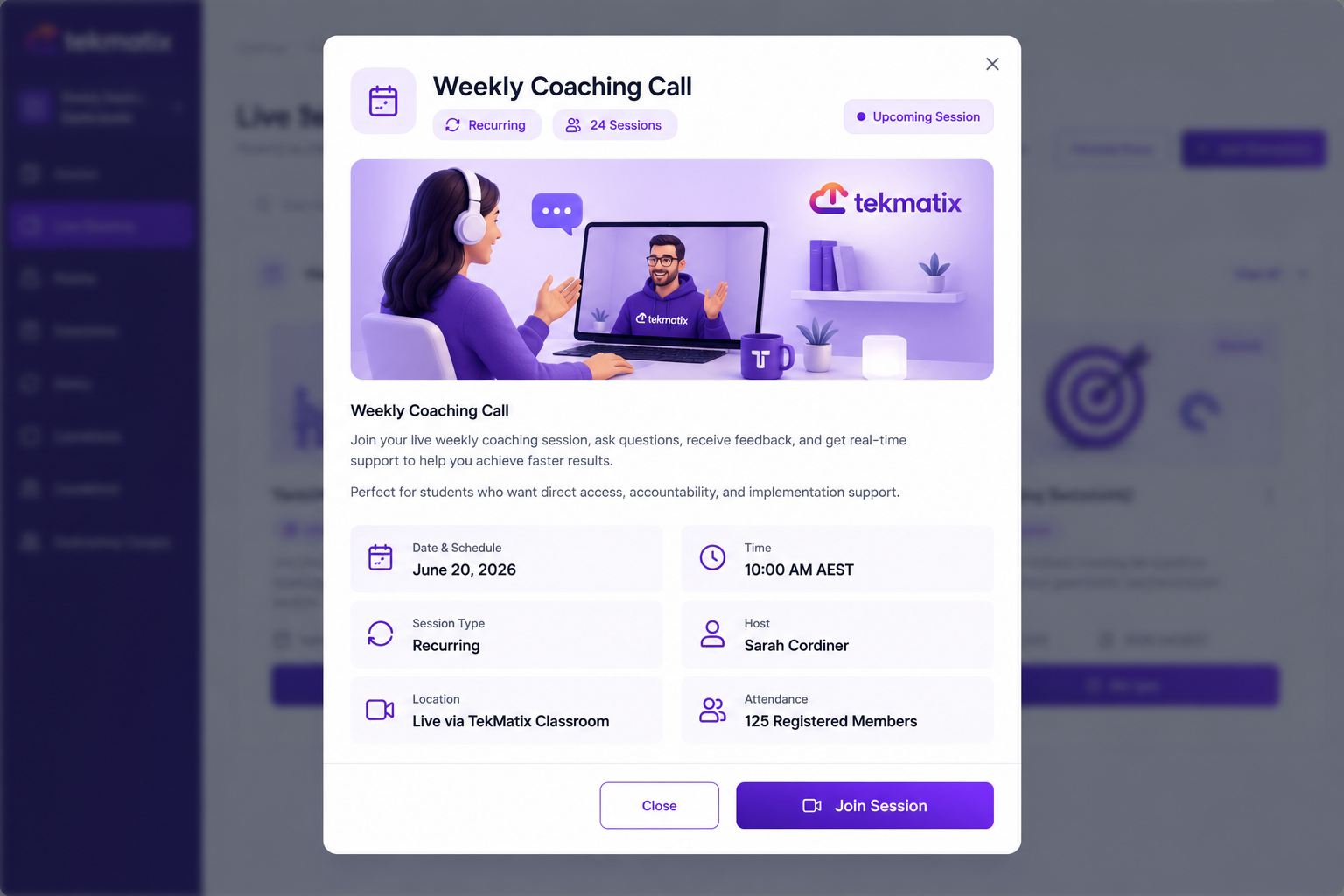
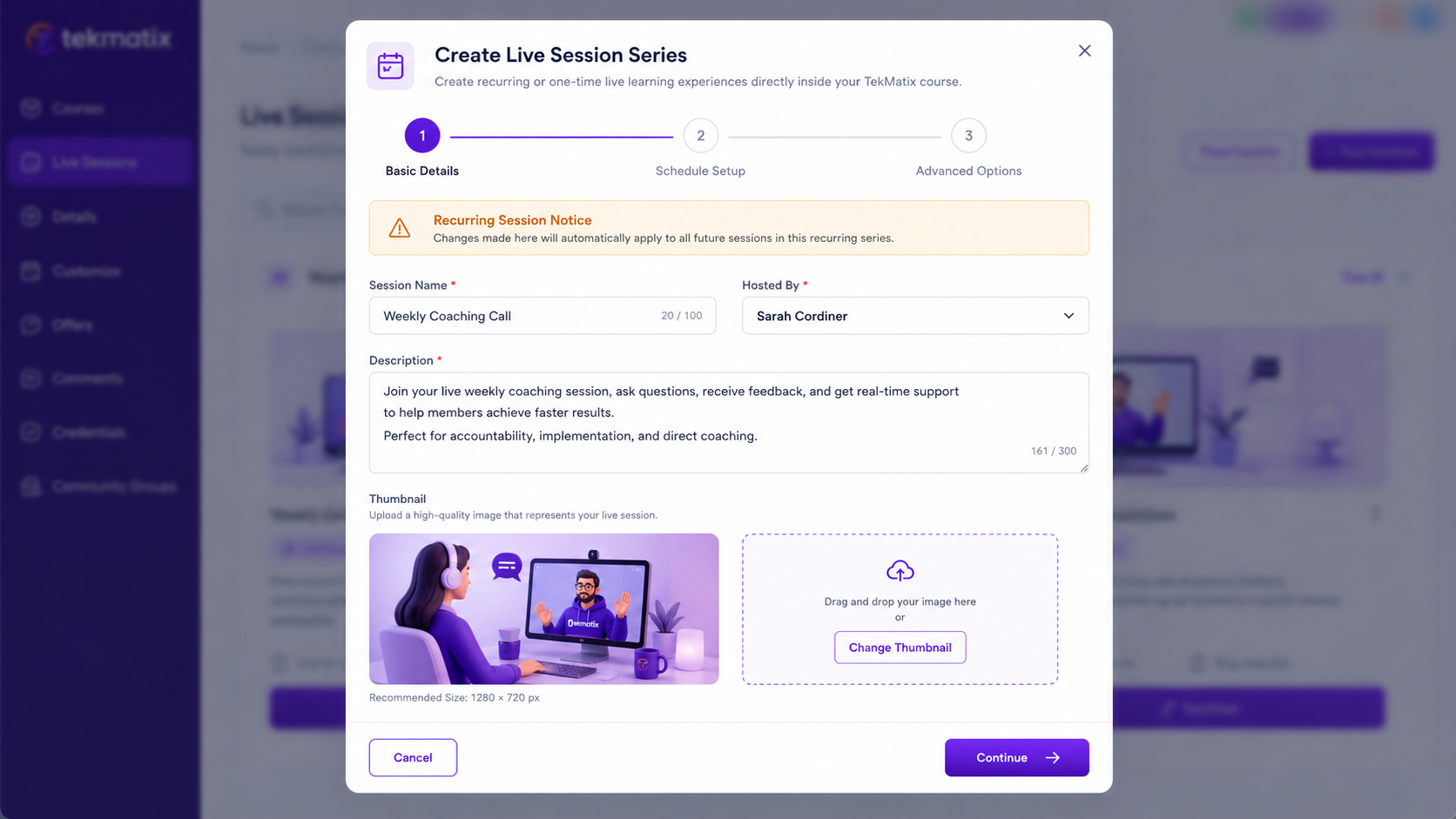
Schedule one-time live sessions or create recurring session series directly within your course.
Recurring sessions support:
Daily schedules
Weekly schedules
Custom recurring patterns
Timezone-aware scheduling for learners worldwide
This ensures your live events appear at the correct time for every participant.
📚 Built Directly Into the Course Experience
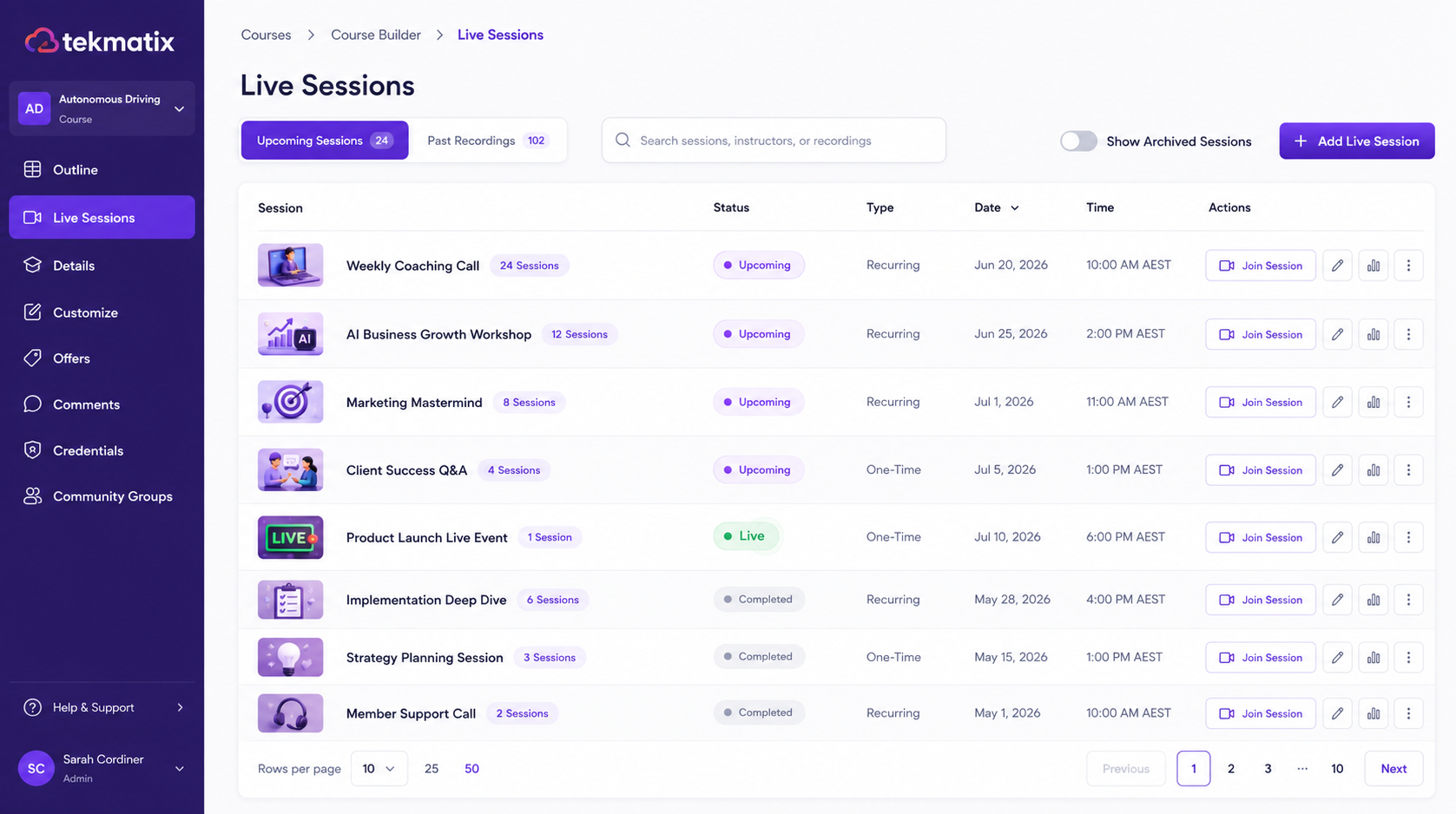
Live Sessions are now fully integrated into the Course Outline.
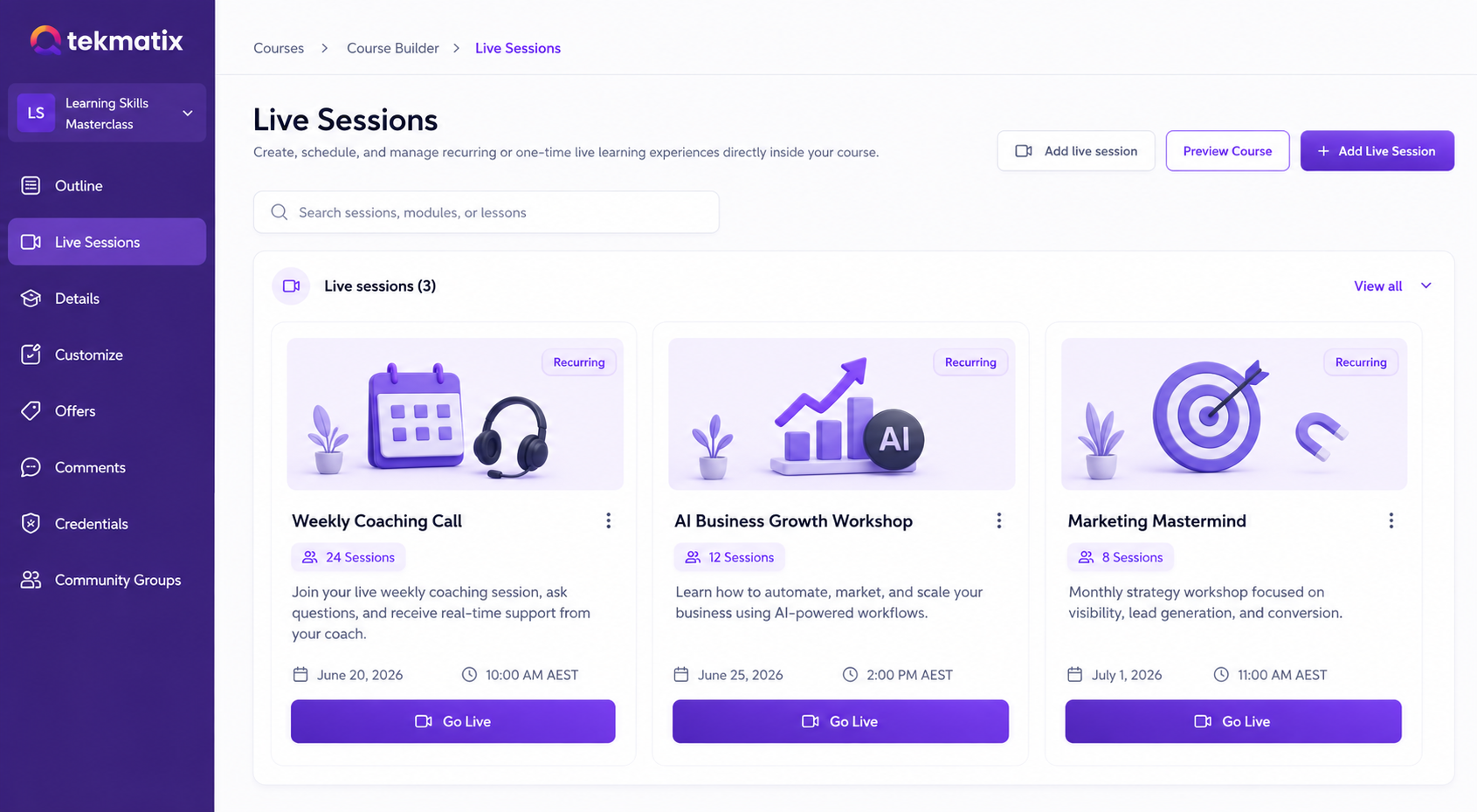
Dedicated Live Sessions section within each course
Session cards with preview details
Easy visibility of upcoming sessions
Simplified navigation for both creators and learners
Everything learners need is available in one place.
✏️ Better Management & Control
Managing live sessions is now more flexible.
Creators can:
Edit session details at any time
Cancel individual sessions
Update a single occurrence in a recurring series
Apply changes across all future sessions
This gives you complete control without disrupting your entire schedule.
🔔 Smarter Go-Live Experience & Notifications
Starting a session is now easier than ever.
The Go Live button becomes available 15 minutes before the session begins
Hosts can launch sessions when they're ready
Admin reminder emails help keep sessions on track
Learner notifications can be managed for reminders, updates, and go-live alerts
Stay organized while keeping learners informed.
🎥 Enhanced Learner Experience With Recordings
Learners now have a dedicated Live Sessions area within their course experience.
After a session ends, creators can:
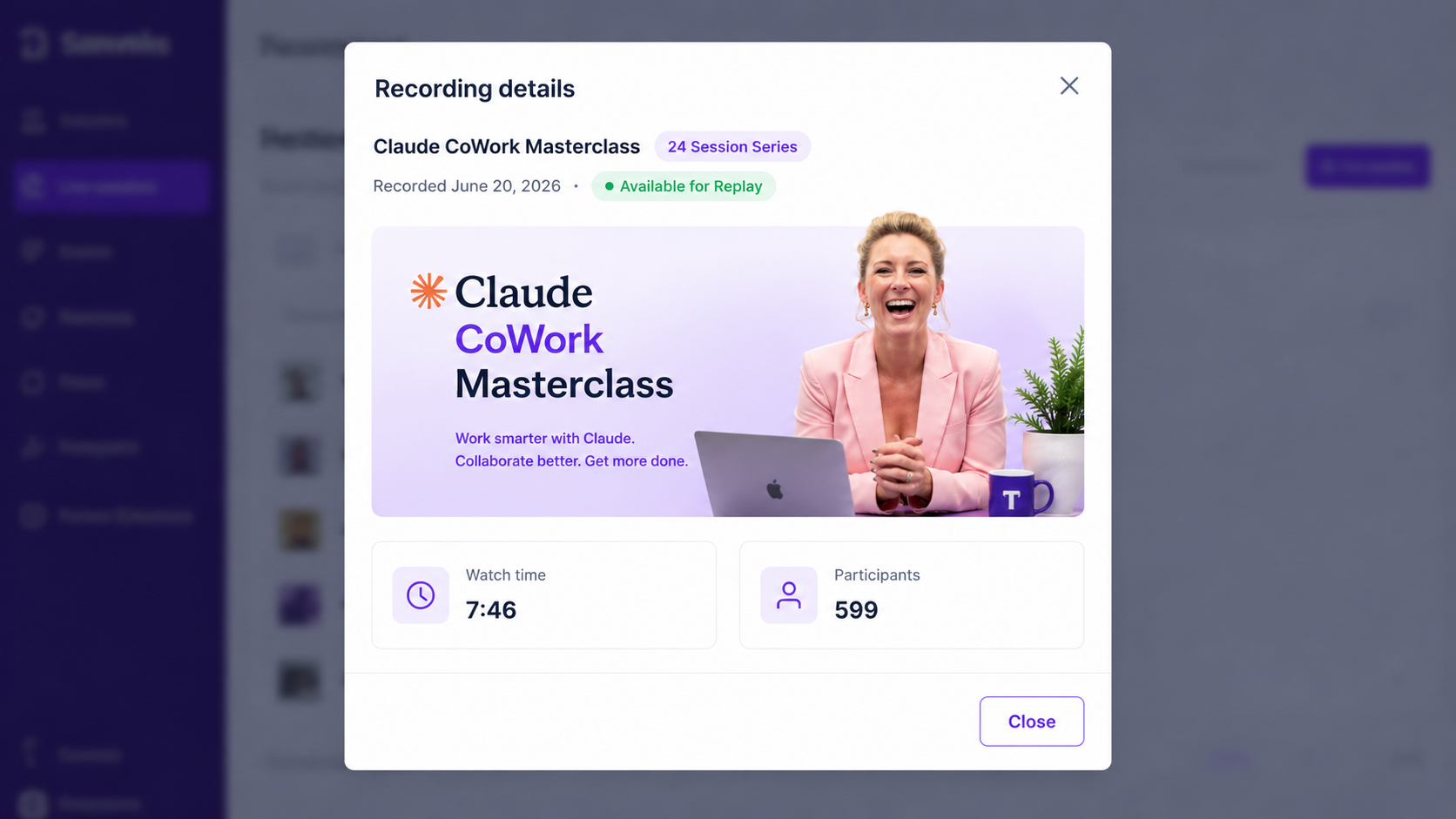
Access session recordings
Download recordings
Add recordings directly into the course as lessons
Create an on-demand learning library from live content
This helps maximize the value of every live session long after it ends.
🔍 How to Access
Open your course inside Tekmatix
Navigate to the Course Outline
Select Live Sessions
Create a one-time or recurring session
Configure notifications and scheduling preferences
Launch your session when it's time to go live
🎯 Why It Matters
Run live learning experiences directly inside your course
Eliminate the need for multiple tools and disconnected workflows
Improve learner engagement with scheduled live interactions
Build recurring programs and coaching experiences with ease
Turn live sessions into reusable course content
Deliver a more seamless learning experience for your audience
With Live Sessions built directly into Courses, Tekmatix gives creators everything they need to deliver engaging live learning experiences and transform them into long-term educational assets.

✨ Why This Matters
Live Sessions unify scheduling, hosting, notifications, learner access, and recordings into a single workflow — making live teaching simpler for creators and more engaging for learners.

Latest Blog Posts
Live Sessions in Courses Are Now Available in Tekmatix
📝 Overview
Live Sessions in Courses make it easier than ever to plan, host, and reuse live learning experiences—all from within Tekmatix.
Whether you're running a single live class, a weekly coaching session, a group program, or an ongoing training series, you can now manage your live events directly inside your course without relying on external systems or complex workflows.
🆕 What's New
📅 Flexible Session Scheduling
Schedule one-time live sessions or create recurring session series directly within your course.
Recurring sessions support:
Daily schedules
Weekly schedules
Custom recurring patterns
Timezone-aware scheduling for learners worldwide
This ensures your live events appear at the correct time for every participant.
📚 Built Directly Into the Course Experience
Live Sessions are now fully integrated into the Course Outline.
Dedicated Live Sessions section within each course
Session cards with preview details
Easy visibility of upcoming sessions
Simplified navigation for both creators and learners
Everything learners need is available in one place.
✏️ Better Management & Control
Managing live sessions is now more flexible.
Creators can:
Edit session details at any time
Cancel individual sessions
Update a single occurrence in a recurring series
Apply changes across all future sessions
This gives you complete control without disrupting your entire schedule.
🔔 Smarter Go-Live Experience & Notifications
Starting a session is now easier than ever.
The Go Live button becomes available 15 minutes before the session begins
Hosts can launch sessions when they're ready
Admin reminder emails help keep sessions on track
Learner notifications can be managed for reminders, updates, and go-live alerts
Stay organized while keeping learners informed.
🎥 Enhanced Learner Experience With Recordings
Learners now have a dedicated Live Sessions area within their course experience.
After a session ends, creators can:
Access session recordings
Download recordings
Add recordings directly into the course as lessons
Create an on-demand learning library from live content
This helps maximize the value of every live session long after it ends.
🔍 How to Access
Open your course inside Tekmatix
Navigate to the Course Outline
Select Live Sessions
Create a one-time or recurring session
Configure notifications and scheduling preferences
Launch your session when it's time to go live
🎯 Why It Matters
Run live learning experiences directly inside your course
Eliminate the need for multiple tools and disconnected workflows
Improve learner engagement with scheduled live interactions
Build recurring programs and coaching experiences with ease
Turn live sessions into reusable course content
Deliver a more seamless learning experience for your audience
With Live Sessions built directly into Courses, Tekmatix gives creators everything they need to deliver engaging live learning experiences and transform them into long-term educational assets.
✨ Why This Matters
Live Sessions unify scheduling, hosting, notifications, learner access, and recordings into a single workflow — making live teaching simpler for creators and more engaging for learners.
Marketing
Live Sessions in Courses Are Now Available in Tekmatix
📝 Overview
Live Sessions in Courses make it easier than ever to plan, host, and reuse live learning experiences—all from within Tekmatix.
Whether you're running a single live class, a weekly coaching session, a group program, or an ongoing training series, you can now manage your live events directly inside your course without relying on external systems or complex workflows.
🆕 What's New
📅 Flexible Session Scheduling
Schedule one-time live sessions or create recurring session series directly within your course.
Recurring sessions support:
Daily schedules
Weekly schedules
Custom recurring patterns
Timezone-aware scheduling for learners worldwide
This ensures your live events appear at the correct time for every participant.
📚 Built Directly Into the Course Experience
Live Sessions are now fully integrated into the Course Outline.
Dedicated Live Sessions section within each course
Session cards with preview details
Easy visibility of upcoming sessions
Simplified navigation for both creators and learners
Everything learners need is available in one place.
✏️ Better Management & Control
Managing live sessions is now more flexible.
Creators can:
Edit session details at any time
Cancel individual sessions
Update a single occurrence in a recurring series
Apply changes across all future sessions
This gives you complete control without disrupting your entire schedule.
🔔 Smarter Go-Live Experience & Notifications
Starting a session is now easier than ever.
The Go Live button becomes available 15 minutes before the session begins
Hosts can launch sessions when they're ready
Admin reminder emails help keep sessions on track
Learner notifications can be managed for reminders, updates, and go-live alerts
Stay organized while keeping learners informed.
🎥 Enhanced Learner Experience With Recordings
Learners now have a dedicated Live Sessions area within their course experience.
After a session ends, creators can:
Access session recordings
Download recordings
Add recordings directly into the course as lessons
Create an on-demand learning library from live content
This helps maximize the value of every live session long after it ends.
🔍 How to Access
Open your course inside Tekmatix
Navigate to the Course Outline
Select Live Sessions
Create a one-time or recurring session
Configure notifications and scheduling preferences
Launch your session when it's time to go live
🎯 Why It Matters
Run live learning experiences directly inside your course
Eliminate the need for multiple tools and disconnected workflows
Improve learner engagement with scheduled live interactions
Build recurring programs and coaching experiences with ease
Turn live sessions into reusable course content
Deliver a more seamless learning experience for your audience
With Live Sessions built directly into Courses, Tekmatix gives creators everything they need to deliver engaging live learning experiences and transform them into long-term educational assets.
✨ Why This Matters
Live Sessions unify scheduling, hosting, notifications, learner access, and recordings into a single workflow — making live teaching simpler for creators and more engaging for learners.
Live Sessions in Courses Are Now Available in Tekmatix
📝 Overview
Live Sessions in Courses make it easier than ever to plan, host, and reuse live learning experiences—all from within Tekmatix.
Whether you're running a single live class, a weekly coaching session, a group program, or an ongoing training series, you can now manage your live events directly inside your course without relying on external systems or complex workflows.
🆕 What's New
📅 Flexible Session Scheduling
Schedule one-time live sessions or create recurring session series directly within your course.
Recurring sessions support:
Daily schedules
Weekly schedules
Custom recurring patterns
Timezone-aware scheduling for learners worldwide
This ensures your live events appear at the correct time for every participant.
📚 Built Directly Into the Course Experience
Live Sessions are now fully integrated into the Course Outline.
Dedicated Live Sessions section within each course
Session cards with preview details
Easy visibility of upcoming sessions
Simplified navigation for both creators and learners
Everything learners need is available in one place.
✏️ Better Management & Control
Managing live sessions is now more flexible.
Creators can:
Edit session details at any time
Cancel individual sessions
Update a single occurrence in a recurring series
Apply changes across all future sessions
This gives you complete control without disrupting your entire schedule.
🔔 Smarter Go-Live Experience & Notifications
Starting a session is now easier than ever.
The Go Live button becomes available 15 minutes before the session begins
Hosts can launch sessions when they're ready
Admin reminder emails help keep sessions on track
Learner notifications can be managed for reminders, updates, and go-live alerts
Stay organized while keeping learners informed.
🎥 Enhanced Learner Experience With Recordings
Learners now have a dedicated Live Sessions area within their course experience.
After a session ends, creators can:
Access session recordings
Download recordings
Add recordings directly into the course as lessons
Create an on-demand learning library from live content
This helps maximize the value of every live session long after it ends.
🔍 How to Access
Open your course inside Tekmatix
Navigate to the Course Outline
Select Live Sessions
Create a one-time or recurring session
Configure notifications and scheduling preferences
Launch your session when it's time to go live
🎯 Why It Matters
Run live learning experiences directly inside your course
Eliminate the need for multiple tools and disconnected workflows
Improve learner engagement with scheduled live interactions
Build recurring programs and coaching experiences with ease
Turn live sessions into reusable course content
Deliver a more seamless learning experience for your audience
With Live Sessions built directly into Courses, Tekmatix gives creators everything they need to deliver engaging live learning experiences and transform them into long-term educational assets.
✨ Why This Matters
Live Sessions unify scheduling, hosting, notifications, learner access, and recordings into a single workflow — making live teaching simpler for creators and more engaging for learners.
CRM
Live Sessions in Courses Are Now Available in Tekmatix
📝 Overview
Live Sessions in Courses make it easier than ever to plan, host, and reuse live learning experiences—all from within Tekmatix.
Whether you're running a single live class, a weekly coaching session, a group program, or an ongoing training series, you can now manage your live events directly inside your course without relying on external systems or complex workflows.
🆕 What's New
📅 Flexible Session Scheduling
Schedule one-time live sessions or create recurring session series directly within your course.
Recurring sessions support:
Daily schedules
Weekly schedules
Custom recurring patterns
Timezone-aware scheduling for learners worldwide
This ensures your live events appear at the correct time for every participant.
📚 Built Directly Into the Course Experience
Live Sessions are now fully integrated into the Course Outline.
Dedicated Live Sessions section within each course
Session cards with preview details
Easy visibility of upcoming sessions
Simplified navigation for both creators and learners
Everything learners need is available in one place.
✏️ Better Management & Control
Managing live sessions is now more flexible.
Creators can:
Edit session details at any time
Cancel individual sessions
Update a single occurrence in a recurring series
Apply changes across all future sessions
This gives you complete control without disrupting your entire schedule.
🔔 Smarter Go-Live Experience & Notifications
Starting a session is now easier than ever.
The Go Live button becomes available 15 minutes before the session begins
Hosts can launch sessions when they're ready
Admin reminder emails help keep sessions on track
Learner notifications can be managed for reminders, updates, and go-live alerts
Stay organized while keeping learners informed.
🎥 Enhanced Learner Experience With Recordings
Learners now have a dedicated Live Sessions area within their course experience.
After a session ends, creators can:
Access session recordings
Download recordings
Add recordings directly into the course as lessons
Create an on-demand learning library from live content
This helps maximize the value of every live session long after it ends.
🔍 How to Access
Open your course inside Tekmatix
Navigate to the Course Outline
Select Live Sessions
Create a one-time or recurring session
Configure notifications and scheduling preferences
Launch your session when it's time to go live
🎯 Why It Matters
Run live learning experiences directly inside your course
Eliminate the need for multiple tools and disconnected workflows
Improve learner engagement with scheduled live interactions
Build recurring programs and coaching experiences with ease
Turn live sessions into reusable course content
Deliver a more seamless learning experience for your audience
With Live Sessions built directly into Courses, Tekmatix gives creators everything they need to deliver engaging live learning experiences and transform them into long-term educational assets.
✨ Why This Matters
Live Sessions unify scheduling, hosting, notifications, learner access, and recordings into a single workflow — making live teaching simpler for creators and more engaging for learners.
Live Sessions in Courses Are Now Available in Tekmatix
📝 Overview
Live Sessions in Courses make it easier than ever to plan, host, and reuse live learning experiences—all from within Tekmatix.
Whether you're running a single live class, a weekly coaching session, a group program, or an ongoing training series, you can now manage your live events directly inside your course without relying on external systems or complex workflows.
🆕 What's New
📅 Flexible Session Scheduling
Schedule one-time live sessions or create recurring session series directly within your course.
Recurring sessions support:
Daily schedules
Weekly schedules
Custom recurring patterns
Timezone-aware scheduling for learners worldwide
This ensures your live events appear at the correct time for every participant.
📚 Built Directly Into the Course Experience
Live Sessions are now fully integrated into the Course Outline.
Dedicated Live Sessions section within each course
Session cards with preview details
Easy visibility of upcoming sessions
Simplified navigation for both creators and learners
Everything learners need is available in one place.
✏️ Better Management & Control
Managing live sessions is now more flexible.
Creators can:
Edit session details at any time
Cancel individual sessions
Update a single occurrence in a recurring series
Apply changes across all future sessions
This gives you complete control without disrupting your entire schedule.
🔔 Smarter Go-Live Experience & Notifications
Starting a session is now easier than ever.
The Go Live button becomes available 15 minutes before the session begins
Hosts can launch sessions when they're ready
Admin reminder emails help keep sessions on track
Learner notifications can be managed for reminders, updates, and go-live alerts
Stay organized while keeping learners informed.
🎥 Enhanced Learner Experience With Recordings
Learners now have a dedicated Live Sessions area within their course experience.
After a session ends, creators can:
Access session recordings
Download recordings
Add recordings directly into the course as lessons
Create an on-demand learning library from live content
This helps maximize the value of every live session long after it ends.
🔍 How to Access
Open your course inside Tekmatix
Navigate to the Course Outline
Select Live Sessions
Create a one-time or recurring session
Configure notifications and scheduling preferences
Launch your session when it's time to go live
🎯 Why It Matters
Run live learning experiences directly inside your course
Eliminate the need for multiple tools and disconnected workflows
Improve learner engagement with scheduled live interactions
Build recurring programs and coaching experiences with ease
Turn live sessions into reusable course content
Deliver a more seamless learning experience for your audience
With Live Sessions built directly into Courses, Tekmatix gives creators everything they need to deliver engaging live learning experiences and transform them into long-term educational assets.
✨ Why This Matters
Live Sessions unify scheduling, hosting, notifications, learner access, and recordings into a single workflow — making live teaching simpler for creators and more engaging for learners.

Join The TekMatix Newsletter
Get sent regular tech and business growth tips.
Web Design
Live Sessions in Courses Are Now Available in Tekmatix
📝 Overview
Live Sessions in Courses make it easier than ever to plan, host, and reuse live learning experiences—all from within Tekmatix.
Whether you're running a single live class, a weekly coaching session, a group program, or an ongoing training series, you can now manage your live events directly inside your course without relying on external systems or complex workflows.
🆕 What's New
📅 Flexible Session Scheduling
Schedule one-time live sessions or create recurring session series directly within your course.
Recurring sessions support:
Daily schedules
Weekly schedules
Custom recurring patterns
Timezone-aware scheduling for learners worldwide
This ensures your live events appear at the correct time for every participant.
📚 Built Directly Into the Course Experience
Live Sessions are now fully integrated into the Course Outline.
Dedicated Live Sessions section within each course
Session cards with preview details
Easy visibility of upcoming sessions
Simplified navigation for both creators and learners
Everything learners need is available in one place.
✏️ Better Management & Control
Managing live sessions is now more flexible.
Creators can:
Edit session details at any time
Cancel individual sessions
Update a single occurrence in a recurring series
Apply changes across all future sessions
This gives you complete control without disrupting your entire schedule.
🔔 Smarter Go-Live Experience & Notifications
Starting a session is now easier than ever.
The Go Live button becomes available 15 minutes before the session begins
Hosts can launch sessions when they're ready
Admin reminder emails help keep sessions on track
Learner notifications can be managed for reminders, updates, and go-live alerts
Stay organized while keeping learners informed.
🎥 Enhanced Learner Experience With Recordings
Learners now have a dedicated Live Sessions area within their course experience.
After a session ends, creators can:
Access session recordings
Download recordings
Add recordings directly into the course as lessons
Create an on-demand learning library from live content
This helps maximize the value of every live session long after it ends.
🔍 How to Access
Open your course inside Tekmatix
Navigate to the Course Outline
Select Live Sessions
Create a one-time or recurring session
Configure notifications and scheduling preferences
Launch your session when it's time to go live
🎯 Why It Matters
Run live learning experiences directly inside your course
Eliminate the need for multiple tools and disconnected workflows
Improve learner engagement with scheduled live interactions
Build recurring programs and coaching experiences with ease
Turn live sessions into reusable course content
Deliver a more seamless learning experience for your audience
With Live Sessions built directly into Courses, Tekmatix gives creators everything they need to deliver engaging live learning experiences and transform them into long-term educational assets.
✨ Why This Matters
Live Sessions unify scheduling, hosting, notifications, learner access, and recordings into a single workflow — making live teaching simpler for creators and more engaging for learners.
Live Sessions in Courses Are Now Available in Tekmatix
📝 Overview
Live Sessions in Courses make it easier than ever to plan, host, and reuse live learning experiences—all from within Tekmatix.
Whether you're running a single live class, a weekly coaching session, a group program, or an ongoing training series, you can now manage your live events directly inside your course without relying on external systems or complex workflows.
🆕 What's New
📅 Flexible Session Scheduling
Schedule one-time live sessions or create recurring session series directly within your course.
Recurring sessions support:
Daily schedules
Weekly schedules
Custom recurring patterns
Timezone-aware scheduling for learners worldwide
This ensures your live events appear at the correct time for every participant.
📚 Built Directly Into the Course Experience
Live Sessions are now fully integrated into the Course Outline.
Dedicated Live Sessions section within each course
Session cards with preview details
Easy visibility of upcoming sessions
Simplified navigation for both creators and learners
Everything learners need is available in one place.
✏️ Better Management & Control
Managing live sessions is now more flexible.
Creators can:
Edit session details at any time
Cancel individual sessions
Update a single occurrence in a recurring series
Apply changes across all future sessions
This gives you complete control without disrupting your entire schedule.
🔔 Smarter Go-Live Experience & Notifications
Starting a session is now easier than ever.
The Go Live button becomes available 15 minutes before the session begins
Hosts can launch sessions when they're ready
Admin reminder emails help keep sessions on track
Learner notifications can be managed for reminders, updates, and go-live alerts
Stay organized while keeping learners informed.
🎥 Enhanced Learner Experience With Recordings
Learners now have a dedicated Live Sessions area within their course experience.
After a session ends, creators can:
Access session recordings
Download recordings
Add recordings directly into the course as lessons
Create an on-demand learning library from live content
This helps maximize the value of every live session long after it ends.
🔍 How to Access
Open your course inside Tekmatix
Navigate to the Course Outline
Select Live Sessions
Create a one-time or recurring session
Configure notifications and scheduling preferences
Launch your session when it's time to go live
🎯 Why It Matters
Run live learning experiences directly inside your course
Eliminate the need for multiple tools and disconnected workflows
Improve learner engagement with scheduled live interactions
Build recurring programs and coaching experiences with ease
Turn live sessions into reusable course content
Deliver a more seamless learning experience for your audience
With Live Sessions built directly into Courses, Tekmatix gives creators everything they need to deliver engaging live learning experiences and transform them into long-term educational assets.
✨ Why This Matters
Live Sessions unify scheduling, hosting, notifications, learner access, and recordings into a single workflow — making live teaching simpler for creators and more engaging for learners.