

Tekmatix Help Articles
Love your help
Use the search bar below to find help guides and articles for using Tekmatix
Use the search bar below to look for help articles you need.

How To Use Webinar Video Analytics to Maximize Engagement and Conversions
How To Use Webinar Video Analytics to Maximize Engagement and Conversions
Webinar Video Analytics in Tekmatix is a powerful tool that transforms attendee behavior into actionable insights. Whether you host live, on-demand, or recurring webinars, these analytics help you optimize content, increase engagement, and drive revenue by showing exactly how viewers interact with your webinars.
Why Webinar Video Analytics Matters
Tracking webinar performance is crucial for understanding your audience and improving your results. With Tekmatix Webinar Video Analytics, you can:
Identify engagement peaks and drop-off points to refine your content flow.
Compare registrations vs. actual attendance to evaluate your marketing effectiveness.
Track repeat attendees in recurring sessions to spot loyal viewers and valuable topics.
Optimize scheduling by analyzing trends to find the best days and times.
Share visual reports with your team or clients for quick, data-backed decisions.
Proper use of these insights ensures that your webinars don’t just attract viewers they convert them.
Understanding Different Webinar Analytics Types
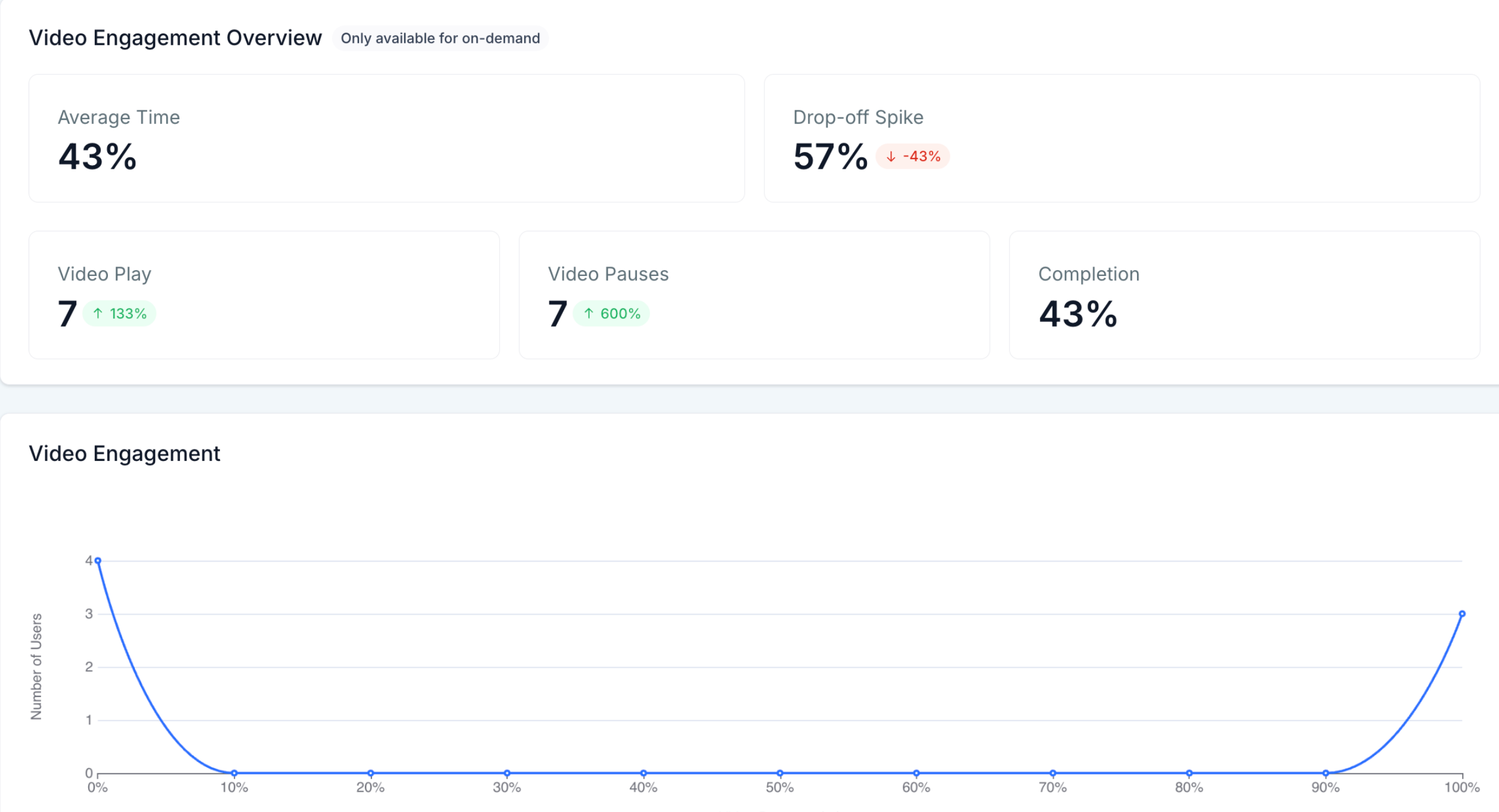
On-Demand Webinar Analytics
Designed for pre-recorded webinars that attendees can watch anytime. Key metrics include:
Total Views: The cumulative play count.
Average Watch Time: Mean minutes watched per viewer.
Engagement Events: Plays, pauses, and completion percentages.
Drop-off Analysis: Exact timestamps where viewers leave, plus exit percentages.
These metrics help you identify whether your evergreen content continues to resonate and where stronger calls-to-action are needed.
Live Webinar Analytics
Focuses on scheduled broadcasts and real-time attendance:
Total Registrations vs. Total Attendees: Instantly spot no-show gaps.
Peak Live Viewers: Highest concurrent audience shown on the timeline graph.
Engagement Spikes: Track plays, pauses, and chat activity as they occur.
This data lets you optimize reminder workflows and interaction moments during live sessions.
Recurring Webinar Analytics
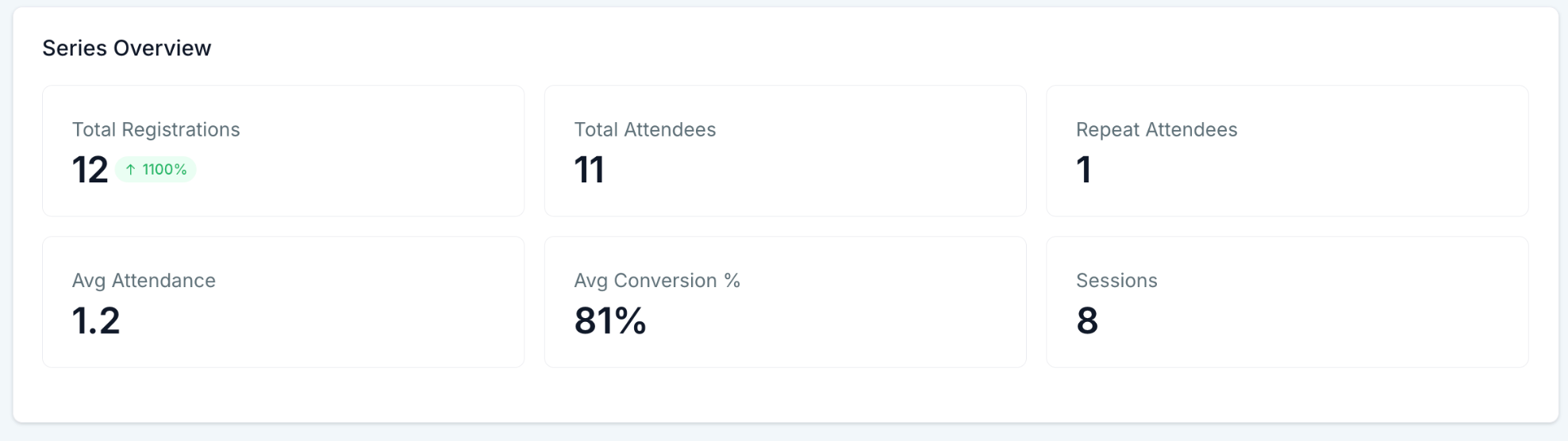
Aggregates data across all sessions in a series:
Series Overview: Registrations, attendees, repeat attendees, average attendance %, average conversion %, session count.
Trend Graphs: Shows registration and attendance patterns across sessions to detect momentum or fatigue.
These insights help you choose the best cadence and topics for ongoing webinar programs.
How To Set Up Webinar Video Analytics in Tekmatix
Setting up Webinar Video Analytics is straightforward but following these steps ensures accurate and complete data:
Create or import your webinar under Websites & Funnels → Webinars (Live, On-Demand, or Recurring).
Important: Publish the registration pages and make sure your form feeds into Contacts. This ties viewer activity directly to your CRM records.
Run your webinar. Tekmatix automatically records every play, pause, and exit event.
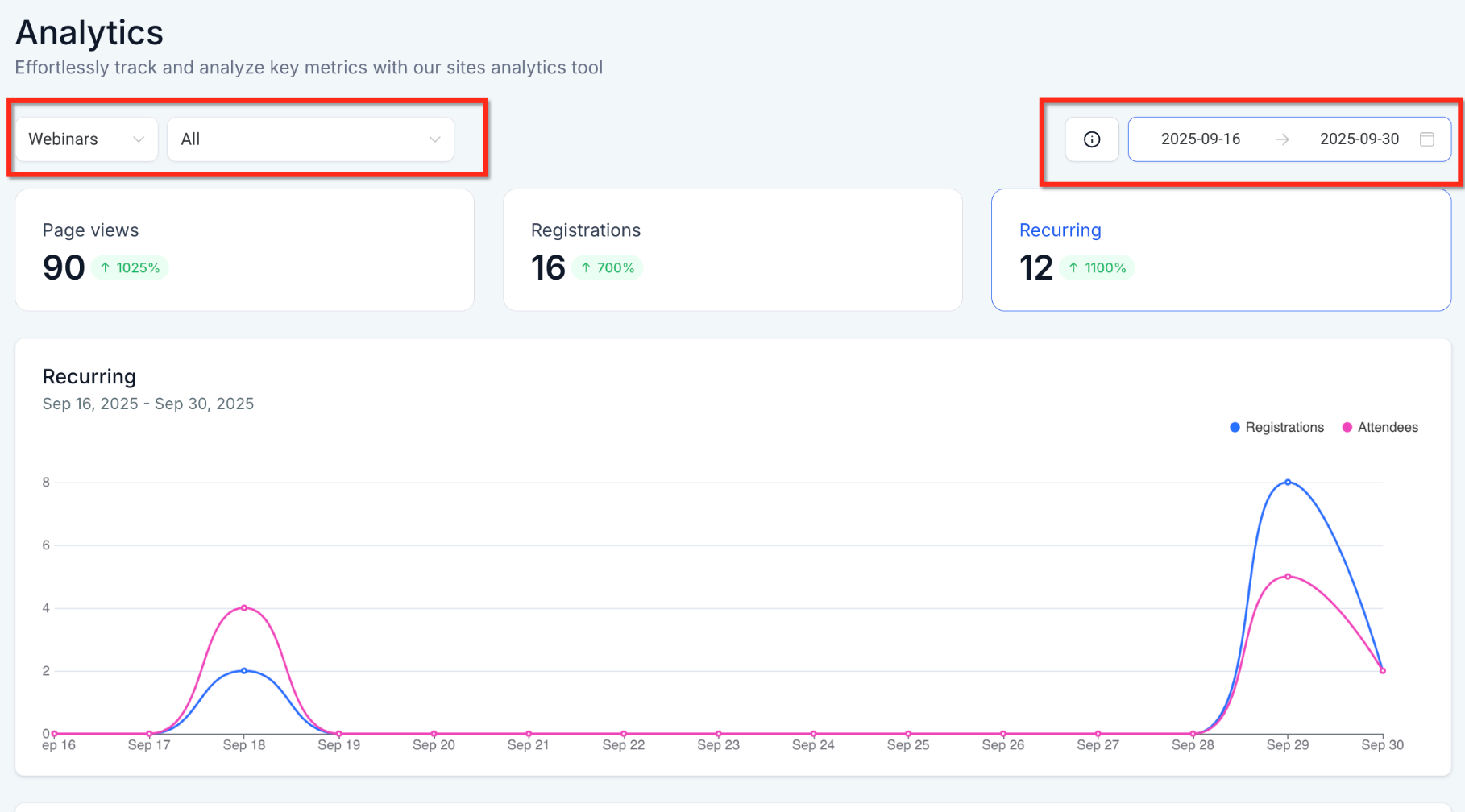
Access your analytics under Websites & Funnels → Analytics → Webinars. Select the relevant tab (On-Demand, Live, or Recurring) and choose a date range using the filter in the top-right corner.

Hover over any graph point to view exact counts and percentages.
Use Quick Filters (device, location, traffic source) to drill down without changing the underlying data.
Sample Scenario: Using Webinar Analytics to Boost Engagement
Imagine you host a recurring webinar series on “Digital Marketing Trends.” After analyzing your webinar analytics:
You notice most viewers drop off around minute 20 in your second session.
Engagement spikes whenever you introduce interactive polls.
Your live webinars have a 30% no-show rate despite high registration numbers.
Trend graphs show repeat attendees consistently engage with specific topics like AI in marketing.
Using this data, you adjust your webinar: you add more polls around minute 20, send reminder emails 1 hour before the webinar, and plan future sessions on AI-focused topics. Within weeks, attendance and engagement increase, and more attendees convert into paying customers.
Frequently Asked Questions
Q: Do I need to add tracking code?
No. Tracking is native to Tekmatix webinars and automatically enabled once published.
Q: How soon are metrics available after a webinar?
Live webinar data updates in near-real time; final counts process within 10–15 minutes after the session ends.
Q: Can I filter by device type or traffic source?
Yes. Use Quick Filters to segment by device, UTM source, or custom fields.
Q: What counts as a repeat attendee?
Any contact that attends two or more sessions in the same recurring series.
Q: Can analytics track multiple plays of the same on-demand webinar?
Yes. Each playback increments Total Views; unique contacts count only once toward Unique Viewers.
Q: Can I export analytics?
Yes. Click the three-dot menu in any widget to export data as CSV or PDF.
Q: Can automations trigger when someone watches a certain percentage?
Yes. Use the Video Tracking workflow trigger and set the percentage threshold.
Q: Do recurring webinar graphs update automatically with new sessions?
Yes. Series Overview and Trend Graphs refresh as soon as new session data is available.

Latest Blog Posts
How To Use Webinar Video Analytics to Maximize Engagement and Conversions
How To Use Webinar Video Analytics to Maximize Engagement and Conversions
Webinar Video Analytics in Tekmatix is a powerful tool that transforms attendee behavior into actionable insights. Whether you host live, on-demand, or recurring webinars, these analytics help you optimize content, increase engagement, and drive revenue by showing exactly how viewers interact with your webinars.
Why Webinar Video Analytics Matters
Tracking webinar performance is crucial for understanding your audience and improving your results. With Tekmatix Webinar Video Analytics, you can:
Identify engagement peaks and drop-off points to refine your content flow.
Compare registrations vs. actual attendance to evaluate your marketing effectiveness.
Track repeat attendees in recurring sessions to spot loyal viewers and valuable topics.
Optimize scheduling by analyzing trends to find the best days and times.
Share visual reports with your team or clients for quick, data-backed decisions.
Proper use of these insights ensures that your webinars don’t just attract viewers they convert them.
Understanding Different Webinar Analytics Types
On-Demand Webinar Analytics
Designed for pre-recorded webinars that attendees can watch anytime. Key metrics include:
Total Views: The cumulative play count.
Average Watch Time: Mean minutes watched per viewer.
Engagement Events: Plays, pauses, and completion percentages.
Drop-off Analysis: Exact timestamps where viewers leave, plus exit percentages.
These metrics help you identify whether your evergreen content continues to resonate and where stronger calls-to-action are needed.
Live Webinar Analytics
Focuses on scheduled broadcasts and real-time attendance:
Total Registrations vs. Total Attendees: Instantly spot no-show gaps.
Peak Live Viewers: Highest concurrent audience shown on the timeline graph.
Engagement Spikes: Track plays, pauses, and chat activity as they occur.
This data lets you optimize reminder workflows and interaction moments during live sessions.
Recurring Webinar Analytics
Aggregates data across all sessions in a series:
Series Overview: Registrations, attendees, repeat attendees, average attendance %, average conversion %, session count.
Trend Graphs: Shows registration and attendance patterns across sessions to detect momentum or fatigue.
These insights help you choose the best cadence and topics for ongoing webinar programs.
How To Set Up Webinar Video Analytics in Tekmatix
Setting up Webinar Video Analytics is straightforward but following these steps ensures accurate and complete data:
Create or import your webinar under Websites & Funnels → Webinars (Live, On-Demand, or Recurring).
Important: Publish the registration pages and make sure your form feeds into Contacts. This ties viewer activity directly to your CRM records.Run your webinar. Tekmatix automatically records every play, pause, and exit event.
Access your analytics under Websites & Funnels → Analytics → Webinars. Select the relevant tab (On-Demand, Live, or Recurring) and choose a date range using the filter in the top-right corner.
Hover over any graph point to view exact counts and percentages.
Use Quick Filters (device, location, traffic source) to drill down without changing the underlying data.
Sample Scenario: Using Webinar Analytics to Boost Engagement
Imagine you host a recurring webinar series on “Digital Marketing Trends.” After analyzing your webinar analytics:
You notice most viewers drop off around minute 20 in your second session.
Engagement spikes whenever you introduce interactive polls.
Your live webinars have a 30% no-show rate despite high registration numbers.
Trend graphs show repeat attendees consistently engage with specific topics like AI in marketing.
Using this data, you adjust your webinar: you add more polls around minute 20, send reminder emails 1 hour before the webinar, and plan future sessions on AI-focused topics. Within weeks, attendance and engagement increase, and more attendees convert into paying customers.
Frequently Asked Questions
Q: Do I need to add tracking code?
No. Tracking is native to Tekmatix webinars and automatically enabled once published.
Q: How soon are metrics available after a webinar?
Live webinar data updates in near-real time; final counts process within 10–15 minutes after the session ends.
Q: Can I filter by device type or traffic source?
Yes. Use Quick Filters to segment by device, UTM source, or custom fields.
Q: What counts as a repeat attendee?
Any contact that attends two or more sessions in the same recurring series.
Q: Can analytics track multiple plays of the same on-demand webinar?
Yes. Each playback increments Total Views; unique contacts count only once toward Unique Viewers.
Q: Can I export analytics?
Yes. Click the three-dot menu in any widget to export data as CSV or PDF.
Q: Can automations trigger when someone watches a certain percentage?
Yes. Use the Video Tracking workflow trigger and set the percentage threshold.
Q: Do recurring webinar graphs update automatically with new sessions?
Yes. Series Overview and Trend Graphs refresh as soon as new session data is available.
Marketing
How To Use Webinar Video Analytics to Maximize Engagement and Conversions
How To Use Webinar Video Analytics to Maximize Engagement and Conversions
Webinar Video Analytics in Tekmatix is a powerful tool that transforms attendee behavior into actionable insights. Whether you host live, on-demand, or recurring webinars, these analytics help you optimize content, increase engagement, and drive revenue by showing exactly how viewers interact with your webinars.
Why Webinar Video Analytics Matters
Tracking webinar performance is crucial for understanding your audience and improving your results. With Tekmatix Webinar Video Analytics, you can:
Identify engagement peaks and drop-off points to refine your content flow.
Compare registrations vs. actual attendance to evaluate your marketing effectiveness.
Track repeat attendees in recurring sessions to spot loyal viewers and valuable topics.
Optimize scheduling by analyzing trends to find the best days and times.
Share visual reports with your team or clients for quick, data-backed decisions.
Proper use of these insights ensures that your webinars don’t just attract viewers they convert them.
Understanding Different Webinar Analytics Types
On-Demand Webinar Analytics
Designed for pre-recorded webinars that attendees can watch anytime. Key metrics include:
Total Views: The cumulative play count.
Average Watch Time: Mean minutes watched per viewer.
Engagement Events: Plays, pauses, and completion percentages.
Drop-off Analysis: Exact timestamps where viewers leave, plus exit percentages.
These metrics help you identify whether your evergreen content continues to resonate and where stronger calls-to-action are needed.
Live Webinar Analytics
Focuses on scheduled broadcasts and real-time attendance:
Total Registrations vs. Total Attendees: Instantly spot no-show gaps.
Peak Live Viewers: Highest concurrent audience shown on the timeline graph.
Engagement Spikes: Track plays, pauses, and chat activity as they occur.
This data lets you optimize reminder workflows and interaction moments during live sessions.
Recurring Webinar Analytics
Aggregates data across all sessions in a series:
Series Overview: Registrations, attendees, repeat attendees, average attendance %, average conversion %, session count.
Trend Graphs: Shows registration and attendance patterns across sessions to detect momentum or fatigue.
These insights help you choose the best cadence and topics for ongoing webinar programs.
How To Set Up Webinar Video Analytics in Tekmatix
Setting up Webinar Video Analytics is straightforward but following these steps ensures accurate and complete data:
Create or import your webinar under Websites & Funnels → Webinars (Live, On-Demand, or Recurring).
Important: Publish the registration pages and make sure your form feeds into Contacts. This ties viewer activity directly to your CRM records.Run your webinar. Tekmatix automatically records every play, pause, and exit event.
Access your analytics under Websites & Funnels → Analytics → Webinars. Select the relevant tab (On-Demand, Live, or Recurring) and choose a date range using the filter in the top-right corner.
Hover over any graph point to view exact counts and percentages.
Use Quick Filters (device, location, traffic source) to drill down without changing the underlying data.
Sample Scenario: Using Webinar Analytics to Boost Engagement
Imagine you host a recurring webinar series on “Digital Marketing Trends.” After analyzing your webinar analytics:
You notice most viewers drop off around minute 20 in your second session.
Engagement spikes whenever you introduce interactive polls.
Your live webinars have a 30% no-show rate despite high registration numbers.
Trend graphs show repeat attendees consistently engage with specific topics like AI in marketing.
Using this data, you adjust your webinar: you add more polls around minute 20, send reminder emails 1 hour before the webinar, and plan future sessions on AI-focused topics. Within weeks, attendance and engagement increase, and more attendees convert into paying customers.
Frequently Asked Questions
Q: Do I need to add tracking code?
No. Tracking is native to Tekmatix webinars and automatically enabled once published.
Q: How soon are metrics available after a webinar?
Live webinar data updates in near-real time; final counts process within 10–15 minutes after the session ends.
Q: Can I filter by device type or traffic source?
Yes. Use Quick Filters to segment by device, UTM source, or custom fields.
Q: What counts as a repeat attendee?
Any contact that attends two or more sessions in the same recurring series.
Q: Can analytics track multiple plays of the same on-demand webinar?
Yes. Each playback increments Total Views; unique contacts count only once toward Unique Viewers.
Q: Can I export analytics?
Yes. Click the three-dot menu in any widget to export data as CSV or PDF.
Q: Can automations trigger when someone watches a certain percentage?
Yes. Use the Video Tracking workflow trigger and set the percentage threshold.
Q: Do recurring webinar graphs update automatically with new sessions?
Yes. Series Overview and Trend Graphs refresh as soon as new session data is available.
How To Use Webinar Video Analytics to Maximize Engagement and Conversions
How To Use Webinar Video Analytics to Maximize Engagement and Conversions
Webinar Video Analytics in Tekmatix is a powerful tool that transforms attendee behavior into actionable insights. Whether you host live, on-demand, or recurring webinars, these analytics help you optimize content, increase engagement, and drive revenue by showing exactly how viewers interact with your webinars.
Why Webinar Video Analytics Matters
Tracking webinar performance is crucial for understanding your audience and improving your results. With Tekmatix Webinar Video Analytics, you can:
Identify engagement peaks and drop-off points to refine your content flow.
Compare registrations vs. actual attendance to evaluate your marketing effectiveness.
Track repeat attendees in recurring sessions to spot loyal viewers and valuable topics.
Optimize scheduling by analyzing trends to find the best days and times.
Share visual reports with your team or clients for quick, data-backed decisions.
Proper use of these insights ensures that your webinars don’t just attract viewers they convert them.
Understanding Different Webinar Analytics Types
On-Demand Webinar Analytics
Designed for pre-recorded webinars that attendees can watch anytime. Key metrics include:
Total Views: The cumulative play count.
Average Watch Time: Mean minutes watched per viewer.
Engagement Events: Plays, pauses, and completion percentages.
Drop-off Analysis: Exact timestamps where viewers leave, plus exit percentages.
These metrics help you identify whether your evergreen content continues to resonate and where stronger calls-to-action are needed.
Live Webinar Analytics
Focuses on scheduled broadcasts and real-time attendance:
Total Registrations vs. Total Attendees: Instantly spot no-show gaps.
Peak Live Viewers: Highest concurrent audience shown on the timeline graph.
Engagement Spikes: Track plays, pauses, and chat activity as they occur.
This data lets you optimize reminder workflows and interaction moments during live sessions.
Recurring Webinar Analytics
Aggregates data across all sessions in a series:
Series Overview: Registrations, attendees, repeat attendees, average attendance %, average conversion %, session count.
Trend Graphs: Shows registration and attendance patterns across sessions to detect momentum or fatigue.
These insights help you choose the best cadence and topics for ongoing webinar programs.
How To Set Up Webinar Video Analytics in Tekmatix
Setting up Webinar Video Analytics is straightforward but following these steps ensures accurate and complete data:
Create or import your webinar under Websites & Funnels → Webinars (Live, On-Demand, or Recurring).
Important: Publish the registration pages and make sure your form feeds into Contacts. This ties viewer activity directly to your CRM records.Run your webinar. Tekmatix automatically records every play, pause, and exit event.
Access your analytics under Websites & Funnels → Analytics → Webinars. Select the relevant tab (On-Demand, Live, or Recurring) and choose a date range using the filter in the top-right corner.
Hover over any graph point to view exact counts and percentages.
Use Quick Filters (device, location, traffic source) to drill down without changing the underlying data.
Sample Scenario: Using Webinar Analytics to Boost Engagement
Imagine you host a recurring webinar series on “Digital Marketing Trends.” After analyzing your webinar analytics:
You notice most viewers drop off around minute 20 in your second session.
Engagement spikes whenever you introduce interactive polls.
Your live webinars have a 30% no-show rate despite high registration numbers.
Trend graphs show repeat attendees consistently engage with specific topics like AI in marketing.
Using this data, you adjust your webinar: you add more polls around minute 20, send reminder emails 1 hour before the webinar, and plan future sessions on AI-focused topics. Within weeks, attendance and engagement increase, and more attendees convert into paying customers.
Frequently Asked Questions
Q: Do I need to add tracking code?
No. Tracking is native to Tekmatix webinars and automatically enabled once published.
Q: How soon are metrics available after a webinar?
Live webinar data updates in near-real time; final counts process within 10–15 minutes after the session ends.
Q: Can I filter by device type or traffic source?
Yes. Use Quick Filters to segment by device, UTM source, or custom fields.
Q: What counts as a repeat attendee?
Any contact that attends two or more sessions in the same recurring series.
Q: Can analytics track multiple plays of the same on-demand webinar?
Yes. Each playback increments Total Views; unique contacts count only once toward Unique Viewers.
Q: Can I export analytics?
Yes. Click the three-dot menu in any widget to export data as CSV or PDF.
Q: Can automations trigger when someone watches a certain percentage?
Yes. Use the Video Tracking workflow trigger and set the percentage threshold.
Q: Do recurring webinar graphs update automatically with new sessions?
Yes. Series Overview and Trend Graphs refresh as soon as new session data is available.
CRM
How To Use Webinar Video Analytics to Maximize Engagement and Conversions
How To Use Webinar Video Analytics to Maximize Engagement and Conversions
Webinar Video Analytics in Tekmatix is a powerful tool that transforms attendee behavior into actionable insights. Whether you host live, on-demand, or recurring webinars, these analytics help you optimize content, increase engagement, and drive revenue by showing exactly how viewers interact with your webinars.
Why Webinar Video Analytics Matters
Tracking webinar performance is crucial for understanding your audience and improving your results. With Tekmatix Webinar Video Analytics, you can:
Identify engagement peaks and drop-off points to refine your content flow.
Compare registrations vs. actual attendance to evaluate your marketing effectiveness.
Track repeat attendees in recurring sessions to spot loyal viewers and valuable topics.
Optimize scheduling by analyzing trends to find the best days and times.
Share visual reports with your team or clients for quick, data-backed decisions.
Proper use of these insights ensures that your webinars don’t just attract viewers they convert them.
Understanding Different Webinar Analytics Types
On-Demand Webinar Analytics
Designed for pre-recorded webinars that attendees can watch anytime. Key metrics include:
Total Views: The cumulative play count.
Average Watch Time: Mean minutes watched per viewer.
Engagement Events: Plays, pauses, and completion percentages.
Drop-off Analysis: Exact timestamps where viewers leave, plus exit percentages.
These metrics help you identify whether your evergreen content continues to resonate and where stronger calls-to-action are needed.
Live Webinar Analytics
Focuses on scheduled broadcasts and real-time attendance:
Total Registrations vs. Total Attendees: Instantly spot no-show gaps.
Peak Live Viewers: Highest concurrent audience shown on the timeline graph.
Engagement Spikes: Track plays, pauses, and chat activity as they occur.
This data lets you optimize reminder workflows and interaction moments during live sessions.
Recurring Webinar Analytics
Aggregates data across all sessions in a series:
Series Overview: Registrations, attendees, repeat attendees, average attendance %, average conversion %, session count.
Trend Graphs: Shows registration and attendance patterns across sessions to detect momentum or fatigue.
These insights help you choose the best cadence and topics for ongoing webinar programs.
How To Set Up Webinar Video Analytics in Tekmatix
Setting up Webinar Video Analytics is straightforward but following these steps ensures accurate and complete data:
Create or import your webinar under Websites & Funnels → Webinars (Live, On-Demand, or Recurring).
Important: Publish the registration pages and make sure your form feeds into Contacts. This ties viewer activity directly to your CRM records.Run your webinar. Tekmatix automatically records every play, pause, and exit event.
Access your analytics under Websites & Funnels → Analytics → Webinars. Select the relevant tab (On-Demand, Live, or Recurring) and choose a date range using the filter in the top-right corner.
Hover over any graph point to view exact counts and percentages.
Use Quick Filters (device, location, traffic source) to drill down without changing the underlying data.
Sample Scenario: Using Webinar Analytics to Boost Engagement
Imagine you host a recurring webinar series on “Digital Marketing Trends.” After analyzing your webinar analytics:
You notice most viewers drop off around minute 20 in your second session.
Engagement spikes whenever you introduce interactive polls.
Your live webinars have a 30% no-show rate despite high registration numbers.
Trend graphs show repeat attendees consistently engage with specific topics like AI in marketing.
Using this data, you adjust your webinar: you add more polls around minute 20, send reminder emails 1 hour before the webinar, and plan future sessions on AI-focused topics. Within weeks, attendance and engagement increase, and more attendees convert into paying customers.
Frequently Asked Questions
Q: Do I need to add tracking code?
No. Tracking is native to Tekmatix webinars and automatically enabled once published.
Q: How soon are metrics available after a webinar?
Live webinar data updates in near-real time; final counts process within 10–15 minutes after the session ends.
Q: Can I filter by device type or traffic source?
Yes. Use Quick Filters to segment by device, UTM source, or custom fields.
Q: What counts as a repeat attendee?
Any contact that attends two or more sessions in the same recurring series.
Q: Can analytics track multiple plays of the same on-demand webinar?
Yes. Each playback increments Total Views; unique contacts count only once toward Unique Viewers.
Q: Can I export analytics?
Yes. Click the three-dot menu in any widget to export data as CSV or PDF.
Q: Can automations trigger when someone watches a certain percentage?
Yes. Use the Video Tracking workflow trigger and set the percentage threshold.
Q: Do recurring webinar graphs update automatically with new sessions?
Yes. Series Overview and Trend Graphs refresh as soon as new session data is available.
How To Use Webinar Video Analytics to Maximize Engagement and Conversions
How To Use Webinar Video Analytics to Maximize Engagement and Conversions
Webinar Video Analytics in Tekmatix is a powerful tool that transforms attendee behavior into actionable insights. Whether you host live, on-demand, or recurring webinars, these analytics help you optimize content, increase engagement, and drive revenue by showing exactly how viewers interact with your webinars.
Why Webinar Video Analytics Matters
Tracking webinar performance is crucial for understanding your audience and improving your results. With Tekmatix Webinar Video Analytics, you can:
Identify engagement peaks and drop-off points to refine your content flow.
Compare registrations vs. actual attendance to evaluate your marketing effectiveness.
Track repeat attendees in recurring sessions to spot loyal viewers and valuable topics.
Optimize scheduling by analyzing trends to find the best days and times.
Share visual reports with your team or clients for quick, data-backed decisions.
Proper use of these insights ensures that your webinars don’t just attract viewers they convert them.
Understanding Different Webinar Analytics Types
On-Demand Webinar Analytics
Designed for pre-recorded webinars that attendees can watch anytime. Key metrics include:
Total Views: The cumulative play count.
Average Watch Time: Mean minutes watched per viewer.
Engagement Events: Plays, pauses, and completion percentages.
Drop-off Analysis: Exact timestamps where viewers leave, plus exit percentages.
These metrics help you identify whether your evergreen content continues to resonate and where stronger calls-to-action are needed.
Live Webinar Analytics
Focuses on scheduled broadcasts and real-time attendance:
Total Registrations vs. Total Attendees: Instantly spot no-show gaps.
Peak Live Viewers: Highest concurrent audience shown on the timeline graph.
Engagement Spikes: Track plays, pauses, and chat activity as they occur.
This data lets you optimize reminder workflows and interaction moments during live sessions.
Recurring Webinar Analytics
Aggregates data across all sessions in a series:
Series Overview: Registrations, attendees, repeat attendees, average attendance %, average conversion %, session count.
Trend Graphs: Shows registration and attendance patterns across sessions to detect momentum or fatigue.
These insights help you choose the best cadence and topics for ongoing webinar programs.
How To Set Up Webinar Video Analytics in Tekmatix
Setting up Webinar Video Analytics is straightforward but following these steps ensures accurate and complete data:
Create or import your webinar under Websites & Funnels → Webinars (Live, On-Demand, or Recurring).
Important: Publish the registration pages and make sure your form feeds into Contacts. This ties viewer activity directly to your CRM records.Run your webinar. Tekmatix automatically records every play, pause, and exit event.
Access your analytics under Websites & Funnels → Analytics → Webinars. Select the relevant tab (On-Demand, Live, or Recurring) and choose a date range using the filter in the top-right corner.
Hover over any graph point to view exact counts and percentages.
Use Quick Filters (device, location, traffic source) to drill down without changing the underlying data.
Sample Scenario: Using Webinar Analytics to Boost Engagement
Imagine you host a recurring webinar series on “Digital Marketing Trends.” After analyzing your webinar analytics:
You notice most viewers drop off around minute 20 in your second session.
Engagement spikes whenever you introduce interactive polls.
Your live webinars have a 30% no-show rate despite high registration numbers.
Trend graphs show repeat attendees consistently engage with specific topics like AI in marketing.
Using this data, you adjust your webinar: you add more polls around minute 20, send reminder emails 1 hour before the webinar, and plan future sessions on AI-focused topics. Within weeks, attendance and engagement increase, and more attendees convert into paying customers.
Frequently Asked Questions
Q: Do I need to add tracking code?
No. Tracking is native to Tekmatix webinars and automatically enabled once published.
Q: How soon are metrics available after a webinar?
Live webinar data updates in near-real time; final counts process within 10–15 minutes after the session ends.
Q: Can I filter by device type or traffic source?
Yes. Use Quick Filters to segment by device, UTM source, or custom fields.
Q: What counts as a repeat attendee?
Any contact that attends two or more sessions in the same recurring series.
Q: Can analytics track multiple plays of the same on-demand webinar?
Yes. Each playback increments Total Views; unique contacts count only once toward Unique Viewers.
Q: Can I export analytics?
Yes. Click the three-dot menu in any widget to export data as CSV or PDF.
Q: Can automations trigger when someone watches a certain percentage?
Yes. Use the Video Tracking workflow trigger and set the percentage threshold.
Q: Do recurring webinar graphs update automatically with new sessions?
Yes. Series Overview and Trend Graphs refresh as soon as new session data is available.

Join The TekMatix Newsletter
Get sent regular tech and business growth tips.
Web Design
How To Use Webinar Video Analytics to Maximize Engagement and Conversions
How To Use Webinar Video Analytics to Maximize Engagement and Conversions
Webinar Video Analytics in Tekmatix is a powerful tool that transforms attendee behavior into actionable insights. Whether you host live, on-demand, or recurring webinars, these analytics help you optimize content, increase engagement, and drive revenue by showing exactly how viewers interact with your webinars.
Why Webinar Video Analytics Matters
Tracking webinar performance is crucial for understanding your audience and improving your results. With Tekmatix Webinar Video Analytics, you can:
Identify engagement peaks and drop-off points to refine your content flow.
Compare registrations vs. actual attendance to evaluate your marketing effectiveness.
Track repeat attendees in recurring sessions to spot loyal viewers and valuable topics.
Optimize scheduling by analyzing trends to find the best days and times.
Share visual reports with your team or clients for quick, data-backed decisions.
Proper use of these insights ensures that your webinars don’t just attract viewers they convert them.
Understanding Different Webinar Analytics Types
On-Demand Webinar Analytics
Designed for pre-recorded webinars that attendees can watch anytime. Key metrics include:
Total Views: The cumulative play count.
Average Watch Time: Mean minutes watched per viewer.
Engagement Events: Plays, pauses, and completion percentages.
Drop-off Analysis: Exact timestamps where viewers leave, plus exit percentages.
These metrics help you identify whether your evergreen content continues to resonate and where stronger calls-to-action are needed.
Live Webinar Analytics
Focuses on scheduled broadcasts and real-time attendance:
Total Registrations vs. Total Attendees: Instantly spot no-show gaps.
Peak Live Viewers: Highest concurrent audience shown on the timeline graph.
Engagement Spikes: Track plays, pauses, and chat activity as they occur.
This data lets you optimize reminder workflows and interaction moments during live sessions.
Recurring Webinar Analytics
Aggregates data across all sessions in a series:
Series Overview: Registrations, attendees, repeat attendees, average attendance %, average conversion %, session count.
Trend Graphs: Shows registration and attendance patterns across sessions to detect momentum or fatigue.
These insights help you choose the best cadence and topics for ongoing webinar programs.
How To Set Up Webinar Video Analytics in Tekmatix
Setting up Webinar Video Analytics is straightforward but following these steps ensures accurate and complete data:
Create or import your webinar under Websites & Funnels → Webinars (Live, On-Demand, or Recurring).
Important: Publish the registration pages and make sure your form feeds into Contacts. This ties viewer activity directly to your CRM records.Run your webinar. Tekmatix automatically records every play, pause, and exit event.
Access your analytics under Websites & Funnels → Analytics → Webinars. Select the relevant tab (On-Demand, Live, or Recurring) and choose a date range using the filter in the top-right corner.
Hover over any graph point to view exact counts and percentages.
Use Quick Filters (device, location, traffic source) to drill down without changing the underlying data.
Sample Scenario: Using Webinar Analytics to Boost Engagement
Imagine you host a recurring webinar series on “Digital Marketing Trends.” After analyzing your webinar analytics:
You notice most viewers drop off around minute 20 in your second session.
Engagement spikes whenever you introduce interactive polls.
Your live webinars have a 30% no-show rate despite high registration numbers.
Trend graphs show repeat attendees consistently engage with specific topics like AI in marketing.
Using this data, you adjust your webinar: you add more polls around minute 20, send reminder emails 1 hour before the webinar, and plan future sessions on AI-focused topics. Within weeks, attendance and engagement increase, and more attendees convert into paying customers.
Frequently Asked Questions
Q: Do I need to add tracking code?
No. Tracking is native to Tekmatix webinars and automatically enabled once published.
Q: How soon are metrics available after a webinar?
Live webinar data updates in near-real time; final counts process within 10–15 minutes after the session ends.
Q: Can I filter by device type or traffic source?
Yes. Use Quick Filters to segment by device, UTM source, or custom fields.
Q: What counts as a repeat attendee?
Any contact that attends two or more sessions in the same recurring series.
Q: Can analytics track multiple plays of the same on-demand webinar?
Yes. Each playback increments Total Views; unique contacts count only once toward Unique Viewers.
Q: Can I export analytics?
Yes. Click the three-dot menu in any widget to export data as CSV or PDF.
Q: Can automations trigger when someone watches a certain percentage?
Yes. Use the Video Tracking workflow trigger and set the percentage threshold.
Q: Do recurring webinar graphs update automatically with new sessions?
Yes. Series Overview and Trend Graphs refresh as soon as new session data is available.
How To Use Webinar Video Analytics to Maximize Engagement and Conversions
How To Use Webinar Video Analytics to Maximize Engagement and Conversions
Webinar Video Analytics in Tekmatix is a powerful tool that transforms attendee behavior into actionable insights. Whether you host live, on-demand, or recurring webinars, these analytics help you optimize content, increase engagement, and drive revenue by showing exactly how viewers interact with your webinars.
Why Webinar Video Analytics Matters
Tracking webinar performance is crucial for understanding your audience and improving your results. With Tekmatix Webinar Video Analytics, you can:
Identify engagement peaks and drop-off points to refine your content flow.
Compare registrations vs. actual attendance to evaluate your marketing effectiveness.
Track repeat attendees in recurring sessions to spot loyal viewers and valuable topics.
Optimize scheduling by analyzing trends to find the best days and times.
Share visual reports with your team or clients for quick, data-backed decisions.
Proper use of these insights ensures that your webinars don’t just attract viewers they convert them.
Understanding Different Webinar Analytics Types
On-Demand Webinar Analytics
Designed for pre-recorded webinars that attendees can watch anytime. Key metrics include:
Total Views: The cumulative play count.
Average Watch Time: Mean minutes watched per viewer.
Engagement Events: Plays, pauses, and completion percentages.
Drop-off Analysis: Exact timestamps where viewers leave, plus exit percentages.
These metrics help you identify whether your evergreen content continues to resonate and where stronger calls-to-action are needed.
Live Webinar Analytics
Focuses on scheduled broadcasts and real-time attendance:
Total Registrations vs. Total Attendees: Instantly spot no-show gaps.
Peak Live Viewers: Highest concurrent audience shown on the timeline graph.
Engagement Spikes: Track plays, pauses, and chat activity as they occur.
This data lets you optimize reminder workflows and interaction moments during live sessions.
Recurring Webinar Analytics
Aggregates data across all sessions in a series:
Series Overview: Registrations, attendees, repeat attendees, average attendance %, average conversion %, session count.
Trend Graphs: Shows registration and attendance patterns across sessions to detect momentum or fatigue.
These insights help you choose the best cadence and topics for ongoing webinar programs.
How To Set Up Webinar Video Analytics in Tekmatix
Setting up Webinar Video Analytics is straightforward but following these steps ensures accurate and complete data:
Create or import your webinar under Websites & Funnels → Webinars (Live, On-Demand, or Recurring).
Important: Publish the registration pages and make sure your form feeds into Contacts. This ties viewer activity directly to your CRM records.Run your webinar. Tekmatix automatically records every play, pause, and exit event.
Access your analytics under Websites & Funnels → Analytics → Webinars. Select the relevant tab (On-Demand, Live, or Recurring) and choose a date range using the filter in the top-right corner.
Hover over any graph point to view exact counts and percentages.
Use Quick Filters (device, location, traffic source) to drill down without changing the underlying data.
Sample Scenario: Using Webinar Analytics to Boost Engagement
Imagine you host a recurring webinar series on “Digital Marketing Trends.” After analyzing your webinar analytics:
You notice most viewers drop off around minute 20 in your second session.
Engagement spikes whenever you introduce interactive polls.
Your live webinars have a 30% no-show rate despite high registration numbers.
Trend graphs show repeat attendees consistently engage with specific topics like AI in marketing.
Using this data, you adjust your webinar: you add more polls around minute 20, send reminder emails 1 hour before the webinar, and plan future sessions on AI-focused topics. Within weeks, attendance and engagement increase, and more attendees convert into paying customers.
Frequently Asked Questions
Q: Do I need to add tracking code?
No. Tracking is native to Tekmatix webinars and automatically enabled once published.
Q: How soon are metrics available after a webinar?
Live webinar data updates in near-real time; final counts process within 10–15 minutes after the session ends.
Q: Can I filter by device type or traffic source?
Yes. Use Quick Filters to segment by device, UTM source, or custom fields.
Q: What counts as a repeat attendee?
Any contact that attends two or more sessions in the same recurring series.
Q: Can analytics track multiple plays of the same on-demand webinar?
Yes. Each playback increments Total Views; unique contacts count only once toward Unique Viewers.
Q: Can I export analytics?
Yes. Click the three-dot menu in any widget to export data as CSV or PDF.
Q: Can automations trigger when someone watches a certain percentage?
Yes. Use the Video Tracking workflow trigger and set the percentage threshold.
Q: Do recurring webinar graphs update automatically with new sessions?
Yes. Series Overview and Trend Graphs refresh as soon as new session data is available.