

Tekmatix Help Articles
Love your help
Use the search bar below to find help guides and articles for using Tekmatix
Use the search bar below to look for help articles you need.
How To Let Your Tekmatix AI Bot Respond to Voice Messages with Audio Response
How To Let Your Tekmatix AI Bot Respond to Voice Messages with Audio Response
Why This Feature Matters
Many customers prefer sending voice notes instead of typing messages, especially on platforms like WhatsApp, Instagram, and Messenger. If your AI bot can only respond to text, you may miss important conversations or delay responses.
With Audio Response in Tekmatix Conversations AI, your AI bot can listen to customer voice messages, transcribe them automatically, and respond intelligently.
This means your customers can communicate naturally while your business still benefits from automated responses and faster support.
Key Advantages
Using Audio Response helps businesses:
Deliver a more natural and human-like customer experience
Respond to customer questions faster
Support voice-based communication across multiple channels
Reduce manual responses from your support team
Maintain consistent AI behavior across voice and text conversations
This feature is especially helpful for businesses that rely heavily on WhatsApp, Instagram, and Messenger conversations.
What is Audio Response in Tekmatix Conversations AI?
Audio Response allows your Tekmatix Conversations AI bot to understand voice messages sent by customers.
When a customer sends an audio message:
Tekmatix automatically transcribes the audio into text
The AI bot analyzes the message
The bot generates a relevant response based on its training and prompts
The reply is then sent to the customer using your configured AI conversation settings, ensuring a consistent experience.
Supported Messaging Channels
Audio Response works on messaging channels where Conversations AI is already active.
These include:
WhatsApp
Facebook Messenger
Instagram Direct Messages
SMS (MMS)
Make sure these channels are properly connected to your Tekmatix account before testing audio responses.
Supported Audio Formats
Tekmatix can process several types of audio messages.
Voice Notes (from Messaging Apps)
Supported platforms include:
WhatsApp voice notes
Facebook Messenger voice notes
Instagram voice notes
These recordings are created directly inside the messaging apps using the microphone button.
Uploaded Audio Files
The system also supports common audio file formats, including:
OGG
MP3
AAC
M4A
MPEG
MP4 (audio-only)
Important:
Video files that contain audio are not supported. Only audio files can be transcribed.
How To Enable Audio Response in Tekmatix
Follow these steps to activate voice message responses for your AI bot.
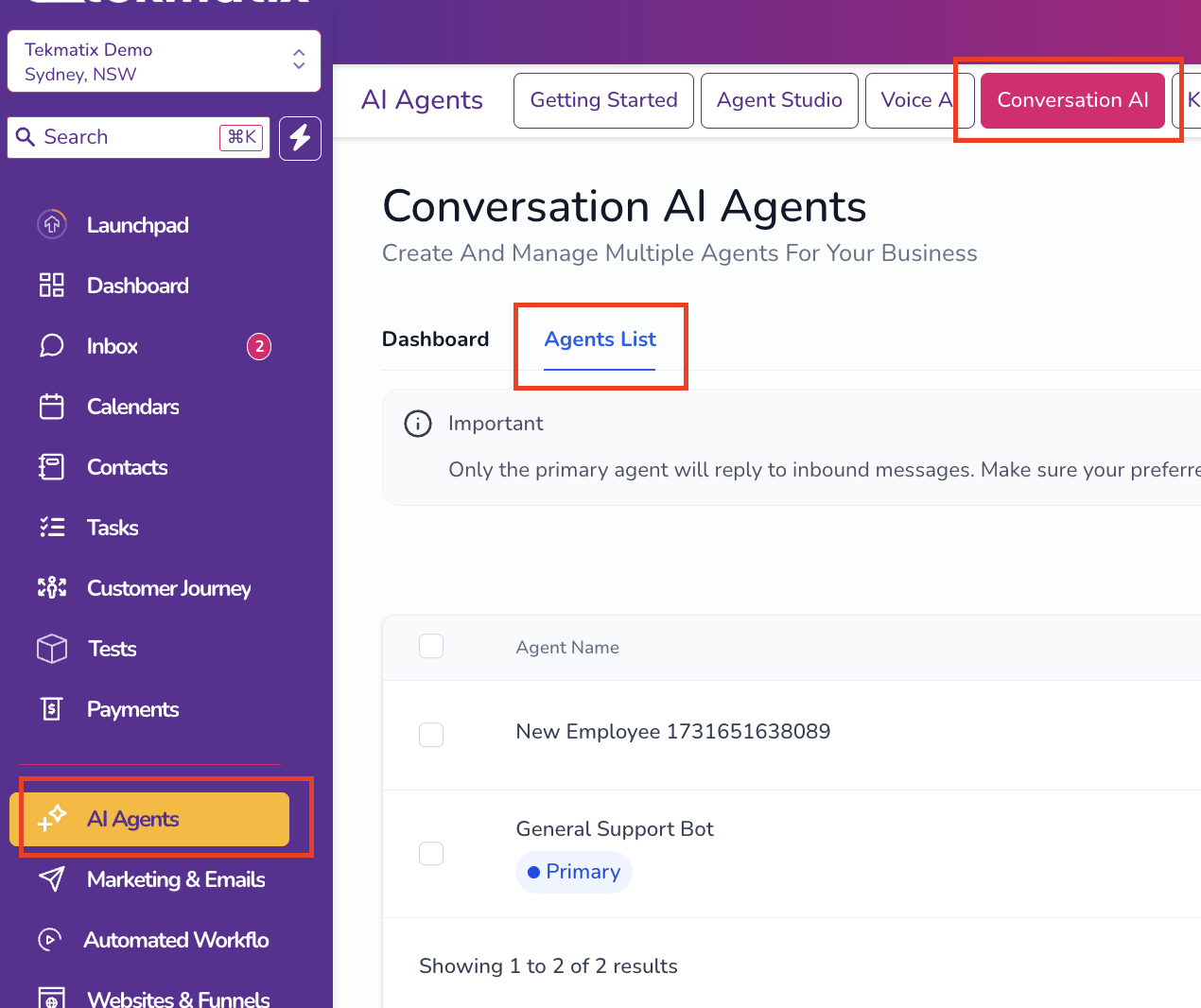
Step 1: Open Conversations AI Settings
Log in to your Tekmatix account
Navigate to AI Agents
Click Conversation AI
Open the Agent List
Step 2: Edit Your AI Bot
Find the AI bot you want to configure
Click the three dots (⋮) next to the bot
Select Edit
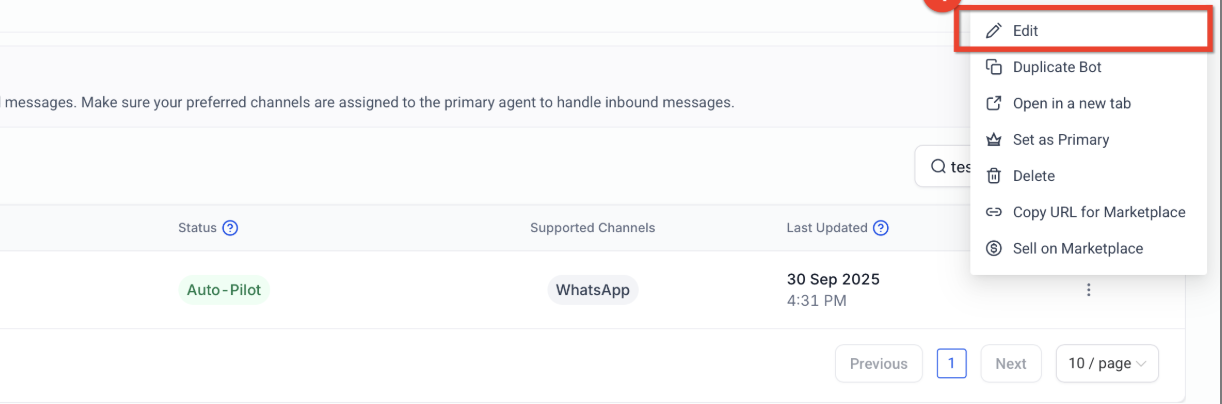
This will open the bot’s configuration settings.
Step 3: Enable Voice Note Responses
Locate the setting labeled: “Also allow this bot to respond to Voice Notes”
Toggle the setting ON
Click Save Changes
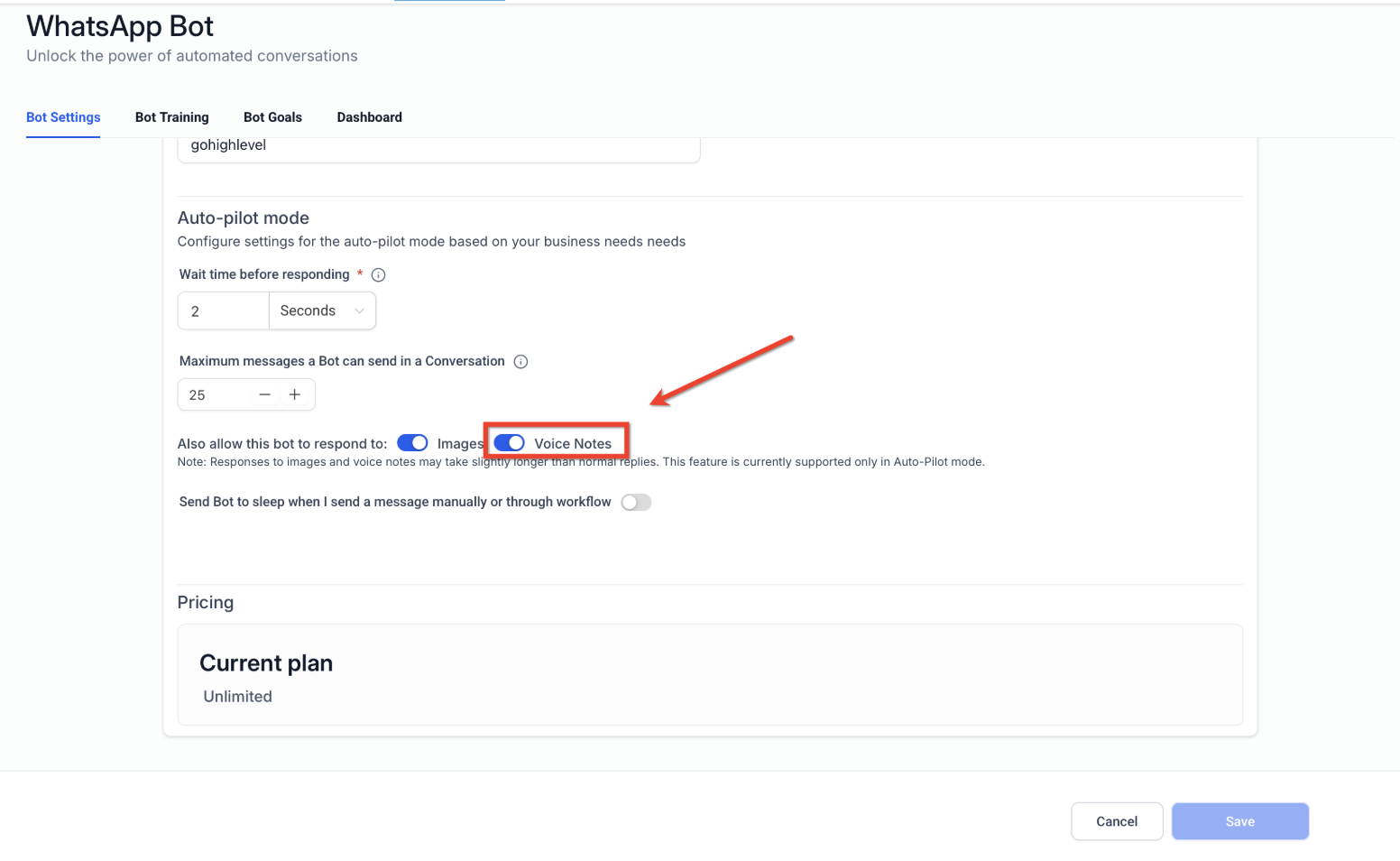
Your AI bot can now process incoming voice messages.
Step 4: Test the Feature
To confirm everything is working:
Send a voice note to your business via:
WhatsApp
Facebook Messenger
Instagram
The system will:
Transcribe the audio
Pass it to your AI bot
Generate an intelligent response
If configured correctly, your AI bot will respond based on its training and prompts.
How Audio Response Works Behind the Scenes
Understanding how the system processes audio helps you design better AI interactions.
Wait Time Aggregation
The bot waits for the configured Wait Time Before Responding. This allows it to gather multiple incoming messages, such as:
Audio messages
Text messages
Additional voice notes
It then sends one unified response for better context.
Message Limits
Your AI bot also follows your Maximum Message Limit settings. Once the limit is reached, the bot will pause until the next cycle.
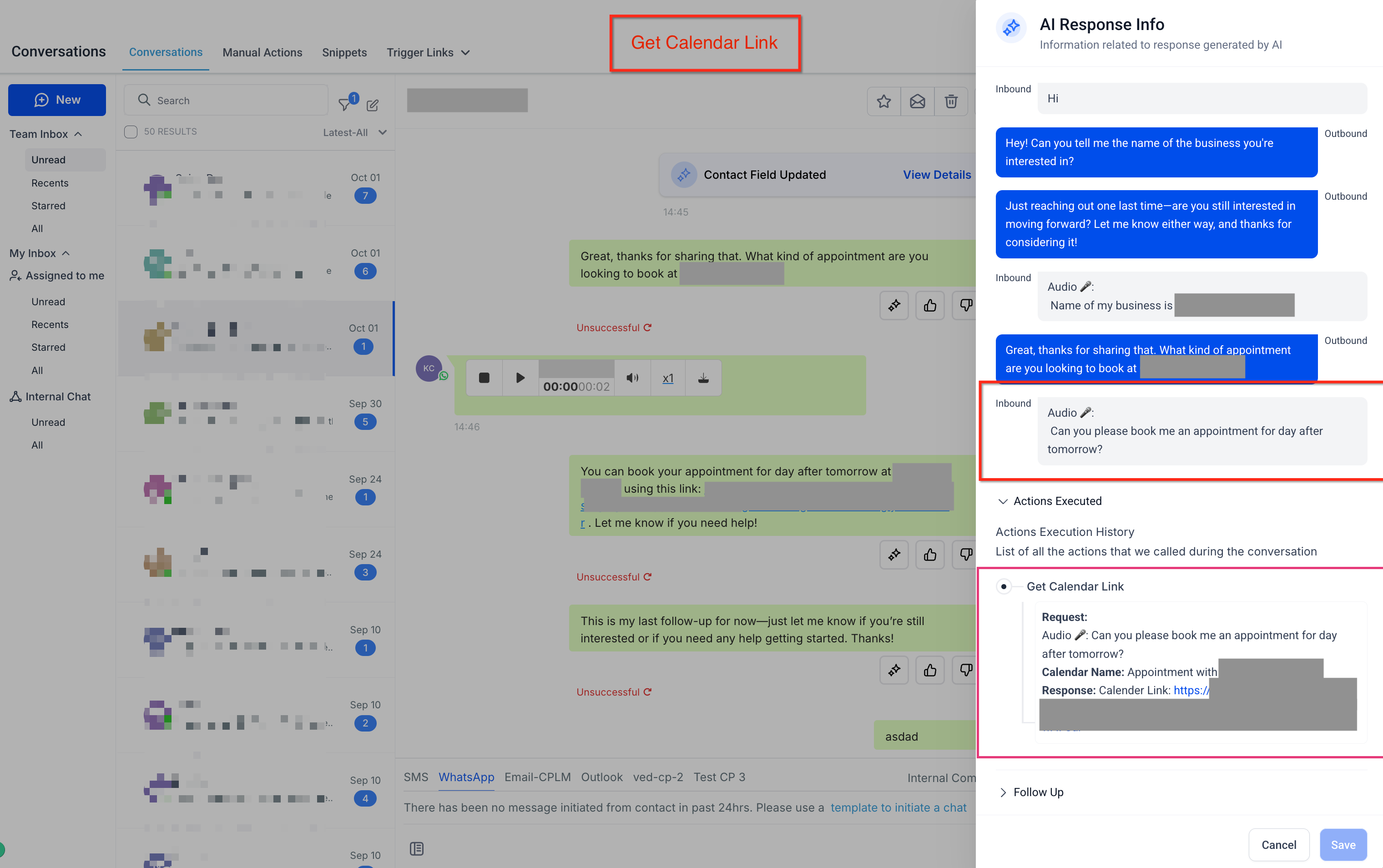
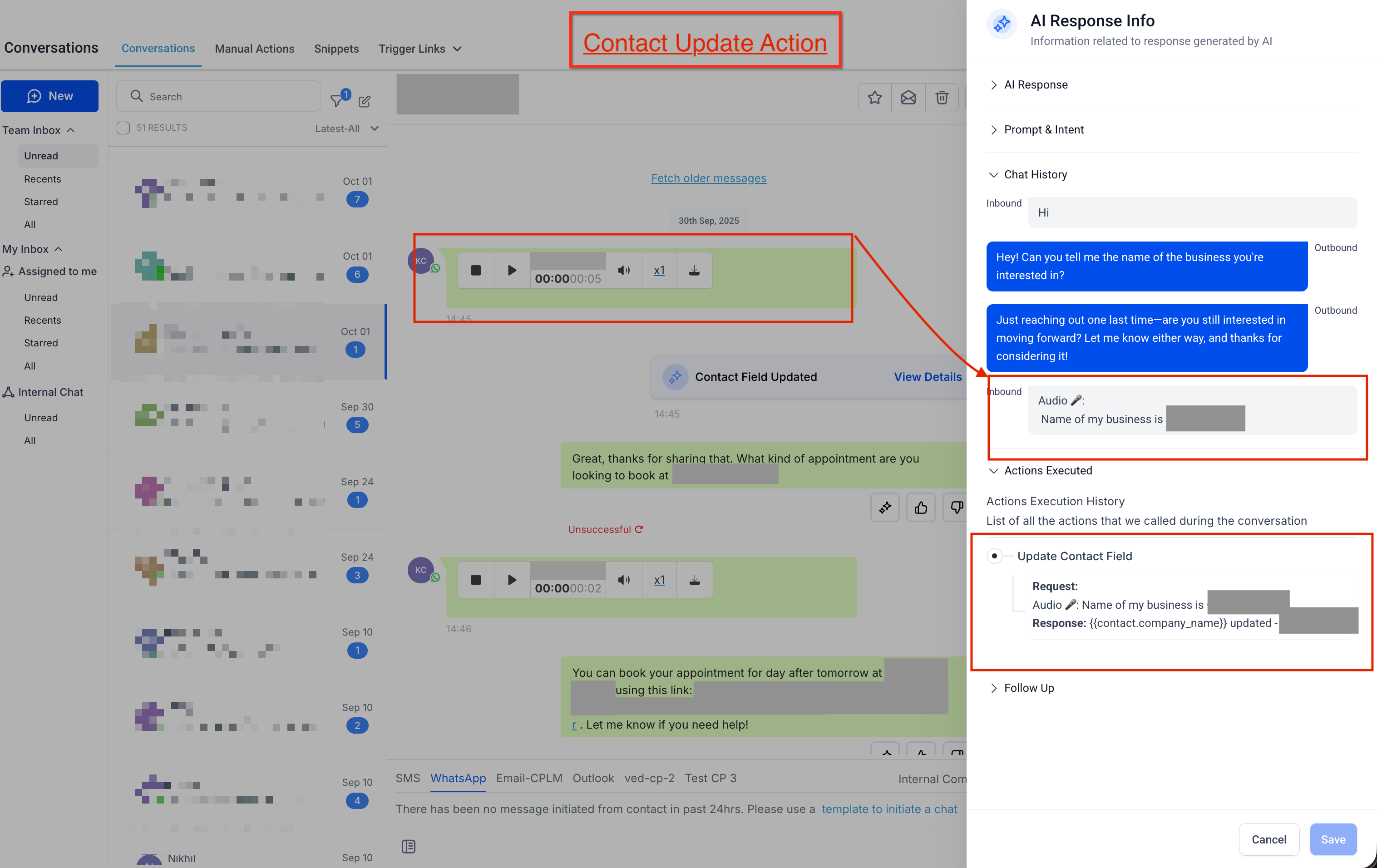
AI Transparency
You can review how the AI generated a response by opening the AI Response Info sidebar within the conversation.
This allows you to see:
The transcription
The prompt used
The training sources
The reasoning behind the response
Real-World Example: Using Audio Response for Customer Support
Scenario: A Fitness Coaching Business
A fitness coach uses Tekmatix to manage client inquiries on WhatsApp.
Many clients prefer sending voice messages asking questions like:
“Hey, I just finished my workout. Can you remind me what my meal plan for today is?”
Before enabling Audio Response, these voice notes required manual replies from the coach or staff.
After enabling Audio Response in Conversations AI:
A client sends a voice note on WhatsApp.
Tekmatix transcribes the audio message.
The AI bot analyzes the request.
The bot responds with helpful information such as:
“Great job finishing your workout! According to your meal plan, today's lunch includes grilled chicken, brown rice, and vegetables.”
The client receives an instant response, while the coach saves time and focuses on higher-value tasks.
Best Practices for Using Audio Response
To get the best results from this feature:
✔ Train your AI bot with clear knowledge sources and prompts
✔ Use appropriate Wait Time settings to gather complete customer messages
✔ Test audio responses across multiple channels
✔ Monitor conversations using AI Response Info to improve accuracy
These steps help ensure your AI delivers relevant and reliable responses.
Frequently Asked Questions
Does Audio Response cost extra?
Audio transcription and AI responses are included under standard Conversations AI usage. Messaging costs may still apply depending on the channel used (such as SMS, MMS, or WhatsApp messaging fees).
Will the bot reply with audio?
Most responses are delivered as text messages for compatibility across platforms.
Can I enable audio responses for specific channels only?
Yes. In the bot settings, you can assign specific channels where the AI bot is active. The bot will only respond on those channels.
How are multiple audio messages handled?
If a customer sends multiple voice notes in a short period, the system processes them within the Wait Time window and generates one combined response.
Final Thoughts
The Audio Response feature in Tekmatix Conversations AI allows businesses to support customers who prefer speaking rather than typing.
By enabling this feature, you can:
Improve customer experience
Respond to voice messages automatically
Reduce manual support workload
Maintain consistent AI-driven conversations
As voice messaging continues to grow across platforms like WhatsApp and Instagram, enabling Audio Response can help your business stay responsive and efficient.

Latest Blog Posts
How To Let Your Tekmatix AI Bot Respond to Voice Messages with Audio Response
How To Let Your Tekmatix AI Bot Respond to Voice Messages with Audio Response
Why This Feature Matters
Many customers prefer sending voice notes instead of typing messages, especially on platforms like WhatsApp, Instagram, and Messenger. If your AI bot can only respond to text, you may miss important conversations or delay responses.
With Audio Response in Tekmatix Conversations AI, your AI bot can listen to customer voice messages, transcribe them automatically, and respond intelligently.
This means your customers can communicate naturally while your business still benefits from automated responses and faster support.
Key Advantages
Using Audio Response helps businesses:
Deliver a more natural and human-like customer experience
Respond to customer questions faster
Support voice-based communication across multiple channels
Reduce manual responses from your support team
Maintain consistent AI behavior across voice and text conversations
This feature is especially helpful for businesses that rely heavily on WhatsApp, Instagram, and Messenger conversations.
What is Audio Response in Tekmatix Conversations AI?
Audio Response allows your Tekmatix Conversations AI bot to understand voice messages sent by customers.
When a customer sends an audio message:
Tekmatix automatically transcribes the audio into text
The AI bot analyzes the message
The bot generates a relevant response based on its training and prompts
The reply is then sent to the customer using your configured AI conversation settings, ensuring a consistent experience.
Supported Messaging Channels
Audio Response works on messaging channels where Conversations AI is already active.
These include:
WhatsApp
Facebook Messenger
Instagram Direct Messages
SMS (MMS)
Make sure these channels are properly connected to your Tekmatix account before testing audio responses.
Supported Audio Formats
Tekmatix can process several types of audio messages.
Voice Notes (from Messaging Apps)
Supported platforms include:
WhatsApp voice notes
Facebook Messenger voice notes
Instagram voice notes
These recordings are created directly inside the messaging apps using the microphone button.
Uploaded Audio Files
The system also supports common audio file formats, including:
OGG
MP3
AAC
M4A
MPEG
MP4 (audio-only)
Important:
Video files that contain audio are not supported. Only audio files can be transcribed.
How To Enable Audio Response in Tekmatix
Follow these steps to activate voice message responses for your AI bot.
Step 1: Open Conversations AI Settings
Log in to your Tekmatix account
Navigate to AI Agents
Click Conversation AI
Open the Agent List
Step 2: Edit Your AI Bot
Find the AI bot you want to configure
Click the three dots (⋮) next to the bot
Select Edit
This will open the bot’s configuration settings.
Step 3: Enable Voice Note Responses
Locate the setting labeled: “Also allow this bot to respond to Voice Notes”
Toggle the setting ON
Click Save Changes
Your AI bot can now process incoming voice messages.
Step 4: Test the Feature
To confirm everything is working:
Send a voice note to your business via:
WhatsApp
Facebook Messenger
Instagram
The system will:
Transcribe the audio
Pass it to your AI bot
Generate an intelligent response
If configured correctly, your AI bot will respond based on its training and prompts.
How Audio Response Works Behind the Scenes
Understanding how the system processes audio helps you design better AI interactions.
Wait Time Aggregation
The bot waits for the configured Wait Time Before Responding. This allows it to gather multiple incoming messages, such as:
Audio messages
Text messages
Additional voice notes
It then sends one unified response for better context.
Message Limits
Your AI bot also follows your Maximum Message Limit settings. Once the limit is reached, the bot will pause until the next cycle.
AI Transparency
You can review how the AI generated a response by opening the AI Response Info sidebar within the conversation.
This allows you to see:
The transcription
The prompt used
The training sources
The reasoning behind the response
Real-World Example: Using Audio Response for Customer Support
Scenario: A Fitness Coaching Business
A fitness coach uses Tekmatix to manage client inquiries on WhatsApp.
Many clients prefer sending voice messages asking questions like:
“Hey, I just finished my workout. Can you remind me what my meal plan for today is?”
Before enabling Audio Response, these voice notes required manual replies from the coach or staff.
After enabling Audio Response in Conversations AI:
A client sends a voice note on WhatsApp.
Tekmatix transcribes the audio message.
The AI bot analyzes the request.
The bot responds with helpful information such as:
“Great job finishing your workout! According to your meal plan, today's lunch includes grilled chicken, brown rice, and vegetables.”
The client receives an instant response, while the coach saves time and focuses on higher-value tasks.
Best Practices for Using Audio Response
To get the best results from this feature:
✔ Train your AI bot with clear knowledge sources and prompts
✔ Use appropriate Wait Time settings to gather complete customer messages
✔ Test audio responses across multiple channels
✔ Monitor conversations using AI Response Info to improve accuracy
These steps help ensure your AI delivers relevant and reliable responses.
Frequently Asked Questions
Does Audio Response cost extra?
Audio transcription and AI responses are included under standard Conversations AI usage. Messaging costs may still apply depending on the channel used (such as SMS, MMS, or WhatsApp messaging fees).
Will the bot reply with audio?
Most responses are delivered as text messages for compatibility across platforms.
Can I enable audio responses for specific channels only?
Yes. In the bot settings, you can assign specific channels where the AI bot is active. The bot will only respond on those channels.
How are multiple audio messages handled?
If a customer sends multiple voice notes in a short period, the system processes them within the Wait Time window and generates one combined response.
Final Thoughts
The Audio Response feature in Tekmatix Conversations AI allows businesses to support customers who prefer speaking rather than typing.
By enabling this feature, you can:
Improve customer experience
Respond to voice messages automatically
Reduce manual support workload
Maintain consistent AI-driven conversations
As voice messaging continues to grow across platforms like WhatsApp and Instagram, enabling Audio Response can help your business stay responsive and efficient.
Marketing
How To Let Your Tekmatix AI Bot Respond to Voice Messages with Audio Response
How To Let Your Tekmatix AI Bot Respond to Voice Messages with Audio Response
Why This Feature Matters
Many customers prefer sending voice notes instead of typing messages, especially on platforms like WhatsApp, Instagram, and Messenger. If your AI bot can only respond to text, you may miss important conversations or delay responses.
With Audio Response in Tekmatix Conversations AI, your AI bot can listen to customer voice messages, transcribe them automatically, and respond intelligently.
This means your customers can communicate naturally while your business still benefits from automated responses and faster support.
Key Advantages
Using Audio Response helps businesses:
Deliver a more natural and human-like customer experience
Respond to customer questions faster
Support voice-based communication across multiple channels
Reduce manual responses from your support team
Maintain consistent AI behavior across voice and text conversations
This feature is especially helpful for businesses that rely heavily on WhatsApp, Instagram, and Messenger conversations.
What is Audio Response in Tekmatix Conversations AI?
Audio Response allows your Tekmatix Conversations AI bot to understand voice messages sent by customers.
When a customer sends an audio message:
Tekmatix automatically transcribes the audio into text
The AI bot analyzes the message
The bot generates a relevant response based on its training and prompts
The reply is then sent to the customer using your configured AI conversation settings, ensuring a consistent experience.
Supported Messaging Channels
Audio Response works on messaging channels where Conversations AI is already active.
These include:
WhatsApp
Facebook Messenger
Instagram Direct Messages
SMS (MMS)
Make sure these channels are properly connected to your Tekmatix account before testing audio responses.
Supported Audio Formats
Tekmatix can process several types of audio messages.
Voice Notes (from Messaging Apps)
Supported platforms include:
WhatsApp voice notes
Facebook Messenger voice notes
Instagram voice notes
These recordings are created directly inside the messaging apps using the microphone button.
Uploaded Audio Files
The system also supports common audio file formats, including:
OGG
MP3
AAC
M4A
MPEG
MP4 (audio-only)
Important:
Video files that contain audio are not supported. Only audio files can be transcribed.
How To Enable Audio Response in Tekmatix
Follow these steps to activate voice message responses for your AI bot.
Step 1: Open Conversations AI Settings
Log in to your Tekmatix account
Navigate to AI Agents
Click Conversation AI
Open the Agent List
Step 2: Edit Your AI Bot
Find the AI bot you want to configure
Click the three dots (⋮) next to the bot
Select Edit
This will open the bot’s configuration settings.
Step 3: Enable Voice Note Responses
Locate the setting labeled: “Also allow this bot to respond to Voice Notes”
Toggle the setting ON
Click Save Changes
Your AI bot can now process incoming voice messages.
Step 4: Test the Feature
To confirm everything is working:
Send a voice note to your business via:
WhatsApp
Facebook Messenger
Instagram
The system will:
Transcribe the audio
Pass it to your AI bot
Generate an intelligent response
If configured correctly, your AI bot will respond based on its training and prompts.
How Audio Response Works Behind the Scenes
Understanding how the system processes audio helps you design better AI interactions.
Wait Time Aggregation
The bot waits for the configured Wait Time Before Responding. This allows it to gather multiple incoming messages, such as:
Audio messages
Text messages
Additional voice notes
It then sends one unified response for better context.
Message Limits
Your AI bot also follows your Maximum Message Limit settings. Once the limit is reached, the bot will pause until the next cycle.
AI Transparency
You can review how the AI generated a response by opening the AI Response Info sidebar within the conversation.
This allows you to see:
The transcription
The prompt used
The training sources
The reasoning behind the response
Real-World Example: Using Audio Response for Customer Support
Scenario: A Fitness Coaching Business
A fitness coach uses Tekmatix to manage client inquiries on WhatsApp.
Many clients prefer sending voice messages asking questions like:
“Hey, I just finished my workout. Can you remind me what my meal plan for today is?”
Before enabling Audio Response, these voice notes required manual replies from the coach or staff.
After enabling Audio Response in Conversations AI:
A client sends a voice note on WhatsApp.
Tekmatix transcribes the audio message.
The AI bot analyzes the request.
The bot responds with helpful information such as:
“Great job finishing your workout! According to your meal plan, today's lunch includes grilled chicken, brown rice, and vegetables.”
The client receives an instant response, while the coach saves time and focuses on higher-value tasks.
Best Practices for Using Audio Response
To get the best results from this feature:
✔ Train your AI bot with clear knowledge sources and prompts
✔ Use appropriate Wait Time settings to gather complete customer messages
✔ Test audio responses across multiple channels
✔ Monitor conversations using AI Response Info to improve accuracy
These steps help ensure your AI delivers relevant and reliable responses.
Frequently Asked Questions
Does Audio Response cost extra?
Audio transcription and AI responses are included under standard Conversations AI usage. Messaging costs may still apply depending on the channel used (such as SMS, MMS, or WhatsApp messaging fees).
Will the bot reply with audio?
Most responses are delivered as text messages for compatibility across platforms.
Can I enable audio responses for specific channels only?
Yes. In the bot settings, you can assign specific channels where the AI bot is active. The bot will only respond on those channels.
How are multiple audio messages handled?
If a customer sends multiple voice notes in a short period, the system processes them within the Wait Time window and generates one combined response.
Final Thoughts
The Audio Response feature in Tekmatix Conversations AI allows businesses to support customers who prefer speaking rather than typing.
By enabling this feature, you can:
Improve customer experience
Respond to voice messages automatically
Reduce manual support workload
Maintain consistent AI-driven conversations
As voice messaging continues to grow across platforms like WhatsApp and Instagram, enabling Audio Response can help your business stay responsive and efficient.
How To Let Your Tekmatix AI Bot Respond to Voice Messages with Audio Response
How To Let Your Tekmatix AI Bot Respond to Voice Messages with Audio Response
Why This Feature Matters
Many customers prefer sending voice notes instead of typing messages, especially on platforms like WhatsApp, Instagram, and Messenger. If your AI bot can only respond to text, you may miss important conversations or delay responses.
With Audio Response in Tekmatix Conversations AI, your AI bot can listen to customer voice messages, transcribe them automatically, and respond intelligently.
This means your customers can communicate naturally while your business still benefits from automated responses and faster support.
Key Advantages
Using Audio Response helps businesses:
Deliver a more natural and human-like customer experience
Respond to customer questions faster
Support voice-based communication across multiple channels
Reduce manual responses from your support team
Maintain consistent AI behavior across voice and text conversations
This feature is especially helpful for businesses that rely heavily on WhatsApp, Instagram, and Messenger conversations.
What is Audio Response in Tekmatix Conversations AI?
Audio Response allows your Tekmatix Conversations AI bot to understand voice messages sent by customers.
When a customer sends an audio message:
Tekmatix automatically transcribes the audio into text
The AI bot analyzes the message
The bot generates a relevant response based on its training and prompts
The reply is then sent to the customer using your configured AI conversation settings, ensuring a consistent experience.
Supported Messaging Channels
Audio Response works on messaging channels where Conversations AI is already active.
These include:
WhatsApp
Facebook Messenger
Instagram Direct Messages
SMS (MMS)
Make sure these channels are properly connected to your Tekmatix account before testing audio responses.
Supported Audio Formats
Tekmatix can process several types of audio messages.
Voice Notes (from Messaging Apps)
Supported platforms include:
WhatsApp voice notes
Facebook Messenger voice notes
Instagram voice notes
These recordings are created directly inside the messaging apps using the microphone button.
Uploaded Audio Files
The system also supports common audio file formats, including:
OGG
MP3
AAC
M4A
MPEG
MP4 (audio-only)
Important:
Video files that contain audio are not supported. Only audio files can be transcribed.
How To Enable Audio Response in Tekmatix
Follow these steps to activate voice message responses for your AI bot.
Step 1: Open Conversations AI Settings
Log in to your Tekmatix account
Navigate to AI Agents
Click Conversation AI
Open the Agent List
Step 2: Edit Your AI Bot
Find the AI bot you want to configure
Click the three dots (⋮) next to the bot
Select Edit
This will open the bot’s configuration settings.
Step 3: Enable Voice Note Responses
Locate the setting labeled: “Also allow this bot to respond to Voice Notes”
Toggle the setting ON
Click Save Changes
Your AI bot can now process incoming voice messages.
Step 4: Test the Feature
To confirm everything is working:
Send a voice note to your business via:
WhatsApp
Facebook Messenger
Instagram
The system will:
Transcribe the audio
Pass it to your AI bot
Generate an intelligent response
If configured correctly, your AI bot will respond based on its training and prompts.
How Audio Response Works Behind the Scenes
Understanding how the system processes audio helps you design better AI interactions.
Wait Time Aggregation
The bot waits for the configured Wait Time Before Responding. This allows it to gather multiple incoming messages, such as:
Audio messages
Text messages
Additional voice notes
It then sends one unified response for better context.
Message Limits
Your AI bot also follows your Maximum Message Limit settings. Once the limit is reached, the bot will pause until the next cycle.
AI Transparency
You can review how the AI generated a response by opening the AI Response Info sidebar within the conversation.
This allows you to see:
The transcription
The prompt used
The training sources
The reasoning behind the response
Real-World Example: Using Audio Response for Customer Support
Scenario: A Fitness Coaching Business
A fitness coach uses Tekmatix to manage client inquiries on WhatsApp.
Many clients prefer sending voice messages asking questions like:
“Hey, I just finished my workout. Can you remind me what my meal plan for today is?”
Before enabling Audio Response, these voice notes required manual replies from the coach or staff.
After enabling Audio Response in Conversations AI:
A client sends a voice note on WhatsApp.
Tekmatix transcribes the audio message.
The AI bot analyzes the request.
The bot responds with helpful information such as:
“Great job finishing your workout! According to your meal plan, today's lunch includes grilled chicken, brown rice, and vegetables.”
The client receives an instant response, while the coach saves time and focuses on higher-value tasks.
Best Practices for Using Audio Response
To get the best results from this feature:
✔ Train your AI bot with clear knowledge sources and prompts
✔ Use appropriate Wait Time settings to gather complete customer messages
✔ Test audio responses across multiple channels
✔ Monitor conversations using AI Response Info to improve accuracy
These steps help ensure your AI delivers relevant and reliable responses.
Frequently Asked Questions
Does Audio Response cost extra?
Audio transcription and AI responses are included under standard Conversations AI usage. Messaging costs may still apply depending on the channel used (such as SMS, MMS, or WhatsApp messaging fees).
Will the bot reply with audio?
Most responses are delivered as text messages for compatibility across platforms.
Can I enable audio responses for specific channels only?
Yes. In the bot settings, you can assign specific channels where the AI bot is active. The bot will only respond on those channels.
How are multiple audio messages handled?
If a customer sends multiple voice notes in a short period, the system processes them within the Wait Time window and generates one combined response.
Final Thoughts
The Audio Response feature in Tekmatix Conversations AI allows businesses to support customers who prefer speaking rather than typing.
By enabling this feature, you can:
Improve customer experience
Respond to voice messages automatically
Reduce manual support workload
Maintain consistent AI-driven conversations
As voice messaging continues to grow across platforms like WhatsApp and Instagram, enabling Audio Response can help your business stay responsive and efficient.
CRM
How To Let Your Tekmatix AI Bot Respond to Voice Messages with Audio Response
How To Let Your Tekmatix AI Bot Respond to Voice Messages with Audio Response
Why This Feature Matters
Many customers prefer sending voice notes instead of typing messages, especially on platforms like WhatsApp, Instagram, and Messenger. If your AI bot can only respond to text, you may miss important conversations or delay responses.
With Audio Response in Tekmatix Conversations AI, your AI bot can listen to customer voice messages, transcribe them automatically, and respond intelligently.
This means your customers can communicate naturally while your business still benefits from automated responses and faster support.
Key Advantages
Using Audio Response helps businesses:
Deliver a more natural and human-like customer experience
Respond to customer questions faster
Support voice-based communication across multiple channels
Reduce manual responses from your support team
Maintain consistent AI behavior across voice and text conversations
This feature is especially helpful for businesses that rely heavily on WhatsApp, Instagram, and Messenger conversations.
What is Audio Response in Tekmatix Conversations AI?
Audio Response allows your Tekmatix Conversations AI bot to understand voice messages sent by customers.
When a customer sends an audio message:
Tekmatix automatically transcribes the audio into text
The AI bot analyzes the message
The bot generates a relevant response based on its training and prompts
The reply is then sent to the customer using your configured AI conversation settings, ensuring a consistent experience.
Supported Messaging Channels
Audio Response works on messaging channels where Conversations AI is already active.
These include:
WhatsApp
Facebook Messenger
Instagram Direct Messages
SMS (MMS)
Make sure these channels are properly connected to your Tekmatix account before testing audio responses.
Supported Audio Formats
Tekmatix can process several types of audio messages.
Voice Notes (from Messaging Apps)
Supported platforms include:
WhatsApp voice notes
Facebook Messenger voice notes
Instagram voice notes
These recordings are created directly inside the messaging apps using the microphone button.
Uploaded Audio Files
The system also supports common audio file formats, including:
OGG
MP3
AAC
M4A
MPEG
MP4 (audio-only)
Important:
Video files that contain audio are not supported. Only audio files can be transcribed.
How To Enable Audio Response in Tekmatix
Follow these steps to activate voice message responses for your AI bot.
Step 1: Open Conversations AI Settings
Log in to your Tekmatix account
Navigate to AI Agents
Click Conversation AI
Open the Agent List
Step 2: Edit Your AI Bot
Find the AI bot you want to configure
Click the three dots (⋮) next to the bot
Select Edit
This will open the bot’s configuration settings.
Step 3: Enable Voice Note Responses
Locate the setting labeled: “Also allow this bot to respond to Voice Notes”
Toggle the setting ON
Click Save Changes
Your AI bot can now process incoming voice messages.
Step 4: Test the Feature
To confirm everything is working:
Send a voice note to your business via:
WhatsApp
Facebook Messenger
Instagram
The system will:
Transcribe the audio
Pass it to your AI bot
Generate an intelligent response
If configured correctly, your AI bot will respond based on its training and prompts.
How Audio Response Works Behind the Scenes
Understanding how the system processes audio helps you design better AI interactions.
Wait Time Aggregation
The bot waits for the configured Wait Time Before Responding. This allows it to gather multiple incoming messages, such as:
Audio messages
Text messages
Additional voice notes
It then sends one unified response for better context.
Message Limits
Your AI bot also follows your Maximum Message Limit settings. Once the limit is reached, the bot will pause until the next cycle.
AI Transparency
You can review how the AI generated a response by opening the AI Response Info sidebar within the conversation.
This allows you to see:
The transcription
The prompt used
The training sources
The reasoning behind the response
Real-World Example: Using Audio Response for Customer Support
Scenario: A Fitness Coaching Business
A fitness coach uses Tekmatix to manage client inquiries on WhatsApp.
Many clients prefer sending voice messages asking questions like:
“Hey, I just finished my workout. Can you remind me what my meal plan for today is?”
Before enabling Audio Response, these voice notes required manual replies from the coach or staff.
After enabling Audio Response in Conversations AI:
A client sends a voice note on WhatsApp.
Tekmatix transcribes the audio message.
The AI bot analyzes the request.
The bot responds with helpful information such as:
“Great job finishing your workout! According to your meal plan, today's lunch includes grilled chicken, brown rice, and vegetables.”
The client receives an instant response, while the coach saves time and focuses on higher-value tasks.
Best Practices for Using Audio Response
To get the best results from this feature:
✔ Train your AI bot with clear knowledge sources and prompts
✔ Use appropriate Wait Time settings to gather complete customer messages
✔ Test audio responses across multiple channels
✔ Monitor conversations using AI Response Info to improve accuracy
These steps help ensure your AI delivers relevant and reliable responses.
Frequently Asked Questions
Does Audio Response cost extra?
Audio transcription and AI responses are included under standard Conversations AI usage. Messaging costs may still apply depending on the channel used (such as SMS, MMS, or WhatsApp messaging fees).
Will the bot reply with audio?
Most responses are delivered as text messages for compatibility across platforms.
Can I enable audio responses for specific channels only?
Yes. In the bot settings, you can assign specific channels where the AI bot is active. The bot will only respond on those channels.
How are multiple audio messages handled?
If a customer sends multiple voice notes in a short period, the system processes them within the Wait Time window and generates one combined response.
Final Thoughts
The Audio Response feature in Tekmatix Conversations AI allows businesses to support customers who prefer speaking rather than typing.
By enabling this feature, you can:
Improve customer experience
Respond to voice messages automatically
Reduce manual support workload
Maintain consistent AI-driven conversations
As voice messaging continues to grow across platforms like WhatsApp and Instagram, enabling Audio Response can help your business stay responsive and efficient.
How To Let Your Tekmatix AI Bot Respond to Voice Messages with Audio Response
How To Let Your Tekmatix AI Bot Respond to Voice Messages with Audio Response
Why This Feature Matters
Many customers prefer sending voice notes instead of typing messages, especially on platforms like WhatsApp, Instagram, and Messenger. If your AI bot can only respond to text, you may miss important conversations or delay responses.
With Audio Response in Tekmatix Conversations AI, your AI bot can listen to customer voice messages, transcribe them automatically, and respond intelligently.
This means your customers can communicate naturally while your business still benefits from automated responses and faster support.
Key Advantages
Using Audio Response helps businesses:
Deliver a more natural and human-like customer experience
Respond to customer questions faster
Support voice-based communication across multiple channels
Reduce manual responses from your support team
Maintain consistent AI behavior across voice and text conversations
This feature is especially helpful for businesses that rely heavily on WhatsApp, Instagram, and Messenger conversations.
What is Audio Response in Tekmatix Conversations AI?
Audio Response allows your Tekmatix Conversations AI bot to understand voice messages sent by customers.
When a customer sends an audio message:
Tekmatix automatically transcribes the audio into text
The AI bot analyzes the message
The bot generates a relevant response based on its training and prompts
The reply is then sent to the customer using your configured AI conversation settings, ensuring a consistent experience.
Supported Messaging Channels
Audio Response works on messaging channels where Conversations AI is already active.
These include:
WhatsApp
Facebook Messenger
Instagram Direct Messages
SMS (MMS)
Make sure these channels are properly connected to your Tekmatix account before testing audio responses.
Supported Audio Formats
Tekmatix can process several types of audio messages.
Voice Notes (from Messaging Apps)
Supported platforms include:
WhatsApp voice notes
Facebook Messenger voice notes
Instagram voice notes
These recordings are created directly inside the messaging apps using the microphone button.
Uploaded Audio Files
The system also supports common audio file formats, including:
OGG
MP3
AAC
M4A
MPEG
MP4 (audio-only)
Important:
Video files that contain audio are not supported. Only audio files can be transcribed.
How To Enable Audio Response in Tekmatix
Follow these steps to activate voice message responses for your AI bot.
Step 1: Open Conversations AI Settings
Log in to your Tekmatix account
Navigate to AI Agents
Click Conversation AI
Open the Agent List
Step 2: Edit Your AI Bot
Find the AI bot you want to configure
Click the three dots (⋮) next to the bot
Select Edit
This will open the bot’s configuration settings.
Step 3: Enable Voice Note Responses
Locate the setting labeled: “Also allow this bot to respond to Voice Notes”
Toggle the setting ON
Click Save Changes
Your AI bot can now process incoming voice messages.
Step 4: Test the Feature
To confirm everything is working:
Send a voice note to your business via:
WhatsApp
Facebook Messenger
Instagram
The system will:
Transcribe the audio
Pass it to your AI bot
Generate an intelligent response
If configured correctly, your AI bot will respond based on its training and prompts.
How Audio Response Works Behind the Scenes
Understanding how the system processes audio helps you design better AI interactions.
Wait Time Aggregation
The bot waits for the configured Wait Time Before Responding. This allows it to gather multiple incoming messages, such as:
Audio messages
Text messages
Additional voice notes
It then sends one unified response for better context.
Message Limits
Your AI bot also follows your Maximum Message Limit settings. Once the limit is reached, the bot will pause until the next cycle.
AI Transparency
You can review how the AI generated a response by opening the AI Response Info sidebar within the conversation.
This allows you to see:
The transcription
The prompt used
The training sources
The reasoning behind the response
Real-World Example: Using Audio Response for Customer Support
Scenario: A Fitness Coaching Business
A fitness coach uses Tekmatix to manage client inquiries on WhatsApp.
Many clients prefer sending voice messages asking questions like:
“Hey, I just finished my workout. Can you remind me what my meal plan for today is?”
Before enabling Audio Response, these voice notes required manual replies from the coach or staff.
After enabling Audio Response in Conversations AI:
A client sends a voice note on WhatsApp.
Tekmatix transcribes the audio message.
The AI bot analyzes the request.
The bot responds with helpful information such as:
“Great job finishing your workout! According to your meal plan, today's lunch includes grilled chicken, brown rice, and vegetables.”
The client receives an instant response, while the coach saves time and focuses on higher-value tasks.
Best Practices for Using Audio Response
To get the best results from this feature:
✔ Train your AI bot with clear knowledge sources and prompts
✔ Use appropriate Wait Time settings to gather complete customer messages
✔ Test audio responses across multiple channels
✔ Monitor conversations using AI Response Info to improve accuracy
These steps help ensure your AI delivers relevant and reliable responses.
Frequently Asked Questions
Does Audio Response cost extra?
Audio transcription and AI responses are included under standard Conversations AI usage. Messaging costs may still apply depending on the channel used (such as SMS, MMS, or WhatsApp messaging fees).
Will the bot reply with audio?
Most responses are delivered as text messages for compatibility across platforms.
Can I enable audio responses for specific channels only?
Yes. In the bot settings, you can assign specific channels where the AI bot is active. The bot will only respond on those channels.
How are multiple audio messages handled?
If a customer sends multiple voice notes in a short period, the system processes them within the Wait Time window and generates one combined response.
Final Thoughts
The Audio Response feature in Tekmatix Conversations AI allows businesses to support customers who prefer speaking rather than typing.
By enabling this feature, you can:
Improve customer experience
Respond to voice messages automatically
Reduce manual support workload
Maintain consistent AI-driven conversations
As voice messaging continues to grow across platforms like WhatsApp and Instagram, enabling Audio Response can help your business stay responsive and efficient.

Join The TekMatix Newsletter
Get sent regular tech and business growth tips.
Web Design
How To Let Your Tekmatix AI Bot Respond to Voice Messages with Audio Response
How To Let Your Tekmatix AI Bot Respond to Voice Messages with Audio Response
Why This Feature Matters
Many customers prefer sending voice notes instead of typing messages, especially on platforms like WhatsApp, Instagram, and Messenger. If your AI bot can only respond to text, you may miss important conversations or delay responses.
With Audio Response in Tekmatix Conversations AI, your AI bot can listen to customer voice messages, transcribe them automatically, and respond intelligently.
This means your customers can communicate naturally while your business still benefits from automated responses and faster support.
Key Advantages
Using Audio Response helps businesses:
Deliver a more natural and human-like customer experience
Respond to customer questions faster
Support voice-based communication across multiple channels
Reduce manual responses from your support team
Maintain consistent AI behavior across voice and text conversations
This feature is especially helpful for businesses that rely heavily on WhatsApp, Instagram, and Messenger conversations.
What is Audio Response in Tekmatix Conversations AI?
Audio Response allows your Tekmatix Conversations AI bot to understand voice messages sent by customers.
When a customer sends an audio message:
Tekmatix automatically transcribes the audio into text
The AI bot analyzes the message
The bot generates a relevant response based on its training and prompts
The reply is then sent to the customer using your configured AI conversation settings, ensuring a consistent experience.
Supported Messaging Channels
Audio Response works on messaging channels where Conversations AI is already active.
These include:
WhatsApp
Facebook Messenger
Instagram Direct Messages
SMS (MMS)
Make sure these channels are properly connected to your Tekmatix account before testing audio responses.
Supported Audio Formats
Tekmatix can process several types of audio messages.
Voice Notes (from Messaging Apps)
Supported platforms include:
WhatsApp voice notes
Facebook Messenger voice notes
Instagram voice notes
These recordings are created directly inside the messaging apps using the microphone button.
Uploaded Audio Files
The system also supports common audio file formats, including:
OGG
MP3
AAC
M4A
MPEG
MP4 (audio-only)
Important:
Video files that contain audio are not supported. Only audio files can be transcribed.
How To Enable Audio Response in Tekmatix
Follow these steps to activate voice message responses for your AI bot.
Step 1: Open Conversations AI Settings
Log in to your Tekmatix account
Navigate to AI Agents
Click Conversation AI
Open the Agent List
Step 2: Edit Your AI Bot
Find the AI bot you want to configure
Click the three dots (⋮) next to the bot
Select Edit
This will open the bot’s configuration settings.
Step 3: Enable Voice Note Responses
Locate the setting labeled: “Also allow this bot to respond to Voice Notes”
Toggle the setting ON
Click Save Changes
Your AI bot can now process incoming voice messages.
Step 4: Test the Feature
To confirm everything is working:
Send a voice note to your business via:
WhatsApp
Facebook Messenger
Instagram
The system will:
Transcribe the audio
Pass it to your AI bot
Generate an intelligent response
If configured correctly, your AI bot will respond based on its training and prompts.
How Audio Response Works Behind the Scenes
Understanding how the system processes audio helps you design better AI interactions.
Wait Time Aggregation
The bot waits for the configured Wait Time Before Responding. This allows it to gather multiple incoming messages, such as:
Audio messages
Text messages
Additional voice notes
It then sends one unified response for better context.
Message Limits
Your AI bot also follows your Maximum Message Limit settings. Once the limit is reached, the bot will pause until the next cycle.
AI Transparency
You can review how the AI generated a response by opening the AI Response Info sidebar within the conversation.
This allows you to see:
The transcription
The prompt used
The training sources
The reasoning behind the response
Real-World Example: Using Audio Response for Customer Support
Scenario: A Fitness Coaching Business
A fitness coach uses Tekmatix to manage client inquiries on WhatsApp.
Many clients prefer sending voice messages asking questions like:
“Hey, I just finished my workout. Can you remind me what my meal plan for today is?”
Before enabling Audio Response, these voice notes required manual replies from the coach or staff.
After enabling Audio Response in Conversations AI:
A client sends a voice note on WhatsApp.
Tekmatix transcribes the audio message.
The AI bot analyzes the request.
The bot responds with helpful information such as:
“Great job finishing your workout! According to your meal plan, today's lunch includes grilled chicken, brown rice, and vegetables.”
The client receives an instant response, while the coach saves time and focuses on higher-value tasks.
Best Practices for Using Audio Response
To get the best results from this feature:
✔ Train your AI bot with clear knowledge sources and prompts
✔ Use appropriate Wait Time settings to gather complete customer messages
✔ Test audio responses across multiple channels
✔ Monitor conversations using AI Response Info to improve accuracy
These steps help ensure your AI delivers relevant and reliable responses.
Frequently Asked Questions
Does Audio Response cost extra?
Audio transcription and AI responses are included under standard Conversations AI usage. Messaging costs may still apply depending on the channel used (such as SMS, MMS, or WhatsApp messaging fees).
Will the bot reply with audio?
Most responses are delivered as text messages for compatibility across platforms.
Can I enable audio responses for specific channels only?
Yes. In the bot settings, you can assign specific channels where the AI bot is active. The bot will only respond on those channels.
How are multiple audio messages handled?
If a customer sends multiple voice notes in a short period, the system processes them within the Wait Time window and generates one combined response.
Final Thoughts
The Audio Response feature in Tekmatix Conversations AI allows businesses to support customers who prefer speaking rather than typing.
By enabling this feature, you can:
Improve customer experience
Respond to voice messages automatically
Reduce manual support workload
Maintain consistent AI-driven conversations
As voice messaging continues to grow across platforms like WhatsApp and Instagram, enabling Audio Response can help your business stay responsive and efficient.
How To Let Your Tekmatix AI Bot Respond to Voice Messages with Audio Response
How To Let Your Tekmatix AI Bot Respond to Voice Messages with Audio Response
Why This Feature Matters
Many customers prefer sending voice notes instead of typing messages, especially on platforms like WhatsApp, Instagram, and Messenger. If your AI bot can only respond to text, you may miss important conversations or delay responses.
With Audio Response in Tekmatix Conversations AI, your AI bot can listen to customer voice messages, transcribe them automatically, and respond intelligently.
This means your customers can communicate naturally while your business still benefits from automated responses and faster support.
Key Advantages
Using Audio Response helps businesses:
Deliver a more natural and human-like customer experience
Respond to customer questions faster
Support voice-based communication across multiple channels
Reduce manual responses from your support team
Maintain consistent AI behavior across voice and text conversations
This feature is especially helpful for businesses that rely heavily on WhatsApp, Instagram, and Messenger conversations.
What is Audio Response in Tekmatix Conversations AI?
Audio Response allows your Tekmatix Conversations AI bot to understand voice messages sent by customers.
When a customer sends an audio message:
Tekmatix automatically transcribes the audio into text
The AI bot analyzes the message
The bot generates a relevant response based on its training and prompts
The reply is then sent to the customer using your configured AI conversation settings, ensuring a consistent experience.
Supported Messaging Channels
Audio Response works on messaging channels where Conversations AI is already active.
These include:
WhatsApp
Facebook Messenger
Instagram Direct Messages
SMS (MMS)
Make sure these channels are properly connected to your Tekmatix account before testing audio responses.
Supported Audio Formats
Tekmatix can process several types of audio messages.
Voice Notes (from Messaging Apps)
Supported platforms include:
WhatsApp voice notes
Facebook Messenger voice notes
Instagram voice notes
These recordings are created directly inside the messaging apps using the microphone button.
Uploaded Audio Files
The system also supports common audio file formats, including:
OGG
MP3
AAC
M4A
MPEG
MP4 (audio-only)
Important:
Video files that contain audio are not supported. Only audio files can be transcribed.
How To Enable Audio Response in Tekmatix
Follow these steps to activate voice message responses for your AI bot.
Step 1: Open Conversations AI Settings
Log in to your Tekmatix account
Navigate to AI Agents
Click Conversation AI
Open the Agent List
Step 2: Edit Your AI Bot
Find the AI bot you want to configure
Click the three dots (⋮) next to the bot
Select Edit
This will open the bot’s configuration settings.
Step 3: Enable Voice Note Responses
Locate the setting labeled: “Also allow this bot to respond to Voice Notes”
Toggle the setting ON
Click Save Changes
Your AI bot can now process incoming voice messages.
Step 4: Test the Feature
To confirm everything is working:
Send a voice note to your business via:
WhatsApp
Facebook Messenger
Instagram
The system will:
Transcribe the audio
Pass it to your AI bot
Generate an intelligent response
If configured correctly, your AI bot will respond based on its training and prompts.
How Audio Response Works Behind the Scenes
Understanding how the system processes audio helps you design better AI interactions.
Wait Time Aggregation
The bot waits for the configured Wait Time Before Responding. This allows it to gather multiple incoming messages, such as:
Audio messages
Text messages
Additional voice notes
It then sends one unified response for better context.
Message Limits
Your AI bot also follows your Maximum Message Limit settings. Once the limit is reached, the bot will pause until the next cycle.
AI Transparency
You can review how the AI generated a response by opening the AI Response Info sidebar within the conversation.
This allows you to see:
The transcription
The prompt used
The training sources
The reasoning behind the response
Real-World Example: Using Audio Response for Customer Support
Scenario: A Fitness Coaching Business
A fitness coach uses Tekmatix to manage client inquiries on WhatsApp.
Many clients prefer sending voice messages asking questions like:
“Hey, I just finished my workout. Can you remind me what my meal plan for today is?”
Before enabling Audio Response, these voice notes required manual replies from the coach or staff.
After enabling Audio Response in Conversations AI:
A client sends a voice note on WhatsApp.
Tekmatix transcribes the audio message.
The AI bot analyzes the request.
The bot responds with helpful information such as:
“Great job finishing your workout! According to your meal plan, today's lunch includes grilled chicken, brown rice, and vegetables.”
The client receives an instant response, while the coach saves time and focuses on higher-value tasks.
Best Practices for Using Audio Response
To get the best results from this feature:
✔ Train your AI bot with clear knowledge sources and prompts
✔ Use appropriate Wait Time settings to gather complete customer messages
✔ Test audio responses across multiple channels
✔ Monitor conversations using AI Response Info to improve accuracy
These steps help ensure your AI delivers relevant and reliable responses.
Frequently Asked Questions
Does Audio Response cost extra?
Audio transcription and AI responses are included under standard Conversations AI usage. Messaging costs may still apply depending on the channel used (such as SMS, MMS, or WhatsApp messaging fees).
Will the bot reply with audio?
Most responses are delivered as text messages for compatibility across platforms.
Can I enable audio responses for specific channels only?
Yes. In the bot settings, you can assign specific channels where the AI bot is active. The bot will only respond on those channels.
How are multiple audio messages handled?
If a customer sends multiple voice notes in a short period, the system processes them within the Wait Time window and generates one combined response.
Final Thoughts
The Audio Response feature in Tekmatix Conversations AI allows businesses to support customers who prefer speaking rather than typing.
By enabling this feature, you can:
Improve customer experience
Respond to voice messages automatically
Reduce manual support workload
Maintain consistent AI-driven conversations
As voice messaging continues to grow across platforms like WhatsApp and Instagram, enabling Audio Response can help your business stay responsive and efficient.